
AMAZON FBA ACCOUNT HEALTH
Amazon Late Shipment Rate — What It Is and How to Fix It for FBA Sellers
By Brandhunterz Ltd | Company No: 15342697 | 12 minute read
Affiliate Disclosure: This article contains affiliate links. If you purchase through our links we may earn a commission at no extra cost to you. We only recommend tools we genuinely use and believe in. Read our full disclaimer.
The Amazon Late Shipment Rate — LSR — is a performance metric on your Seller Central Account Health dashboard that measures the percentage of seller-fulfilled orders shipped after their expected ship date. For wholesale sellers who use Amazon FBA exclusively this metric is almost always zero — because Amazon handles fulfilment and ships every FBA order on time independently. However many FBA sellers also operate a small number of merchant-fulfilled listings alongside their FBA catalogue — perhaps for oversize products products not yet sent to FBA or items they sell locally — and for those sellers the Late Shipment Rate becomes a real and manageable metric that can affect their account health if not properly monitored.
We are Brandhunterz Ltd — a UK registered wholesale sourcing company (Company No: 15342697) — and in this complete guide we explain exactly what the Late Shipment Rate is how it is calculated what the threshold is why it matters for your account health how to check it in Seller Central and precisely what actions FBA sellers with merchant-fulfilled listings need to take to keep it consistently within Amazon’s acceptable range.
💡 Quick Summary
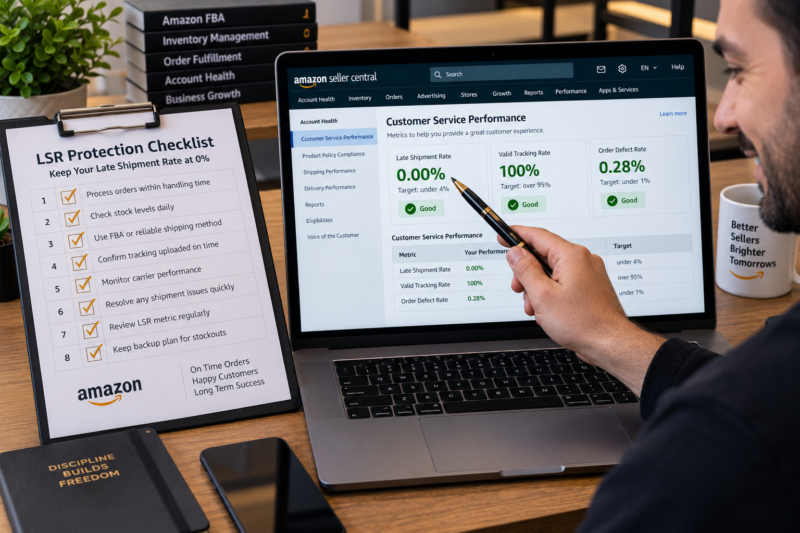
The Late Shipment Rate measures the percentage of seller-fulfilled orders not shipped by the expected ship date — calculated over rolling 10-day and 30-day windows. Amazon requires LSR to stay below 4 percent — a breach risks account suspension. Pure FBA sellers will almost always have a zero LSR because Amazon handles all shipments. Sellers with merchant-fulfilled listings must dispatch every order by its expected ship date confirm shipment in Seller Central before the deadline and maintain reliable stock and courier processes to keep LSR within threshold. Check your LSR in Seller Central under Performance — Account Health every week.
What Is the Late Shipment Rate
The Late Shipment Rate is the percentage of seller-fulfilled orders across your account for which you confirmed shipment after the expected ship date set at the time the order was placed. Amazon calculates the LSR across two separate rolling windows — a 10-day window and a 30-day window — and applies enforcement based on whichever window is in breach. Here is the exact calculation:
LATE SHIPMENT RATE FORMULA
Orders Shipped Late ÷ Total Orders in Window × 100
10-day window: reviewed over the most recent 10 days of orders
30-day window: reviewed over the most recent 30 days of orders
An order counts as late shipped when you confirm the shipment in Seller Central after the expected ship date shown on the order — not after the expected delivery date. The expected ship date is typically the same day or the next business day after the order is placed depending on your handling time settings. Confirming shipment on time even if the physical parcel has not yet been collected is not sufficient — the confirmation must be submitted before the expected ship date deadline shown on each order.
The Late Shipment Rate Threshold
| LSR Status | Rate | Account Health Implication |
|---|---|---|
| 🟢 Healthy | Under 4% | No risk — continue monitoring weekly |
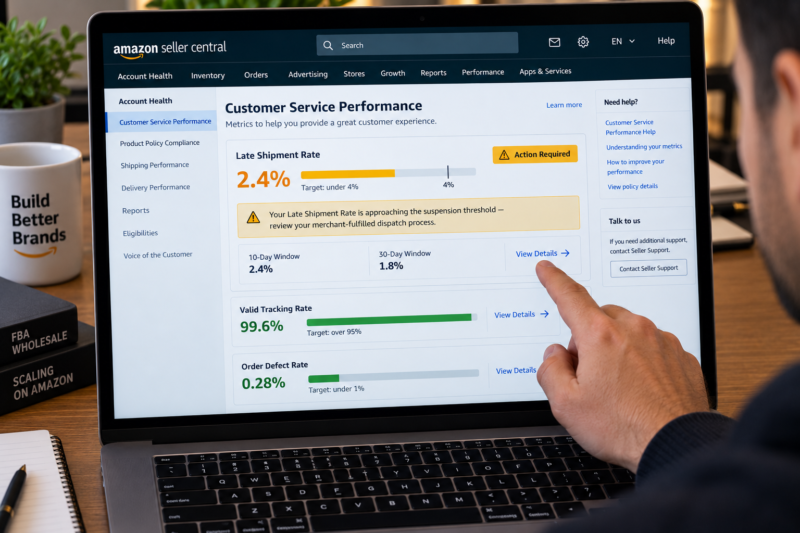
| 🟡 At Risk | Approaching 4% | Performance notification likely — immediate review of merchant-fulfilled dispatch process required |
| 🔴 Critical | At or above 4% | Account suspension risk — Amazon may deactivate merchant-fulfilled listings or entire account |
Why Pure FBA Sellers Rarely Have an LSR Problem
The Late Shipment Rate only applies to seller-fulfilled orders — orders where you as the seller are responsible for picking packing and dispatching the product to the customer yourself. For orders fulfilled through Amazon FBA Amazon confirms shipment automatically when the order leaves their fulfilment centre and this process is entirely within Amazon’s control. Because FBA shipments are never late in the seller-confirmed sense a pure FBA seller operating zero merchant-fulfilled listings will almost always have an LSR of exactly zero.
The LSR becomes a real concern for FBA wholesale sellers in three specific situations:
| Situation | Why LSR Becomes a Risk |
|---|---|
| Running merchant-fulfilled listings alongside FBA | Any merchant-fulfilled order not shipped on time counts toward LSR — even if your FBA orders are always on time |
| FBA stock running out — temporarily switching to merchant-fulfilled | During a stockout period if you fulfil orders manually rather than suppressing the listing dispatch standards must be maintained |
| Stranded FBA inventory forcing orders to merchant-fulfilled | Stranded inventory in FBA cannot be fulfilled — if the listing remains active orders arrive as merchant-fulfilled creating LSR risk |
How to Check Your Late Shipment Rate in Seller Central
Your LSR is displayed in the Customer Service Performance section of your Account Health dashboard. Here is exactly how to find and interpret the data:
Go to Performance — Account Health
Log in to Seller Central and navigate to Performance — Account Health. In the Customer Service Performance section find the Late Shipment Rate row. For most pure FBA sellers this will show 0% in green. If you operate merchant-fulfilled listings the rate may vary.
Click the LSR Percentage to View the Detail
Clicking the LSR figure opens the detail view showing both the 10-day and 30-day window figures alongside a list of the specific orders counted as late. Each late order shows the order ID the ASIN the expected ship date and the actual ship confirmation date — giving you the information needed to identify what went wrong.
Review Both the 10-Day and 30-Day Windows
Amazon monitors both windows simultaneously and enforces the threshold on whichever is breached. A seller with a clean 30-day history can still be at risk if a cluster of late orders occurs within a short 10-day period. Check both figures and note whether the trend is improving or deteriorating week on week.
The Most Common Causes of Late Shipments for Wholesale Sellers
| Cause of Late Shipment | What Happened | Prevention |
|---|---|---|
| Forgot to confirm shipment in Seller Central | Order dispatched on time physically but shipment confirmation not submitted in Seller Central before deadline | Confirm shipment in Seller Central immediately after physically dispatching — never leave confirmation for later |
| Out of stock — order accepted but no stock available | Listing remained active during a stockout — order placed by customer — seller unable to fulfil on time | Suppress merchant-fulfilled listings immediately when stock runs out — never accept orders you cannot fulfil on time |
| Courier collection not booked on time | Seller did not book courier collection promptly — missed collection window — order dispatched the following day | Book courier same day order is received — have a standing daily collection arrangement with your courier where possible |
| Handling time setting too short for your actual process | Seller set 0 or 1 day handling time but prep and packing takes longer — orders consistently missed expected ship date | Set your handling time in Seller Central to match your actual prep time — 1 to 2 days is realistic for most sellers |
| Bank holiday or weekend not accounted for | Order placed on Friday or before bank holiday — seller did not adjust handling time or dispatch process | Configure your merchant-fulfilled listings to exclude non-working days from handling time — update holiday handling settings before all bank holidays |
How to Fix an Elevated Late Shipment Rate
If your LSR is above 2 percent or trending upward you need to act immediately. Here is the priority action sequence:
Identify Every Late Order — Find the Root Cause
Open the LSR detail view and read every late order entry. Note the expected ship date and the actual confirmation date for each one. If multiple late orders share the same expected ship date this suggests a specific day where your dispatch process broke down — a bank holiday a courier failure or a stock issue. If late orders are spread across different dates the problem is likely a systematic handling time or confirmation process issue.
Fix Your Handling Time Settings Immediately
Go to Inventory — Manage Inventory in Seller Central and update the handling time on every merchant-fulfilled listing to reflect your actual dispatch capability. If you need two working days to prep and dispatch an order set handling time to two days. A longer but accurate handling time is always better than a short handling time that you cannot reliably meet — buyers see the estimated delivery date not the handling time directly.
Confirm All Pending Merchant-Fulfilled Orders Immediately
Check your Manage Orders page for any pending merchant-fulfilled orders with an expected ship date today or overdue. Dispatch and confirm these immediately. For orders where the ship date has already passed confirm shipment even if late — an unconfirmed order is worse for your metrics and your customer than a late-confirmed one.
Consider Converting Problem Listings to FBA
If specific merchant-fulfilled listings consistently generate late shipments because of stock availability or dispatch logistics consider converting them to FBA fulfilment. Converting to FBA eliminates LSR risk for those ASINs entirely — Amazon handles dispatch confirmation automatically and always on time. For wholesale sellers already using FBA this transition is straightforward and removes a persistent LSR risk source permanently.
Setting Your Handling Time Correctly in Seller Central
Your handling time setting directly determines the expected ship date shown on every merchant-fulfilled order — which in turn determines what counts as a late shipment. Getting this right is one of the most impactful single changes you can make to prevent future LSR issues:
| Handling Time Setting | Best For | LSR Risk |
|---|---|---|
| 0 days — same day dispatch | Sellers with pre-packed stock and same-day courier collection — very fast operation only | High — any delay causes immediate late |
| 1 day — next business day dispatch | Sellers who prep and dispatch the day after order is received — standard for most small operations | Moderate — manageable with reliable process |
| 2 days — two business day dispatch | Sellers who need more prep time — products requiring careful packing or custom preparation | Low — comfortable buffer for most sellers |
| 3 or more days | Large or complex items — bespoke or made-to-order products — slow dispatch capability | Very low — but reduces listing competitiveness |
💡 How to Update Handling Time in Seller Central
To update handling time go to Inventory — Manage Inventory — find your merchant-fulfilled listing — click Edit — scroll to the Offer section — update the Handling Time field to the correct number of business days — Save and Finish. You can also set a default handling time for all new listings under Settings — Shipping Settings — General Shipping Settings — Default Handling Time.
Managing Holiday and Weekend Handling Time
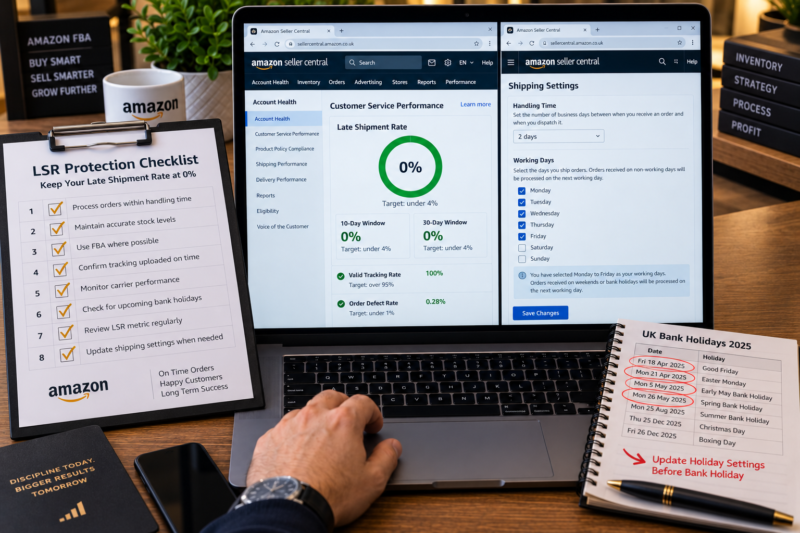
One of the most common causes of unexpected LSR spikes for merchant-fulfilled sellers is bank holidays and weekends where orders are placed with a short expected ship date that falls on a non-working day. Seller Central allows you to configure your working days and holiday settings to ensure handling time calculations exclude non-working days. Here is what to configure:
| Setting | Where to Configure | What to Set |
|---|---|---|
| Working days | Settings — Shipping Settings — General Shipping Settings | Select only the days you actually dispatch — Monday to Friday for most sellers |
| Holiday periods | Settings — Shipping Settings — Holiday Settings | Enter any periods you will not be dispatching — bank holidays — personal holidays — business closures |
| Vacation mode | Account — Account Info — Listing Status | Set listings to Inactive for any period where you cannot dispatch — prevents orders accumulating during absence |
The LSR Protection Checklist for FBA Sellers With Merchant-Fulfilled Listings
| LSR Protection Check | Confirmed |
|---|---|
| LSR confirmed below 4% in both 10-day and 30-day windows | ☐ |
| Handling time set correctly for all merchant-fulfilled listings | ☐ |
| Working days configured in Shipping Settings — non-working days excluded | ☐ |
| Manage Orders checked daily — all merchant-fulfilled orders with ship date today dispatched and confirmed | ☐ |
| Shipment confirmation submitted in Seller Central immediately after physical dispatch — not deferred | ☐ |
| Merchant-fulfilled listings suppressed immediately when stock runs out | ☐ |
| Holiday settings updated before every bank holiday or business closure | ☐ |
| High-volume or difficult-to-dispatch ASINs converted to FBA where possible | ☐ |
| All LSR checks confirmed — late shipment rate protected | ✅ Clear |
Conclusion — Pure FBA Is the Ultimate LSR Protection
The Late Shipment Rate is one of the simplest account health metrics to manage for FBA sellers — because FBA eliminates the metric entirely for every product it fulfils. For wholesale FBA sellers who operate exclusively through FBA the LSR is a background metric that rarely requires active management. For those with merchant-fulfilled listings running alongside FBA the answer is equally clear — maintain correct handling time settings check your Manage Orders page daily confirm every shipment immediately after dispatch and convert any consistently problematic merchant-fulfilled listings to FBA as quickly as your inventory process allows. An LSR of zero is achievable for every FBA seller and every FBA seller should aim for exactly that.
Find your next wholesale brand through our Brands Directory. Research every product with Keepa. Confirm every margin with AMZScout. And keep your Late Shipment Rate at zero using the process in this guide.
FIND YOUR NEXT WHOLESALE BRAND — SELL WITH A ZERO LSR
Browse 5,000+ Verified Wholesale Brands Free
Find verified wholesale trade contacts in the Brandhunterz Brands Directory — source your product apply for your account and sell on Amazon FBA with a consistently perfect Late Shipment Rate.
About the Author
This article is written by the team at Brandhunterz Ltd — a UK registered Amazon FBA wholesale sourcing company (Company No: 15342697) registered in England and Wales since 2023. Visit brandhunterz.com to learn more.