
UK AMAZON SELLERS
How to Start Selling on Amazon UK — Complete Beginner’s Guide
By Brandhunterz Ltd | Company No: 15342697 | 15 minute read
Affiliate Disclosure: This article contains affiliate links. If you purchase through our links we may earn a commission at no extra cost to you. We only recommend tools we genuinely use and believe in. Read our full disclaimer.
Amazon UK is one of the most accessible and scalable e-commerce opportunities available to anyone based in the United Kingdom — whether you are a complete beginner looking to generate a second income or an experienced trader ready to build a full-time wholesale business. The platform handles hundreds of millions of pounds in transactions every year and the infrastructure Amazon provides through its FBA — Fulfilment by Amazon — programme means that even a first-time seller can offer next-day delivery to UK buyers without running a warehouse or managing couriers themselves. The barrier to entry is low the earning potential is significant and the learning curve — while real — is entirely navigable with the right foundational knowledge.
We are Brandhunterz Ltd — a UK registered wholesale sourcing company (Company No: 15342697) — and in this complete beginner’s guide we walk through everything you need to know to start selling on Amazon UK — from choosing your selling model and registering your account to finding your first products sourcing from UK wholesalers understanding the key fees and making your first FBA shipment to an Amazon UK fulfilment centre.
💡 Quick Summary
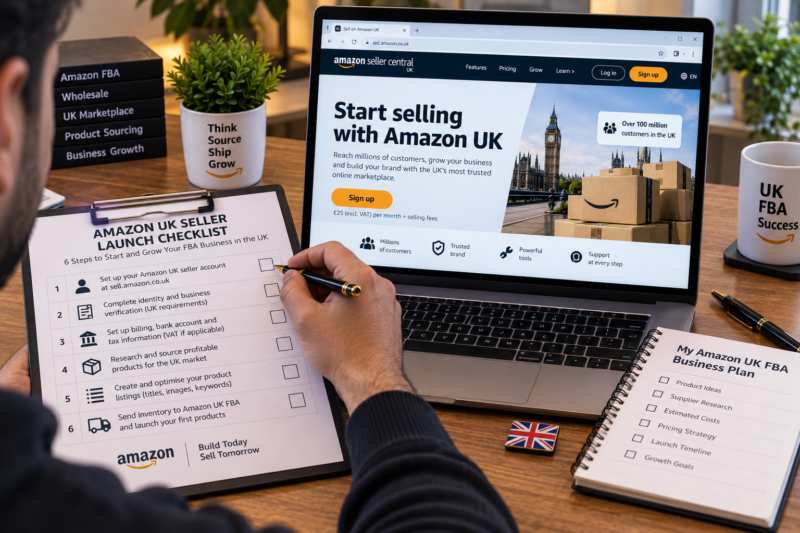
To start selling on Amazon UK you need to choose between Individual and Professional seller accounts — register at sell.amazon.co.uk with your business or personal details — choose a selling model (wholesale FBA is the most scalable for UK sellers) — find products using a research tool such as Keepa or Helium 10 — source stock from a UK wholesale distributor — prep and label your products — create a shipment plan in Seller Central and send your stock to an Amazon UK fulfilment centre. Amazon then stores picks packs and delivers every order on your behalf. Your role is product research sourcing and restocking.
Step 1 — Choose Your Amazon UK Selling Model
Before registering your account the first decision you need to make is which selling model you will use. There are four main approaches to selling on Amazon UK and each has different capital requirements time commitments and scaling potential:
| Selling Model | How It Works | Best For |
|---|---|---|
| Wholesale FBA | Buy existing branded products in bulk from UK wholesalers — sell on established Amazon listings — FBA handles fulfilment | Most scalable — recommended for beginners building a serious business |
| Retail Arbitrage | Buy discounted products from UK retailers and supermarkets — resell at a higher price on Amazon | Beginners learning the platform — low starting capital — hard to scale long term |
| Private Label | Create your own branded product — usually manufactured overseas — sell on your own Amazon listing | Experienced sellers — higher risk — higher capital required — longer timeline to first sale |
| Online Arbitrage | Buy discounted products from online retailers — resell on Amazon at a higher price | Beginners — requires significant time sourcing deals — difficult to build consistent inventory |
For most UK beginners serious about building a scalable Amazon business the wholesale FBA model is the recommended starting point. It combines the advantages of selling established branded products that already have demand and reviews on Amazon with the operational simplicity of FBA fulfilment — and it scales directly with your ability to find more profitable products and negotiate with more wholesale suppliers.
Step 2 — Register Your Amazon UK Seller Account
Your Amazon UK seller account is your central hub for listing products managing inventory monitoring account health and receiving payments. Here is how to register:
Go to sell.amazon.co.uk and Click Sign Up
Navigate to sell.amazon.co.uk and click the Sign Up button. You will be asked whether you want an Individual or Professional account. Individual accounts have no monthly fee but charge £0.75 per item sold and are limited to 35 sales per month. Professional accounts cost £25 per month plus VAT and have no per-item fee or sales limit. For anyone planning to sell more than 35 items per month — which is almost every serious FBA seller — the Professional account is the correct choice from day one.
Enter Your Business or Personal Details
You will be asked to provide your legal name or business name address phone number email address and bank account details for payment. If you are selling as a registered UK limited company you will need your Companies House registration number. If you are selling as a sole trader you will use your personal details. Amazon also requires identity verification — typically a passport or driving licence and proof of address such as a utility bill or bank statement — uploaded during the registration process.
Complete Identity Verification
Amazon requires identity verification for all new seller accounts as part of their Know Your Customer compliance process. You will be asked to upload a valid government ID and a proof of address document and in some cases to complete a short video verification call. This process typically takes 1 to 3 business days to complete. Until verification is approved your account will have limited functionality.
Set Up Your Payment and Tax Information
Add your UK bank account details for disbursements — Amazon pays out to your bank account every two weeks by default. You will also be asked for your tax information — your National Insurance number as a sole trader or your UTR number as a self-employed person or your company tax reference as a limited company. If you are VAT registered you will need to add your VAT number. If you are not yet VAT registered this is not required at registration — but you should monitor your sales and register for VAT when your turnover approaches the current UK threshold.
Step 3 — Understand Amazon UK FBA Fees
Before you source your first product you need to understand the fees Amazon charges — because your profit on every product depends entirely on whether the selling price minus all fees and cost of goods generates a positive margin. Here are the main FBA fee categories for UK sellers:
| Fee Type | What It Covers | Typical Range |
|---|---|---|
| Professional Seller Subscription | Monthly account fee for Professional seller accounts | £25 per month plus VAT |
| Referral Fee | Amazon’s commission on each sale — percentage of the total selling price including VAT | 7% to 15% depending on category — most wholesale categories 8% to 12% |
| FBA Fulfilment Fee | Pick pack and shipping cost per unit fulfilled by Amazon | £2.70 to £5.50 per unit for standard-size products |
| FBA Storage Fee | Monthly fee for storing your inventory in Amazon’s UK fulfilment centres | £0.51 to £1.21 per cubic foot per month — higher in peak season |
| Aged Inventory Surcharge | Additional storage fee for units stored at Amazon for more than 181 days | Applies per unit after 181 days — increases after 365 days |
💡 Use AMZScout to Calculate Your FBA Fees Before Every Purchase
The AMZScout FBA Calculator allows you to input any Amazon UK ASIN and see the exact referral fee FBA fulfilment fee and net profit estimate for any selling price before you place your wholesale order. Never commit to purchasing stock without first calculating your fees and confirming you have a profitable margin. A product that looks profitable at the wholesale price can easily become unprofitable once Amazon’s fees are applied if the margins are too thin.
Step 4 — Find Your First Products to Sell
Product research is the most important skill in wholesale FBA — it determines whether the products you source will sell quickly enough to generate a profit or sit in Amazon’s warehouse accumulating storage fees. For UK wholesale sellers the core criteria for a good product are consistent demand low competition on the listing and a wholesale price that leaves a healthy margin after all Amazon fees. Here is how to research products effectively:
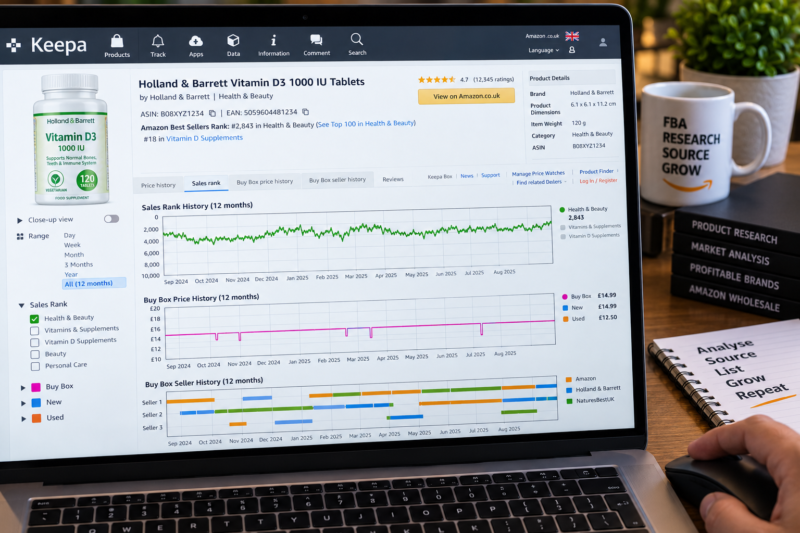
Use Keepa to Analyse Sales History and Demand
Keepa is the most widely used product research tool among UK wholesale FBA sellers and for good reason — it provides a complete price and sales rank history for every Amazon UK product going back years. For wholesale product research the most important Keepa data points are the sales rank history — which shows how consistently a product has been selling — the Buy Box price history — which shows what price the product has been selling at over time — and the Buy Box winner history — which shows how many sellers are rotating through the Buy Box and whether the listing is dominated by a single seller or shared among multiple sellers.
Use Helium 10 to Research Keywords and Competition
Helium 10 provides keyword research competitive analysis and listing quality scores for Amazon UK products. For wholesale sellers the most useful Helium 10 features are the Black Box product finder — which allows you to search the Amazon UK catalogue by sales rank revenue and review count — and the X-Ray Chrome extension — which shows sales estimates and competitive data for any Amazon UK product page directly in your browser.
What Makes a Good Wholesale Product for Amazon UK
| Criterion | What to Look For |
|---|---|
| Consistent sales rank history | Sales rank that stays within a consistent band over 12 months — not a one-off spike — showing genuine recurring demand |
| Multiple Buy Box winners | Two or more sellers sharing the Buy Box over time — indicates the listing is not monopolised and you can win a share of sales |
| Minimum 25% ROI after all fees | Net profit after referral fee FBA fee and cost of goods — calculated using AMZScout before ordering |
| Not gated or restricted | You can add your offer to the listing without requiring category or brand approval — confirmed in Seller Central |
| Standard size and weight | Fits within Amazon UK standard-size FBA dimensions — oversize products attract significantly higher FBA fulfilment fees |
Step 5 — Find a UK Wholesale Supplier
Once you have identified a product you want to sell the next step is finding a UK wholesale supplier who can sell you that product at a price that leaves you a profitable margin after Amazon’s fees. There are several ways to find UK wholesale suppliers:
| Sourcing Method | How It Works |
|---|---|
| Brandhunterz Brands Directory | Browse our Brands Directory to find verified UK wholesale brands with confirmed trade contact details — the fastest starting point for UK FBA sellers finding their first wholesale accounts |
| Brand website direct contact | Find the brand owner’s website — look for a Trade or Wholesale section — contact their trade team directly to apply for a wholesale account |
| UK trade directories | UK trade directories list wholesale distributors by category — search for distributors who carry the brands you want to sell |
| UK trade shows | Spring Fair NEC Birmingham and similar UK trade exhibitions — attend in person to meet brand representatives and apply for wholesale accounts face to face |
Step 6 — Prep Your Products and Send to Amazon FBA
Once you have received your first wholesale order from your UK supplier you need to prepare the products for FBA — this process is called prep — and then create a shipment plan in Seller Central to tell Amazon what you are sending and where. Here is the process:
Generate and Print FNSKU Labels in Seller Central
Every unit going to FBA needs an FNSKU barcode label — Amazon’s internal product identifier — applied to the product packaging. In Seller Central go to Inventory — Manage Inventory — find your listing — click Print Item Labels. Print the labels on a standard label printer — 65 labels per A4 sheet is the standard format — and apply one label per unit covering any existing barcode on the packaging.
Pack Products Into Shipping Boxes
Pack your labelled products into standard brown cardboard shipping boxes. Amazon UK FBA boxes must weigh under 30kg and meet Amazon’s box dimension requirements. Use bubble wrap or packing paper as void fill to prevent products shifting in transit. Seal each box with H-tape — tape along all seams in an H pattern for a secure closure.
Create Your FBA Shipment Plan in Seller Central
In Seller Central go to Inventory — Send to Amazon. Follow the Send to Amazon workflow — select the products and quantities you are sending — enter your box contents and dimensions — confirm your shipment and print your Amazon box labels. Amazon will assign you a UK fulfilment centre to send your boxes to — typically one of their large UK sites such as Tilbury Coventry or Rugeley.
Book Your Courier and Dispatch Your Boxes
Book a courier to collect your boxes and deliver them to the assigned Amazon UK fulfilment centre. Amazon’s Partnered Carrier programme in the UK offers discounted rates with UPS directly through Seller Central — this is usually the most cost-effective option for most new FBA sellers sending standard boxes. Once your shipment is received and checked in by Amazon your products become active in FBA inventory and start appearing in the Buy Box.
Your Amazon UK Seller Launch Checklist
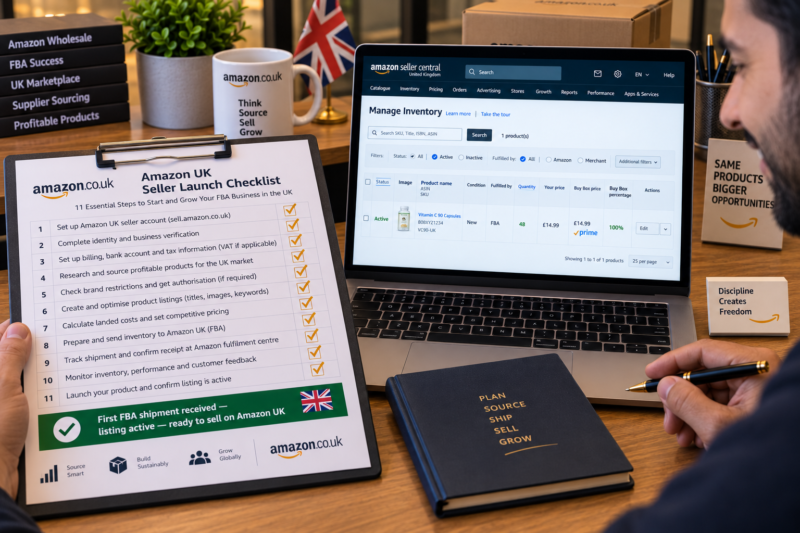
| Amazon UK Seller Launch Step | Done |
|---|---|
| Selling model chosen — wholesale FBA confirmed as primary model | ☐ |
| Professional seller account registered at sell.amazon.co.uk | ☐ |
| Identity verification completed — account fully active | ☐ |
| Bank account and tax information added to Seller Central | ☐ |
| First product researched using Keepa — consistent demand confirmed | ☐ |
| Profit margin calculated using AMZScout — minimum 25% ROI confirmed | ☐ |
| UK wholesale supplier found — trade account application submitted | ☐ |
| First wholesale order placed — stock received and inspected | ☐ |
| Products labelled with FNSKU and packed into FBA shipping boxes | ☐ |
| FBA shipment plan created in Seller Central — boxes dispatched to Amazon UK fulfilment centre | ☐ |
| First FBA shipment received — listing active — ready to sell on Amazon UK | ✅ Live |
Conclusion — The Best Time to Start Is Now
Starting to sell on Amazon UK as a wholesale FBA seller requires less capital and less operational complexity than most people expect — but it does require doing each step correctly from the start. Register a Professional account research your products thoroughly using Keepa and AMZScout source from authorised UK wholesale suppliers and follow Amazon’s FBA prep and shipment requirements precisely. The sellers who struggle are almost always those who skip the research stage and buy stock without verifying demand or profitability. The sellers who succeed are those who treat every product decision as a data-driven business decision from day one.
Start your product search today with our Brands Directory — thousands of verified UK wholesale brands with confirmed trade contact details ready for you to apply.
START YOUR AMAZON UK FBA JOURNEY TODAY
Browse 5,000+ Verified UK Wholesale Brands Free
Find verified wholesale trade contacts in the Brandhunterz Brands Directory — apply for your first wholesale account source your first products and start selling on Amazon UK FBA today.
About the Author
This article is written by the team at Brandhunterz Ltd — a UK registered Amazon FBA wholesale sourcing company (Company No: 15342697) registered in England and Wales since 2023. Visit brandhunterz.com to learn more.