
USA AMAZON SELLERS
How to Register as an Amazon USA Seller — Step by Step Guide
By Brandhunterz Ltd | Company No: 15342697 | 13 minute read
Affiliate Disclosure: This article contains affiliate links. If you purchase through our links we may earn a commission at no extra cost to you. We only recommend tools we genuinely use and believe in. Read our full disclaimer.
Registering as an Amazon USA seller is the essential first step in launching your wholesale FBA business on the world’s largest e-commerce marketplace. The process is open to sellers from any country — you do not need to be based in the United States to register and sell on Amazon.com — but the requirements differ depending on whether you are a US-based seller or an international seller and getting every step right from the start prevents the delays and account restrictions that commonly affect sellers who rush through the registration without preparing the correct documents in advance. Done correctly the registration process takes between 30 minutes and 2 hours and your account can be verified and fully operational within 1 to 5 business days.
We are Brandhunterz Ltd — a UK registered wholesale sourcing company (Company No: 15342697) — and in this complete step by step guide we cover every stage of the Amazon USA seller registration process — from what you need to prepare before you begin through to completing identity verification passing the tax interview configuring your essential account settings and making your account ready for your first wholesale FBA listing.
💡 Quick Summary
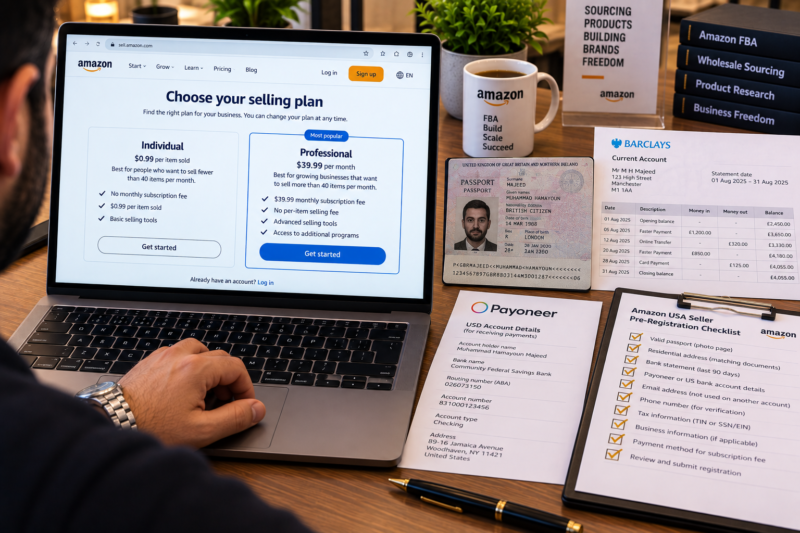
To register as an Amazon USA seller go to sell.amazon.com and choose a Professional account at $39.99 per month. You need a valid government-issued photo ID a proof of address document a business or personal email address a phone number a credit or debit card for billing and a bank account that can receive US dollar payments. International sellers must also complete the Amazon tax interview — selecting the correct W-8 form for non-US entities. Identity verification typically takes 1 to 5 business days. Once verified configure your Tax Settings Notification Preferences Shipping Settings and enable two-step verification before making your first listing.
Who Can Register as an Amazon USA Seller
Amazon USA is genuinely open to sellers from virtually any country in the world — not just those based in the United States. Whether you are a US citizen a US-registered business an international individual or an international business you can register a seller account on Amazon.com and sell into the US market using FBA. The requirements differ slightly depending on your location:
| Seller Type | Tax Requirement | Bank Account Requirement |
|---|---|---|
| US Individual — Sole Proprietor | Social Security Number — SSN — or Individual Taxpayer Identification Number — ITIN | US bank account — direct USD disbursement |
| US Business — LLC or Corporation | Employer Identification Number — EIN — from the IRS | US business bank account — direct USD disbursement |
| International Individual | W-8BEN tax form completed during Amazon tax interview — confirms non-US tax status | Bank account accepting USD via Payoneer Wise or local bank — Amazon Hyperwallet also accepted |
| International Business | W-8BEN-E tax form completed during Amazon tax interview — confirms non-US entity status | Business bank account accepting USD via Payoneer Wise or local bank — Amazon Hyperwallet also accepted |
What You Need Before You Start
Gather all the following documents and information before visiting sell.amazon.com — having everything ready prevents the registration from stalling partway through which can flag your account for additional review:
| Document or Information | Detail | Required For |
|---|---|---|
| Business email address | Dedicated business email — not a personal address already linked to an Amazon shopping account | All sellers |
| Government-issued photo ID | Valid passport or national ID card — must be current — clear photograph with all four corners visible | All sellers |
| Proof of address | Bank statement or utility bill dated within the past 90 days — showing your full name and current address | All sellers |
| Phone number | Any country code accepted — used for two-factor authentication and account security | All sellers |
| Credit or debit card | Internationally accepted card for billing the monthly subscription — Visa Mastercard or American Express | All sellers |
| Bank account for USD disbursements | US bank account — or Payoneer Wise or Amazon Hyperwallet for international sellers receiving USD payments | All sellers |
| Tax identification — US sellers | Social Security Number — SSN — or Employer Identification Number — EIN from IRS | US sellers only |
| Business registration details | Legal business name and registration number — Companies House number for UK limited companies — State registration for US LLCs | Business sellers |
The Registration Process — Step by Step
Go to sell.amazon.com and Click Sign Up
Open a browser and navigate to sell.amazon.com. Click the Sign Up button. You will be asked to create a new Amazon account or log in with an existing one. Use a dedicated business email address for your seller account — not a personal Amazon shopping email. If you already have an Amazon buyer account with a different email address you can still create a new seller account with your business email — the two can coexist as separate accounts.
Select Professional Account — $39.99 Per Month
After creating your account you will be directed to select your selling plan. Select Professional. Do not select Individual — Individual account holders cannot win the Buy Box which makes wholesale FBA selling impossible. The $39.99 monthly fee is recovered from your first few sales and gives you access to all the tools and features that make FBA selling viable — including Buy Box eligibility bulk listing tools and full advertising access.
Enter Your Business Information
Select your business type — options include Privately Owned Business State Owned Business Charity and None I am an individual. Enter your legal business name or full personal name your registered address and your primary business phone number. For business sellers enter your business registration number. For US businesses this is your EIN. For international businesses this is your equivalent national registration number — Companies House number for UK limited companies for example. Enter the details exactly as they appear on your official business registration documents.
Add Your Billing and Payment Information
Add a valid credit or debit card for billing the monthly Professional subscription fee. Add your bank account details for receiving sales disbursements. US sellers add their US bank account routing and account numbers directly. International sellers add their Payoneer Wise or Amazon Hyperwallet account details — these services act as a USD-receiving account and forward payments to your local bank account in your home currency. Choose your disbursement service before registering and have your account details ready.
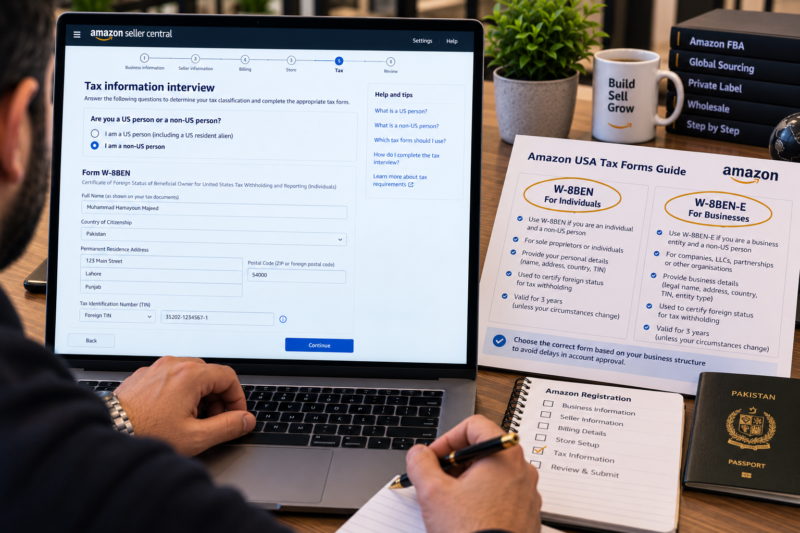
Complete the Amazon Tax Interview
The Amazon tax interview is a required step for all sellers on Amazon.com. It determines how Amazon reports your income to the IRS and what withholding rate applies to your payments. US individuals select I am a US person and provide their SSN or EIN. US businesses select I am a US person and provide their EIN. International individuals select I am not a US person and complete the W-8BEN form. International businesses select I am not a US person and complete the W-8BEN-E form. Completing this step correctly is essential — incorrect tax interview answers can result in Amazon withholding up to 30% of your payments pending correction.
Set Your Store Name
Enter a display name for your Amazon storefront — this is the name buyers see on your seller profile and feedback page. The store name does not need to match your legal business name but must not infringe any existing trademark. Choose a professional name that reflects your business. Store names can be changed after registration so do not let this step delay you — enter a suitable name and proceed.
Upload Your Identity Documents
Upload a clear photograph or scan of your government-issued photo ID — passport or national ID card. Then upload your proof of address document — a bank statement or utility bill dated within the past 90 days. Both documents must be fully legible — all four corners visible no glare no blur and all text clearly readable. Blurry or cropped documents are the most common cause of identity verification rejection. Photograph documents in good natural light on a flat contrasting background for the clearest result.
Complete Video Verification if Requested
Amazon may request a short video verification call as part of the identity verification process particularly for new sellers in certain countries or for business account registrations. This is conducted through a third-party identity verification service — you will be asked to show your photo ID to a webcam confirm your personal details and answer a small number of verification questions. The call is typically 5 to 10 minutes long. Have your identity document ready before scheduling the call.
International Sellers — Receiving USD Payments
One of the most important practical considerations for international sellers registering on Amazon USA is how to receive USD payments. Amazon pays sellers in the currency of the marketplace — meaning Amazon.com sales are disbursed in US dollars. International sellers have three main options for receiving these payments:
| Payment Solution | How It Works | Best For |
|---|---|---|
| Payoneer | Provides a US receiving account — receives USD from Amazon — converts and forwards to your local bank account in your home currency | International sellers from most countries — widely supported by Amazon |
| Wise — formerly TransferWise | Provides a US virtual bank account — receives USD from Amazon — holds or converts to your home currency at mid-market rates | International sellers wanting the best exchange rate — low conversion fees |
| Amazon Currency Converter for Sellers | Amazon converts USD earnings to your home currency and pays directly to your local bank account — no third-party service required | Sellers in supported countries who prefer a simpler setup — exchange rate less favourable than Wise |
After Registration — Essential Account Settings to Configure
Once your account is verified configure the following settings before making your first listing. These settings directly affect how your account operates — incorrect configuration causes listing errors payment delays and account health issues that are entirely avoidable:
| Settings Page | What to Configure | Priority |
|---|---|---|
| Tax Settings | Confirm tax interview is complete — review state tax collection settings — Amazon collects and remits sales tax in most US states under marketplace facilitator laws | Day 1 |
| Notification Preferences | Enable email notifications for Account Health — A-to-Z Claims — Feedback — Policy Violations — Shipment Alerts and Payment Notifications | Day 1 |
| Shipping Settings | Set default handling time and working days — relevant if you operate any merchant-fulfilled listings alongside FBA | Day 1 |
| Two-Step Verification | Enable two-step verification under Settings — Login Settings — essential account security protection | Day 1 |
| Return Settings | Review FBA return settings and confirm your return address is correct — Amazon handles FBA returns automatically | Day 1 |
| Disbursement Schedule | Confirm your USD disbursement bank account is correctly linked — default disbursement is every 14 days | Day 1 |
Common Registration Mistakes to Avoid
| Mistake | What Goes Wrong | How to Avoid |
|---|---|---|
| Selecting Individual instead of Professional | No Buy Box eligibility — FBA severely limited — must upgrade before selling effectively | Always select Professional from the start — the fee is recovered quickly from sales |
| Completing the wrong W-8 form | Amazon withholds up to 30% of payments — requires correction before disbursements resume normally | Individuals use W-8BEN — businesses use W-8BEN-E — confirm which applies before starting the tax interview |
| Blurry or incomplete identity documents | Verification fails — re-upload required — 3 to 7 day delay | Photograph documents in natural light — all four corners visible — all text fully readable |
| Proof of address older than 90 days | Amazon rejects out-of-date documents — re-upload and delay | Check the date on your document before uploading — must be within the past 90 days |
| No USD-receiving bank account set up | Cannot receive sales disbursements — registration stalls at payment setup stage | Set up Payoneer or Wise before registering — have account details ready to enter during registration |
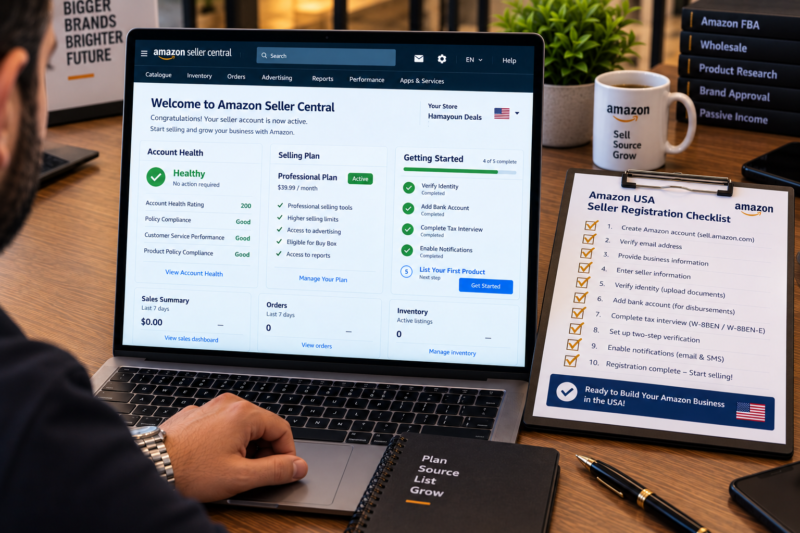
Your Amazon USA Registration Checklist
| Registration and Setup Step | Done |
|---|---|
| Dedicated business email address created for seller account | ☐ |
| USD-receiving bank account set up — Payoneer Wise or US bank account | ☐ |
| All documents gathered — ID proof of address credit card tax details | ☐ |
| Professional account selected at sell.amazon.com | ☐ |
| Business information entered correctly — name address registration number | ☐ |
| Tax interview completed — correct W-8 or W-9 form selected and submitted | ☐ |
| Identity documents uploaded — clear photographs — all text readable | ☐ |
| Identity verification completed — account confirmed active | ☐ |
| Notification preferences enabled for all account health and payment alerts | ☐ |
| Two-step verification enabled on account | ☐ |
| Amazon USA seller account fully registered configured and ready to list | ✅ Ready |
Conclusion — Register Correctly Once and Build From a Solid Foundation
Registering your Amazon USA seller account correctly from the start — choosing the Professional plan completing the tax interview accurately uploading clear identity documents and configuring all essential settings before your first listing — gives you the strongest possible foundation for your FBA business. The sellers who face account restrictions payment holds and verification delays are almost always those who rushed through the registration without preparing the correct documents in advance. The process itself is straightforward — it is the preparation before you begin that makes the difference between a smooth launch and a frustrating delay.
Once your account is live and configured start finding your first wholesale products through our Brands Directory. Research demand with Keepa. Confirm your margins with AMZScout.
ACCOUNT REGISTERED — NOW FIND YOUR FIRST PRODUCT
Browse 5,000+ Verified Wholesale Brands Free
Find verified wholesale trade contacts in the Brandhunterz Brands Directory — apply for your first trade account source your first products and start building your Amazon USA FBA business today.
About the Author
This article is written by the team at Brandhunterz Ltd — a UK registered Amazon FBA wholesale sourcing company (Company No: 15342697) registered in England and Wales since 2023. Visit brandhunterz.com to learn more.