
INTERNATIONAL AMAZON SELLING
How to Receive Amazon Payments Internationally — Payoneer vs Wise vs Hyperwallet
By Brandhunterz Ltd | Company No: 15342697 | 13 minute read
Affiliate Disclosure: This article contains affiliate links. If you purchase through our links we may earn a commission at no extra cost to you. We only recommend tools we genuinely use and believe in. Read our full disclaimer.
One of the first and most important practical questions every international Amazon seller faces is how to actually receive their payments. Amazon pays sellers in the currency of the marketplace — USD for Amazon USA and GBP for Amazon UK — and for sellers based outside these countries receiving those payments into a local bank account requires an intermediary payment service that can hold USD or GBP on your behalf convert it to your local currency and transfer it to your home bank. Choosing the wrong payment service costs sellers real money every single disbursement through poor exchange rates hidden fees or withdrawal delays — while choosing the right one maximises every dollar or pound you earn and keeps your cash flow moving smoothly. The three services that dominate international Amazon seller payments are Payoneer Wise and Amazon Hyperwallet — and each has different strengths weaknesses costs and country availability that make one a better fit than the others depending on where you are based and how you manage your business finances.
We are Brandhunterz Ltd — a UK registered wholesale sourcing company (Company No: 15342697) — and in this complete guide we break down exactly how Payoneer Wise and Amazon Hyperwallet work for international Amazon sellers — covering fees exchange rates setup process withdrawal options country availability and which service is the best choice for sellers from Pakistan India and other countries selling on Amazon USA or Amazon UK.
💡 Quick Summary
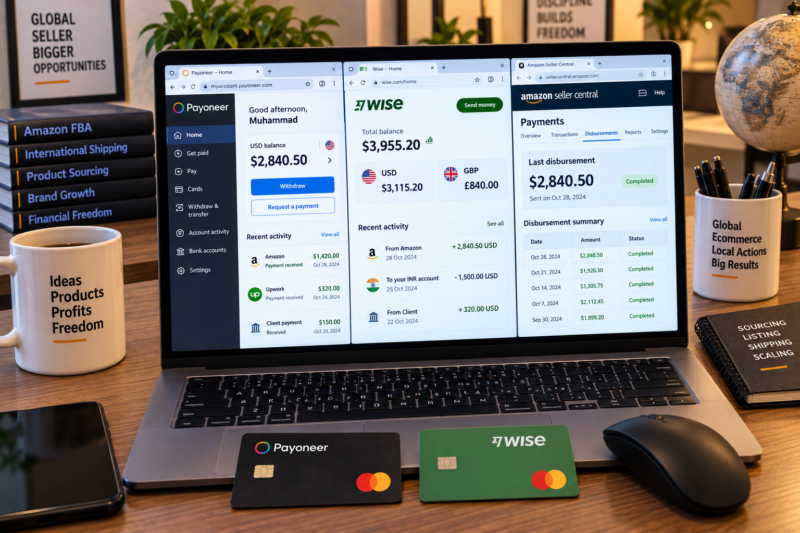
The three main options for receiving Amazon payments internationally are Payoneer — the most widely supported and easiest to set up — Wise — typically the best exchange rates and lowest fees making it the most cost-effective for high-volume sellers — and Amazon Hyperwallet — Amazon’s own built-in solution that requires no third-party account but offers less favourable rates than Wise. For most international sellers in Pakistan India and other eligible countries Wise gives you the most money per disbursement over time while Payoneer is the easiest and most universally available starting point. Always set up your payment account before beginning your Amazon seller registration as the bank account details are required during the registration process itself.
Why International Sellers Cannot Use a Local Bank Account Directly
Amazon disburses payments in the currency of the marketplace — USD for Amazon.com and GBP for Amazon.co.uk. To receive a USD disbursement directly Amazon requires a bank account with a valid US routing number and account number. To receive a GBP disbursement Amazon requires a bank account with a valid UK sort code and account number. Banks in Pakistan India and most other countries outside the USA and UK do not have US routing numbers or UK sort codes — which means Amazon cannot pay them directly. The three payment services in this guide solve this problem by providing international sellers with virtual US or UK bank account details that Amazon can pay into — acting as an intermediary that holds your earnings and enables you to withdraw them to your local bank in your home currency.
Option 1 — Payoneer
Payoneer is the most widely used payment solution among international Amazon sellers globally. It has been accepting Amazon disbursements for over a decade has strong support in Pakistan India Bangladesh and over 200 other countries and has a well-established reputation within the Amazon seller community. Here is a complete breakdown of how Payoneer works and what it costs:
| Payoneer Feature | Detail |
|---|---|
| What it provides | A US virtual bank account with a real routing number and account number — Amazon pays USD into this account — you withdraw to your local bank in your home currency |
| Setup cost | Free to register — no setup fee |
| Annual fee | $29.95 per year if the account receives less than $2,000 in annual payments — free if annual receipts exceed $2,000 |
| Receiving fee from Amazon | Free — no fee charged when Amazon pays into your Payoneer account |
| Currency conversion fee | Approximately 2% above mid-market rate when converting USD to PKR INR or other local currencies — this is where Payoneer costs more than Wise over time |
| Withdrawal fee to local bank | $1.50 per withdrawal in most countries — very low flat fee |
| Country availability | Over 200 countries including Pakistan India Bangladesh Philippines Nigeria Egypt and most Amazon-supported seller countries |
| Withdrawal speed | Typically 2 to 5 business days to reach your local bank account after initiating a withdrawal |
| Payoneer card | Optional Payoneer Mastercard available — allows spending from your Payoneer balance directly — useful for paying for tools subscriptions and supplier orders in USD without converting to local currency first |
| Amazon compatibility | Fully accepted by Amazon USA and Amazon UK for disbursements — one of the most established Amazon-compatible payment solutions |
✅ Payoneer Is Best For
Sellers in Pakistan India Bangladesh Philippines and other countries where Payoneer has strong local support and established banking relationships. New sellers who want the simplest most universally supported setup. Sellers who want a Payoneer Mastercard to pay for tools subscriptions and supplier invoices in USD without converting funds first.
Option 2 — Wise (Formerly TransferWise)
Wise is widely regarded as offering the most cost-effective currency conversion of any international payment service available to Amazon sellers. It uses the mid-market exchange rate — the same rate you see on Google — with a small transparent percentage fee rather than a markup on the rate itself. For high-volume Amazon sellers the difference in exchange rates between Wise and Payoneer can amount to hundreds or thousands of dollars per year in additional earnings. Register your Wise account here. Here is a complete breakdown:
| Wise Feature | Detail |
|---|---|
| What it provides | A USD virtual bank account with real US routing number and account number plus a GBP virtual account with real UK sort code and account number — both accepted by Amazon — hold multiple currencies simultaneously |
| Setup cost | Free to register — no setup fee — one-time account verification required |
| Annual fee | None — no annual fee regardless of account balance or transaction volume |
| Receiving fee from Amazon | Free — no fee to receive Amazon disbursements into your Wise USD or GBP account |
| Currency conversion fee | Approximately 0.35% to 1% of the converted amount at mid-market rate — significantly lower than Payoneer’s approximately 2% markup — this is the key advantage of Wise for high-volume sellers |
| Withdrawal fee to local bank | Typically around $1 to $3 per transfer depending on currency and amount — very low |
| Country availability | Available in most countries including India — availability in Pakistan has varied so check current status at wise.com before registering — fully available in most of Europe UAE Egypt and Southeast Asia |
| Multi-currency account | Hold USD GBP EUR and 50+ other currencies simultaneously — convert between them when rates are favourable — extremely useful for sellers on multiple Amazon marketplaces |
| Wise debit card | Optional Wise Mastercard debit card available — spend from your Wise balance in multiple currencies at mid-market rates — excellent for paying supplier invoices in USD or GBP |
| Amazon compatibility | Fully accepted by Amazon USA and Amazon UK for disbursements — Wise account details work identically to a real US or UK bank account in Amazon Seller Central |
✅ Wise Is Best For
Sellers in India UAE Philippines most of Europe and anywhere Wise is fully available who want the best possible exchange rates on their Amazon disbursements. Growing and scaled sellers where the 1% to 2% exchange rate difference versus Payoneer compounds into significant additional annual earnings. Sellers on both Amazon USA and Amazon UK who benefit from holding both USD and GBP in one account and converting when rates are most favourable.
Option 3 — Amazon Hyperwallet
Amazon Hyperwallet is Amazon’s own built-in disbursement solution for international sellers — powered by PayPal’s Hyperwallet platform and accessible directly within Seller Central without needing to register with any third-party service. It is the simplest option to activate but generally not the most cost-effective for sellers who care about maximising their exchange rate returns. Here is how it works:
| Hyperwallet Feature | Detail |
|---|---|
| What it provides | Amazon converts your USD or GBP earnings using its own exchange rate and pays directly to your local bank account in your home currency — no third-party account needed |
| Setup process | Configured directly within Amazon Seller Central — Settings — Account Info — Deposit Methods — select your country and enter your local bank account details |
| Fees | No explicit fee stated — however Amazon applies its own exchange rate which typically includes a markup of approximately 1.5% to 3% above mid-market — less transparent than Wise or Payoneer |
| Country availability | Available in a growing but still limited number of countries — not available in all Amazon-supported seller countries — check availability in Seller Central Settings for your specific country |
| Withdrawal speed | Typically 3 to 5 business days after Amazon initiates the disbursement |
| Best use case | Sellers in countries where Hyperwallet is available who prioritise simplicity over rate optimisation — or as a temporary solution while setting up Payoneer or Wise |
Direct Comparison — Payoneer vs Wise vs Hyperwallet
| Feature | Payoneer | Wise | Hyperwallet |
|---|---|---|---|
| Setup fee | Free | Free | Free |
| Annual fee | $29.95 if under $2,000 annual | None | None |
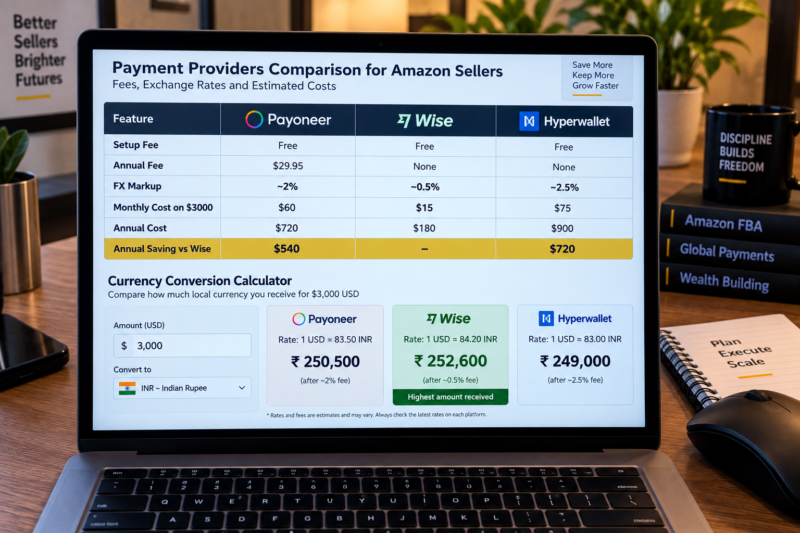
| FX conversion rate | ~2% above mid-market | ~0.35% to 1% above mid-market | ~1.5% to 3% above mid-market |
| Pakistan availability | ✅ Full support | ⚠️ Check current availability | ⚠️ Limited — check Seller Central |
| India availability | ✅ Full support | ✅ Full support | ✅ Available |
| Multi-currency holding | Yes — USD GBP EUR | Yes — 50+ currencies | No — converts immediately |
| Physical debit card | Yes — Mastercard | Yes — Mastercard | No |
| Best for paying suppliers | Yes — Payoneer card or transfer | Yes — Wise card or transfer | No — disbursement only |
| Ease of setup | Very easy | Very easy | Easiest — built into Seller Central |
| Overall recommendation | Best for Pakistan and wide country coverage | Best rates — best for India and high-volume sellers | Simple backup — not the best rates |
How Much Does the Exchange Rate Difference Cost You?
To illustrate why the exchange rate difference between these services matters — consider a seller receiving $3,000 per month from Amazon USA. At a 1% difference in exchange rate the annual cost difference is $360. At a 2% difference it is $720 per year — real money that goes directly to the payment provider rather than into your business. Here is a worked example:
| Monthly Amazon Disbursement — $3,000 USD | Payoneer (~2% markup) | Wise (~0.5% fee) | Difference |
|---|---|---|---|
| FX cost per disbursement | ~$60 | ~$15 | $45 per month |
| Annual FX cost | ~$720 | ~$180 | $540 per year extra with Payoneer |
For a seller at $3,000 monthly disbursement Wise saves approximately $540 per year compared to Payoneer — purely from the exchange rate difference. At higher disbursement levels this saving grows proportionally. This is why growing sellers almost always migrate to Wise once their monthly disbursements make the rate difference significant.
Which Service Should You Choose — By Country
| Country | Recommended Service | Reason |
|---|---|---|
| Pakistan | Payoneer first | Payoneer has the strongest local presence in Pakistan — easiest setup — check Wise availability as a secondary option for better rates if available in Pakistan at time of registration |
| India | Wise preferred — Payoneer backup | Wise is fully available in India and offers better exchange rates — large Indian Amazon seller community uses both but Wise is increasingly preferred for rate optimisation |
| Bangladesh | Payoneer | Payoneer has strong Bangladesh support — Wise availability may be limited — check both before registering |
| Philippines | Payoneer or Wise | Both fully available — Wise recommended for better rates — large Philippine VA and Amazon seller community uses both |
| UAE | Wise preferred | Wise fully available in UAE — excellent rates — AED to USD conversion at near mid-market rates — UAE sellers often hold USD in Wise without converting given AED-USD peg |
| Nigeria Egypt and West Africa | Payoneer | Payoneer has the broadest coverage across Africa — Wise availability varies by country — check wise.com for your specific country before registering |
How to Add Your Payment Account to Amazon Seller Central
Once your Payoneer or Wise account is set up and you have your virtual bank account details — routing number and account number for USD or sort code and account number for GBP — adding it to Amazon Seller Central is straightforward:
During Registration
When registering your Amazon seller account at sell.amazon.com you will be asked to add your bank account details for disbursements. Select United States as the bank country for Payoneer or Wise USD accounts — enter the routing number in the Bank Routing Number field and the account number in the Account Number field. For GBP accounts select United Kingdom and enter the sort code and account number.
After Registration — Updating Bank Details
To add or update your payment account after registration go to Settings — Account Info — Deposit Methods in Seller Central. Click Edit to update your bank details. Changes to bank details may trigger a security hold on disbursements for up to 3 to 5 business days while Amazon verifies the new account — plan accordingly and do not change bank details immediately before a scheduled disbursement.
Verify Your First Disbursement
After your first Amazon disbursement verify that the amount received in your Payoneer or Wise account matches what Seller Central shows as your disbursement amount. Check the Payments — Transaction View report in Seller Central to see the exact disbursement amount and date — then confirm the same amount appears in your Payoneer or Wise account within 1 to 3 business days of the Amazon disbursement date.
Your International Payment Setup Checklist
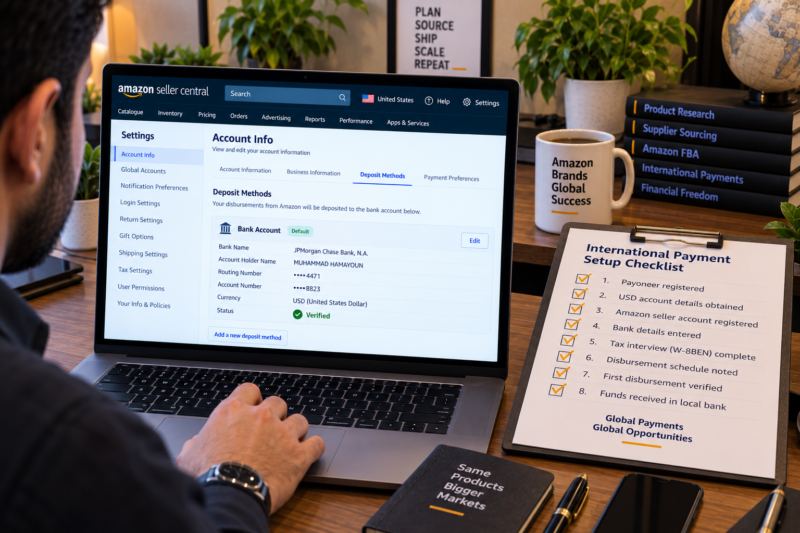
| Payment Setup Step | Done |
|---|---|
| Payoneer or Wise account registered — identity verification completed | ☐ |
| USD virtual account details obtained — routing number and account number noted | ☐ |
| Amazon seller account registered — Payoneer or Wise bank details entered as disbursement account | ☐ |
| Tax interview completed — W-8BEN or W-8BEN-E form submitted — withholding confirmed at correct rate | ☐ |
| Disbursement schedule understood — Amazon pays every 14 days after 14-day holding period | ☐ |
| First disbursement received in Payoneer or Wise — amount verified against Seller Central Transaction View | ☐ |
| Withdrawal initiated to local bank — exchange rate compared — funds received in local currency | ☐ |
| International payment setup complete — Amazon disbursements flowing to local bank account | ✅ Active |
Conclusion — Choose the Right Service Once and Maximise Every Disbursement
The payment service you choose as an international Amazon seller directly affects how much money you actually receive from every sale you make. Payoneer is the safest and most universally available starting point — particularly for sellers in Pakistan Bangladesh and countries where Wise is not yet fully available. Wise is the most cost-effective option for sellers in India the UAE Philippines and most countries where it is fully supported — and the exchange rate saving compounds meaningfully over time as your disbursement volume grows. Amazon Hyperwallet is the simplest option but rarely the most economical. Set up your chosen service before registering your Amazon account have your virtual bank account details ready and verify your first disbursement carefully to confirm everything is working correctly — then focus on what matters most which is finding great products and growing your catalogue.
Find your wholesale products through our Brands Directory. Research demand with Keepa. Confirm margins with AMZScout.
START SELLING ON AMAZON INTERNATIONALLY TODAY
Browse 5,000+ Verified Wholesale Brands Free
Find verified wholesale trade contacts in the Brandhunterz Brands Directory — set up your payment account source your first products and start building your Amazon FBA business from anywhere in the world.
About the Author
This article is written by the team at Brandhunterz Ltd — a UK registered Amazon FBA wholesale sourcing company (Company No: 15342697) registered in England and Wales since 2023. Visit brandhunterz.com to learn more.