
INTERNATIONAL AMAZON SELLING
Amazon Global Selling — How to Sell on Multiple Marketplaces at Once
By Brandhunterz Ltd | Company No: 15342697 | 15 minute read
Affiliate Disclosure: This article contains affiliate links. If you purchase through our links we may earn a commission at no extra cost to you. We only recommend tools we genuinely use and believe in. Read our full disclaimer.
Amazon operates marketplaces across North America Europe the Middle East and Asia Pacific — and for international FBA wholesale sellers who have already proven their model on one marketplace expanding to additional ones is one of the most powerful levers for growing revenue without needing to find entirely new products or suppliers. Selling on multiple Amazon marketplaces simultaneously through Amazon’s Global Selling programme means your proven wholesale ASINs can generate sales in the USA Canada the UK Germany France Italy Spain the UAE Japan Australia and more — all managed through a single unified Seller Central account. For an international seller based in Pakistan or India who has already built a working wholesale operation on Amazon USA adding Amazon UK or Amazon Canada can materially increase monthly revenue with a fraction of the effort required to build the original business.
We are Brandhunterz Ltd — a UK registered wholesale sourcing company (Company No: 15342697) — and in this complete guide we cover exactly how Amazon Global Selling works which marketplaces are available how the unified account structure operates what Build International Listings does how to manage currency and payments across multiple marketplaces what the tax and compliance requirements are for each major marketplace and how to decide which marketplace to expand to first as an international FBA wholesale seller.
💡 Quick Summary
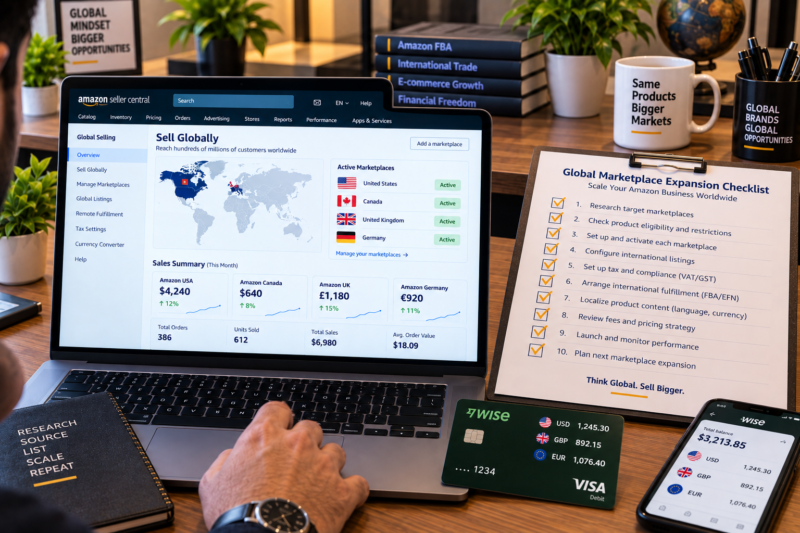
Amazon Global Selling allows you to sell on multiple Amazon marketplaces from a single seller account. North American marketplaces — USA Canada Mexico — are linked in one unified account. European marketplaces — UK Germany France Italy Spain Netherlands Sweden Poland — are linked in a separate unified account. You can hold both. Each marketplace requires its own FBA inventory sourced through suppliers in that region or shipped cross-border. Use Build International Listings to automatically create listings in additional marketplaces from your primary one. Currency is managed through Payoneer or Wise with separate virtual accounts per currency. VAT registration is required for UK and EU selling above the relevant thresholds. Start with your strongest performing marketplace — prove the model — then expand one marketplace at a time.
Amazon’s Global Marketplace Network — All Active Marketplaces
Amazon currently operates the following active selling marketplaces — each with its own customer base currency language and regulatory requirements:
| Region | Marketplace | Currency | Account Group |
|---|---|---|---|
| North America | Amazon.com — USA | USD | NA Unified |
| North America | Amazon.ca — Canada | CAD | NA Unified |
| North America | Amazon.com.mx — Mexico | MXN | NA Unified |
| Europe | Amazon.co.uk — United Kingdom | GBP | EU Unified |
| Europe | Amazon.de — Germany | EUR | EU Unified |
| Europe | Amazon.fr — France | EUR | EU Unified |
| Europe | Amazon.it — Italy | EUR | EU Unified |
| Europe | Amazon.es — Spain | EUR | EU Unified |
| Europe | Amazon.nl — Netherlands | EUR | EU Unified |
| Middle East | Amazon.ae — UAE | AED | Separate |
| Asia Pacific | Amazon.co.jp — Japan | JPY | Separate |
| Asia Pacific | Amazon.com.au — Australia | AUD | Separate |
How Unified Accounts Work — North America and Europe
Amazon groups its marketplaces into unified selling accounts — meaning one Professional seller account gives you access to multiple marketplaces within the same region. There are two main unified account groups relevant to most international wholesale sellers:
| Account Group | What It Includes | Key Benefit |
|---|---|---|
| North American Unified Account | Amazon USA + Canada + Mexico — one seller account covers all three — single inventory view — shared product catalogue | List once on Amazon USA and use Build International Listings to automatically push listings to Canada and Mexico at adjusted prices — no separate account registration required |
| European Unified Account | Amazon UK + Germany + France + Italy + Spain + Netherlands + Sweden + Poland — one seller account covers all — unified European inventory management | List on Amazon UK and automatically push listings to all EU marketplaces using Build International Listings — one registration gives access to eight European marketplaces simultaneously |
✅ The Most Powerful Multi-Marketplace Strategy for International Sellers
Register a North American seller account for Amazon USA and a European seller account for Amazon UK — giving you access to eleven marketplaces across two account groups from a single registration process. This is the most common multi-marketplace structure used by experienced international FBA wholesale sellers. Start with Amazon USA as your primary marketplace prove your product sourcing model then activate Amazon Canada using Build International Listings as your first expansion — the same US wholesale inventory can often be used for both with minimal additional effort.
What Is Build International Listings — and How Does It Work?
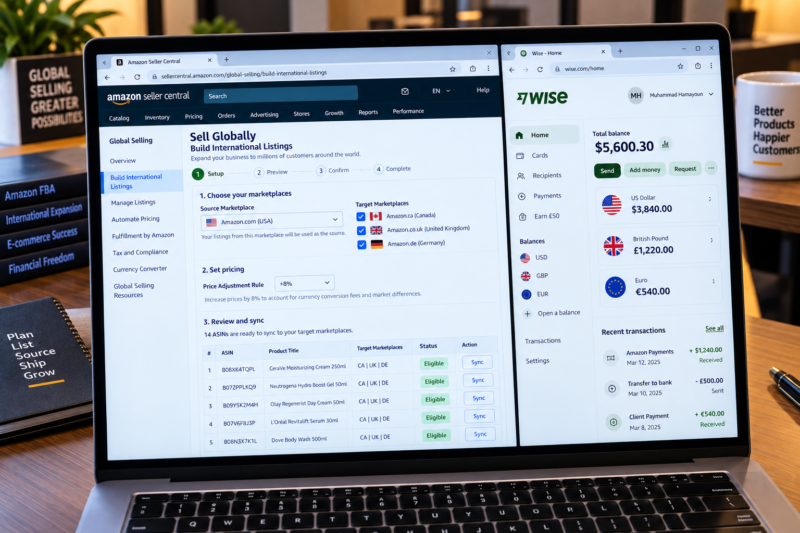
Build International Listings — BIL — is Amazon’s tool for automatically creating and synchronising your product listings across multiple marketplaces within the same unified account. Here is exactly what it does and how international sellers use it:
| BIL Feature | What It Does |
|---|---|
| Automatic listing creation | Takes your existing listings from your source marketplace — e.g. Amazon USA — and automatically creates matching listings on your target marketplaces — e.g. Amazon Canada — using the same ASIN product data |
| Automatic price adjustment | Converts your source marketplace price to the target marketplace currency at the current exchange rate — you set a price adjustment rule (e.g. +5% or +10%) to account for currency fluctuation and additional marketplace fees — prices update automatically when exchange rates shift |
| Listing synchronisation | When you update a listing on your source marketplace — price title or description — BIL automatically pushes that update to all target marketplace listings — no need to update each marketplace manually |
| Exclusion rules | You can exclude specific ASINs from BIL if you do not want them listed on a particular target marketplace — useful when a product is not approved for sale in a specific country or when you do not have supply for that marketplace yet |
| Where to find it | Seller Central — Inventory — Sell Globally — Build International Listings — select your source marketplace and target marketplaces — follow the setup wizard to configure price rules and launch |
Which Marketplace Should International Sellers Expand to First?
The right expansion marketplace depends on where you are currently selling and what your product category strengths are. Here is a strategic guide for the most common expansion decisions international wholesale sellers face:
| Current Primary Marketplace | Best First Expansion | Why |
|---|---|---|
| Amazon USA | Amazon Canada | Same unified NA account — same English language listings — many of the same brands are available in Canada — BIL pushes listings automatically — Canadian FBA centres receive cross-border inventory from USA under Remote Fulfillment with FBA programme |
| Amazon UK | Amazon Germany | Germany is Amazon’s largest European marketplace by revenue — same EU unified account — BIL auto-translates listings into German — Pan-European FBA allows UK inventory to fulfil German orders — VAT registration in Germany required |
| Amazon USA — growing catalogue | Amazon UK | Separate EU account registration required — but GBP earnings are the strongest currency for international sellers converting to PKR or INR — many US wholesale brands have UK distribution available — UK market is less saturated than USA in many categories |
| Amazon USA or UK — well established | Amazon UAE | Growing rapidly — lower competition than USA and UK — strong demand for branded consumer goods — AED is pegged to USD making currency simple — separate account registration required — good fit for sellers with Middle Eastern market knowledge |
Tax and VAT Compliance Across Marketplaces
Tax compliance is the most significant complexity that comes with multi-marketplace selling. Each marketplace has its own tax rules and international sellers must understand their obligations before activating each additional marketplace:
| Marketplace | Tax Requirement | Amazon Collects Tax? |
|---|---|---|
| Amazon USA | Amazon acts as marketplace facilitator and collects state sales tax on your behalf in all states that require it — no sales tax registration needed for most international sellers — complete W-8BEN for income tax | ✅ Yes — sales tax |
| Amazon Canada | GST and HST registration may be required once Canadian sales exceed CAD 30,000 annually — Amazon collects GST and HST on digital goods but not always on physical goods sold by third parties — consult a Canadian tax advisor as you scale | Partial |
| Amazon UK | VAT registration required once UK sales exceed £90,000 annually — if storing inventory in the UK via FBA VAT registration is required from the first sale regardless of revenue — Amazon collects VAT from customers but you must be registered to account for it correctly | ✅ Collects from customers |
| Amazon Germany France Italy Spain | VAT registration required in each EU country where you store inventory — if using Pan-European FBA Amazon distributes your stock across EU fulfilment centres requiring VAT registration in multiple countries — consider using European Fulfillment Network instead to limit where stock is stored | ✅ Collects from customers |
| Amazon UAE | VAT at 5% applies in the UAE — Amazon collects VAT from customers — UAE VAT registration required if annual UAE taxable supplies exceed AED 375,000 — relatively simple VAT regime compared to EU | ✅ Collects from customers |
⚠ Always Get Tax Advice Before Expanding to a New Marketplace
Tax obligations across multiple marketplaces are genuinely complex — particularly for EU selling where VAT registration requirements depend on where your FBA inventory is stored not just where you are selling. Always consult a qualified tax advisor familiar with international Amazon seller obligations before activating a new marketplace and storing inventory in a new country. Non-compliance with VAT registration requirements in the UK and EU carries significant financial penalties.
How to Manage Payments Across Multiple Marketplaces
Each Amazon marketplace disburses in its local currency — USD from Amazon USA GBP from Amazon UK EUR from Amazon Germany and so on. Managing multiple currency streams from different marketplaces requires a payment setup that can hold and convert multiple currencies efficiently:
| Marketplace Currency | Best Payment Solution | Why |
|---|---|---|
| USD — Amazon USA | Wise or Payoneer USD account | Both provide US virtual bank accounts fully accepted by Amazon USA — Wise offers better conversion rates |
| GBP — Amazon UK | Wise GBP account | Wise provides a UK virtual account with sort code and account number — accepted by Amazon UK — best GBP conversion rates for PKR and INR |
| EUR — Amazon Germany France Italy Spain | Wise EUR account | Wise holds EUR and converts at mid-market rates — one Wise account can hold USD GBP and EUR simultaneously making it the most efficient multi-marketplace payment solution |
| CAD — Amazon Canada | Payoneer CAD account | Payoneer provides CAD virtual accounts for Amazon Canada disbursements — check Wise CAD availability as an alternative |
Remote Fulfillment with FBA — Sell in Canada and Mexico Without Separate Inventory
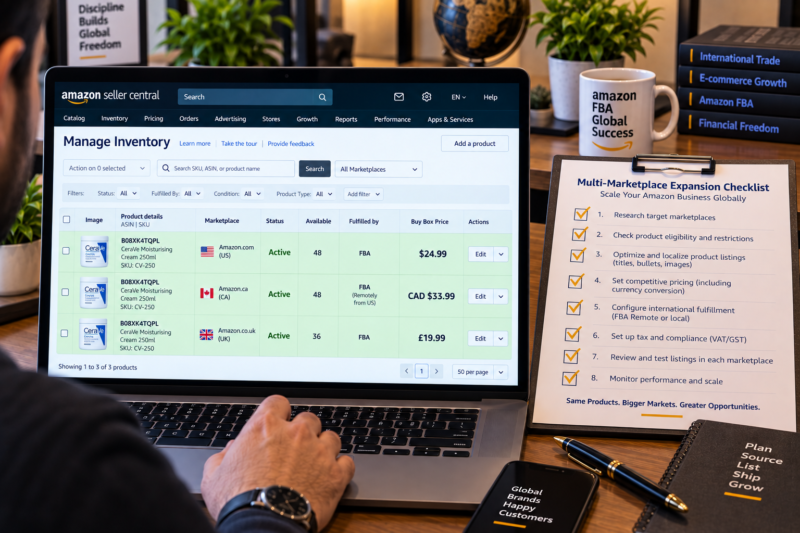
One of the most useful features for international sellers expanding within the North American unified account is Remote Fulfillment with FBA. This programme allows you to sell on Amazon Canada and Amazon Mexico using your existing USA FBA inventory — without sending separate stock to Canadian or Mexican fulfilment centres. Here is how it works:
| Remote Fulfillment Feature | Detail |
|---|---|
| How it works | When a Canadian or Mexican customer orders your product Amazon ships it from your existing US FBA inventory cross-border — you do not send separate stock to Canada or Mexico |
| Additional FBA fee | Amazon charges a higher FBA fee for cross-border fulfilment — typically 30% to 50% higher than standard USA FBA fees — factor this into your margin calculation before enabling |
| No import duty complexity for you | Amazon handles customs duties and import fees as part of the cross-border fulfilment process — the customer pays any applicable import fees at checkout — you are not responsible for cross-border customs paperwork |
| Best use case | Testing Canadian and Mexican demand for your products before committing to sending separate dedicated inventory to those marketplaces — ideal first expansion step for Amazon USA sellers |
| How to enable | Seller Central — Inventory — Sell Globally — Remote Fulfillment with FBA — enrol eligible ASINs — BIL automatically creates the Canadian and Mexican listings |
Your Multi-Marketplace Expansion Checklist
| Multi-Marketplace Step | Done |
|---|---|
| Primary marketplace established — minimum 10 active ASINs — consistent sales — account health green | ☐ |
| First expansion marketplace selected — Canada for Amazon USA sellers — Germany for Amazon UK sellers | ☐ |
| Tax obligations confirmed for target marketplace — VAT registration obtained if required — tax advisor consulted | ☐ |
| Payment account set up for target marketplace currency — Wise or Payoneer virtual account in target currency added to Seller Central | ☐ |
| Build International Listings configured — source marketplace selected — target marketplace activated — price adjustment rule set | ☐ |
| Remote Fulfillment with FBA enabled for NA expansion — or separate FBA inventory sent to new marketplace fulfilment centres | ☐ |
| Listings live on target marketplace — sales data monitored — marketplace-specific account health dashboard checked weekly | ☐ |
| First disbursement from new marketplace received — currency conversion confirmed — margin recalculated including additional FBA fees | ☐ |
| Multi-marketplace operation live — revenue generating across two or more Amazon marketplaces simultaneously | ✅ Active |
Conclusion — One Proven Model Multiplied Across Marketplaces
Amazon Global Selling is one of the most efficient ways for international FBA wholesale sellers to grow revenue — because the hardest work is already done when you have proven your product sourcing model on your primary marketplace. The products are found the supplier relationships are established the prep centre workflow is running and the account is in good health. Expanding to a second marketplace with Build International Listings and Remote Fulfillment with FBA requires a fraction of the effort of building the first marketplace from scratch — and the incremental revenue from Amazon Canada or Amazon UK on top of an established Amazon USA business can be substantial. Expand one marketplace at a time get the tax compliance right for each new country and reinvest the additional revenue into broadening your product catalogue. Use the Brandhunterz Brands Directory to find wholesale suppliers across different markets. Research every ASIN with Keepa. Confirm margins with AMZScout — using the fees specific to each target marketplace.
EXPAND YOUR AMAZON BUSINESS GLOBALLY TODAY
Browse 5,000+ Verified Wholesale Brands Free
Find verified wholesale trade contacts across USA and UK markets in the Brandhunterz Brands Directory — source the right products for each marketplace and build a truly global Amazon FBA wholesale business.
About the Author
This article is written by the team at Brandhunterz Ltd — a UK registered Amazon FBA wholesale sourcing company (Company No: 15342697) registered in England and Wales since 2023. Visit brandhunterz.com to learn more.