
WHOLESALE SOURCING GUIDES
How to Use Seller Amp for Amazon FBA Wholesale Product Research — Complete Guide
By Brandhunterz Ltd | Company No: 15342697 | 13 minute read
Affiliate Disclosure: This article contains affiliate links. If you purchase through our links we may earn a commission at no extra cost to you. We only recommend tools we genuinely use and believe in. Read our full disclaimer.
Amazon FBA wholesale product research requires fast accurate data. The difference between a profitable wholesale business and a loss-making one often comes down to how quickly and accurately you can analyse products as you source — whether that is scanning a supplier price list, browsing Amazon or scanning barcodes at a trade show. Seller Amp is one of the tools many wholesale sellers use for this fast-scan research workflow and in this guide we explain exactly what it does, how to use it and how it fits alongside the broader research stack every FBA wholesale seller needs.
We are Brandhunterz Ltd — a UK registered wholesale sourcing company (Company No: 15342697) — and our product research process combines multiple tools to give us the most complete and reliable picture of any wholesale opportunity before we commit any capital.
💡 Quick Summary
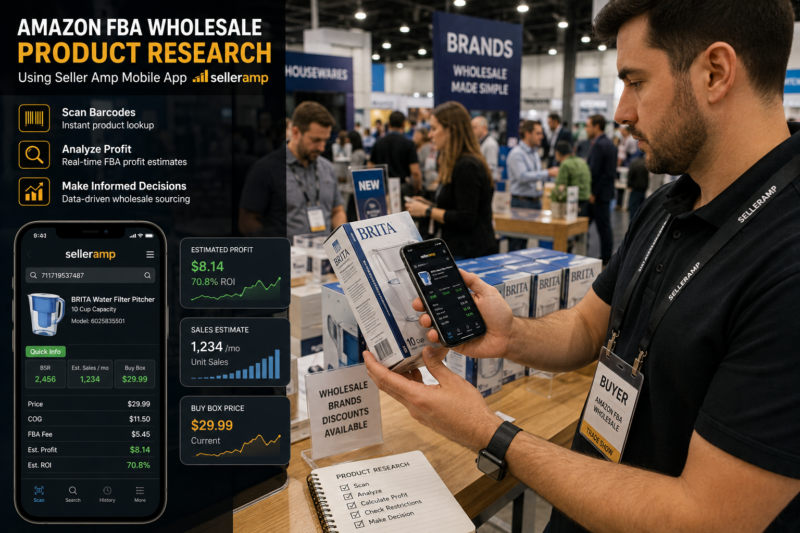
Seller Amp is a fast-scan tool for Amazon FBA wholesale research available as a mobile app and Chrome extension. It provides instant profit calculations, sales rank, Buy Box data and restriction checks. It works best as a quick first-pass tool alongside deeper analysis using Keepa for sales history, Helium 10 or AMZScout for margin validation and Zik Analytics for eBay channel research.
What is Seller Amp?
Seller Amp (also referred to as SAS — Seller Amp SAS) is a product research tool for Amazon FBA sellers available as both a smartphone app and a Chrome browser extension. It is designed primarily for wholesale and arbitrage sellers who need to quickly evaluate large numbers of products — whether scanning barcodes at trade shows with their phone, analysing supplier price lists through the Chrome extension or browsing Amazon for wholesale opportunities.
The core value of Seller Amp is speed. It gives you instant access to the data points most relevant to a wholesale buying decision — profitability, sales rank, Buy Box status, restriction status and competition level — without needing to manually check multiple sources.
| Feature | What It Shows You | Why It Matters for Wholesale |
|---|---|---|
| Profit Calculator | Net profit and ROI after all Amazon fees | Instant margin check on any product |
| Sales Rank | Current BSR and category rank | Quick demand indicator |
| Buy Box Data | Current Buy Box price and winner | Tells you who controls the listing |
| Restriction Check | Whether you can sell this product | Prevents ordering ungatable products |
| Seller Count | Number of FBA sellers on listing | Competition level assessment |
| Amazon on Listing | Whether Amazon sells this product | Critical Buy Box access indicator |
| Variation Viewer | All product variations with BSR and price | Find best-performing variants to order |
How Seller Amp Works — The Two Access Points
Access Point 1 — The Mobile App
The Seller Amp mobile app is available for both iOS and Android. It allows you to scan product barcodes using your phone camera and instantly see all the key data for that product on the Amazon marketplace. This makes it particularly powerful at trade shows where you can walk around scanning products on display and immediately see whether they are worth pursuing a wholesale account for — without needing to sit down at a laptop or manually search each product on Amazon.
The app also allows you to enter a product cost price and instantly calculate your net profit and ROI after Amazon fees — giving you a complete profitability picture in seconds. You can save products to a list during your trade show visit and review them later with deeper analysis tools like Keepa and Helium 10.
Access Point 2 — The Chrome Extension
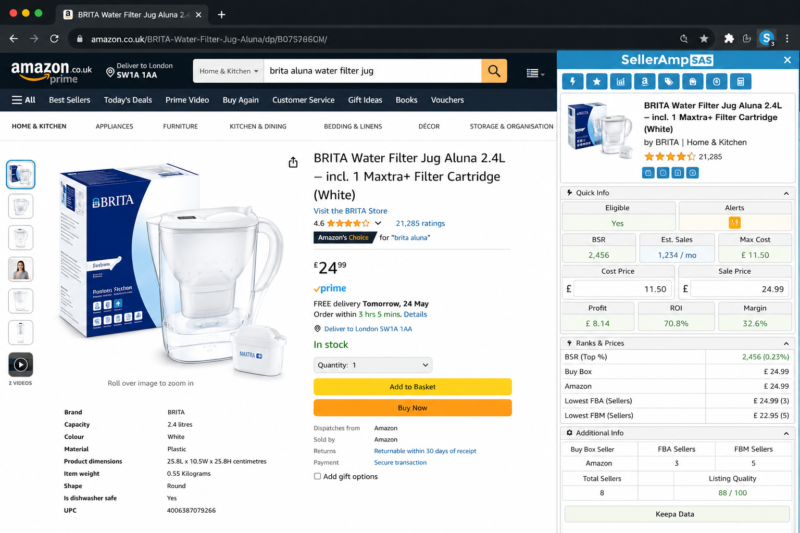
The Seller Amp Chrome extension displays a data panel directly on any Amazon product page as you browse — showing all the key wholesale research data points without needing to navigate to a separate tool. When analysing supplier price lists you can search for each product on Amazon and immediately see the Seller Amp data overlay showing profit, sales rank, Buy Box status and restriction information.
The Chrome extension also works on supplier websites — clicking on a product image will attempt to identify the matching Amazon listing automatically saving significant research time when working through large supplier catalogues.
Setting Up Seller Amp for Wholesale Research
Install the App and Chrome Extension
Download the Seller Amp app from the App Store or Google Play Store and install the Seller Amp Chrome extension from the Chrome Web Store. Both use the same account login. Subscribe to Seller Amp SAS through their website — pricing starts at around £14.99 per month for the full feature set.
Configure Your Marketplace and Buy Cost Settings
Set your primary marketplace — Amazon UK or Amazon US. Configure your default settings including your target minimum ROI percentage and any fixed costs you want included in every calculation such as prep costs and inbound shipping. Setting these correctly from the start ensures every profit calculation reflects your actual cost structure rather than a theoretical one.
Connect Seller Amp to Keepa
Seller Amp integrates with Keepa — displaying a mini sales rank history chart directly within the Seller Amp panel. Enter your Keepa API key in the Seller Amp settings to activate this integration. This gives you both the instant profit calculation from Seller Amp and the 12-month sales history from Keepa in one combined view.
Set Your Quick Decision Thresholds
Configure the green and red traffic light thresholds in Seller Amp settings — setting minimum ROI, maximum seller count and maximum BSR values that reflect your buying criteria. Products meeting your thresholds show green indicators. Products failing any threshold show red. This allows you to make fast go or no-go decisions when scanning products at speed.
Reading the Seller Amp Data Panel
When you open the Seller Amp panel on any Amazon product listing you see a structured display of the key data points. Here is how to interpret each one for wholesale buying decisions:
The Profit Calculator Section
Enter your wholesale buy price in the Buy Cost field and Seller Amp instantly calculates your net profit and ROI after deducting Amazon referral fee, FBA fulfilment fee and any additional costs you have configured. The result shows your margin at the current Buy Box price — the most realistic selling price for a wholesale seller entering the listing.
🟢 Green Light — Proceed to Deeper Research
- ROI above your minimum threshold (30 percent recommended)
- BSR within your target range (under 100,000 in main category)
- Amazon is not selling the product
- Seller count between 2 and 15
- No restriction showing on your account
🔴 Red Light — Skip and Move On
- ROI below your minimum threshold
- Amazon is the Buy Box winner
- More than 20 sellers on the listing
- Product is restricted on your account
- IP complaint or hazmat warning showing
The Sales Rank and History Section
Seller Amp displays the current BSR and if you have connected your Keepa API key it shows a compact sales history chart alongside the current rank. The 30-day, 90-day and 180-day average BSR figures give you a more reliable picture of typical sales velocity than the current rank alone — which can fluctuate significantly hour to hour.
For any product that passes the green light stage in Seller Amp always open the full Keepa chart separately and review 12 months of complete data. Seller Amp’s built-in Keepa widget shows only a summary — the full chart reveals seasonal patterns, price history and long-term consistency that the summary alone cannot confirm.
The Variation Viewer
For products with multiple variations — different sizes, colours or pack quantities — the Seller Amp variation viewer displays each variation with its individual BSR, price and FBA fee. This is particularly valuable for wholesale research because it allows you to identify which specific variants sell best rather than ordering all variations equally. Often one or two variants account for the majority of sales on a listing and targeting those specifically optimises your inventory investment.
Using Seller Amp for Price List Analysis
One of the most valuable workflows for wholesale sellers is using Seller Amp to analyse supplier price lists quickly. When a brand sends you their trade catalogue you typically have a list of dozens or hundreds of products with wholesale prices. Without a fast analysis tool this becomes extremely time consuming to evaluate manually.
Open the Supplier Price List Alongside Amazon
Open the supplier price list — whether a PDF, spreadsheet or their website — alongside Amazon in your browser with the Seller Amp Chrome extension active. Work through the product list systematically.
Search Each Product on Amazon
Search for each product using its EAN barcode or product name. The Seller Amp panel activates automatically showing you instant profit, rank and restriction data with your wholesale buy price entered in the cost field.
Apply Green or Red Decision
If Seller Amp shows green on all key indicators note it as a potential. If any indicator shows red skip it immediately and move to the next product. This first-pass filter typically eliminates 70 to 85 percent of products within seconds leaving only the genuine opportunities for deeper analysis.
Deep Analyse Green Products with Keepa
For every product that passes the Seller Amp first-pass filter open the full Keepa chart and review 12 months of price and sales rank history. This second-pass analysis confirms whether the Seller Amp data reflects consistent long-term performance or is simply a recent spike. Only products passing both the Seller Amp filter and the Keepa 12-month check make it to your order shortlist.
Final Margin Validation with AMZScout or Helium 10
Before placing any wholesale order run a final margin check using AMZScout or Helium 10 to cross-validate the Seller Amp profit calculation and get an independent sales volume estimate. This three-stage process — Seller Amp first pass, Keepa 12-month check, AMZScout or Helium 10 validation — gives you the most complete and reliable picture of any wholesale opportunity.
Seller Amp at Trade Shows
Trade shows are one of the most productive environments for using Seller Amp’s mobile app. Walking around a trade show with thousands of products on display scanning barcodes with your phone and instantly seeing profitability data gives you a significant advantage over buyers who are taking notes to research later.
| Trade Show Workflow Step | Action |
|---|---|
| At each stand | Scan products with Seller Amp — 30 seconds per product |
| Green products | Save to list — collect brand trade card and price list |
| Red products | Move on immediately — no time wasted |
| After the show | Run Keepa 12-month check on all saved green products |
| Shortlisted products | Contact brands for wholesale application |
The Complete Wholesale Research Tool Stack
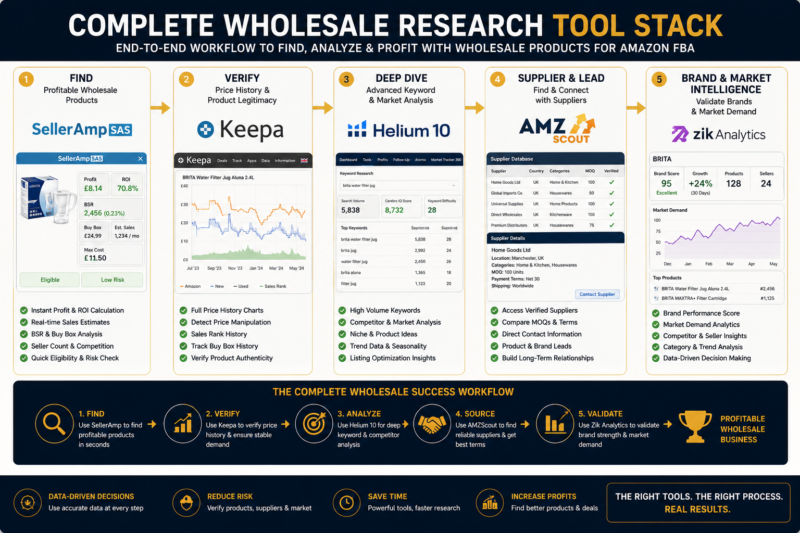
Seller Amp is a powerful tool for fast first-pass product screening but it works best as part of a complete wholesale research stack rather than as a standalone solution. Here is how all the tools fit together:
| Tool | Role in Research Stack | When to Use |
|---|---|---|
| Seller Amp | Fast first-pass scan and profit check | Price list analysis and trade shows |
| Keepa | 12-month sales history verification | Every product passing Seller Amp filter |
| AMZScout | Independent margin and sales estimate | Final validation before ordering |
| Helium 10 | Keyword research and listing analysis | Evaluating listing quality and search demand |
| Zik Analytics | eBay channel sell-through research | Assessing eBay opportunity alongside Amazon |
Seller Amp Limitations to Know
Understanding what Seller Amp cannot do is as important as knowing what it can do. There are specific limitations that make it essential to use alongside other tools rather than relying on it alone:
| Limitation | Why It Matters | Solution |
|---|---|---|
| No full price history | Cannot identify price wars or downward trends | Always check full Keepa chart |
| Current BSR only | Current rank may not reflect typical performance | Use Keepa 30, 90, 180 day average BSR |
| No keyword data | Cannot assess listing search visibility | Use Helium 10 for keyword analysis |
| No eBay research | Cannot evaluate second channel potential | Use Zik Analytics for eBay data |
| Sales estimate only approximate | Monthly sales estimates can vary from reality | Cross-validate with AMZScout |
Conclusion — Seller Amp as Part of a Smarter Research System
Seller Amp is a genuinely useful fast-scan tool for Amazon FBA wholesale sellers — particularly for trade show scanning and first-pass price list analysis where speed is the priority. It eliminates the obvious non-starters in seconds and highlights the products worth taking to deeper analysis.
However it should never be used as the sole basis for a wholesale buying decision. Every product that passes the Seller Amp first-pass filter must be validated with 12 months of Keepa data before ordering. Final margin calculations should be cross-validated with AMZScout or Helium 10 and any wholesale products you plan to sell on eBay alongside Amazon should be validated with Zik Analytics.
This complete research system — Seller Amp for speed, Keepa for history, AMZScout or Helium 10 for validation and Zik Analytics for eBay — is what separates sellers who make confident profitable wholesale buying decisions from those who guess and hope for the best.
FIND WHOLESALE PRODUCTS WORTH RESEARCHING
Browse 5,000+ Verified Wholesale Brands
Once you have your research tools set up find verified wholesale brands worth analysing in our free Brands Directory — all manually verified and Amazon-compatible.
About the Author
This article is written by the team at Brandhunterz Ltd — a UK registered Amazon FBA wholesale sourcing company (Company No: 15342697) registered in England and Wales since 2023. Visit brandhunterz.com to learn more.