
WHOLESALE BUSINESS FINANCE
Amazon FBA Accounting Tools — QuickBooks vs Xero vs A2X
By Brandhunterz Ltd | Company No: 15342697 | 13 minute read
Affiliate Disclosure: This article contains affiliate links. If you purchase through our links we may earn a commission at no extra cost to you. We only recommend tools we genuinely use and believe in. Read our full disclaimer.
Getting your accounting right is one of the most leveraged investments you can make in your Amazon FBA wholesale business. Sellers who rely on manual spreadsheets to track their finances beyond the early months waste enormous amounts of time every month on data entry and reconciliation — time that would generate far more value spent on product research brand applications and supplier relationship building. The right accounting software connected to your Amazon account transforms hours of monthly financial admin into an automated process that produces accurate reports with minimal manual input.
We are Brandhunterz Ltd — a UK registered wholesale sourcing company (Company No: 15342697) — and in this complete guide we compare the three accounting tools that matter most to Amazon FBA wholesale sellers — QuickBooks Online, Xero, and A2X — covering what each does best where each falls short and exactly how to combine them into an accounting system that keeps your FBA business financially clear and tax-ready at all times across both Amazon USA and Amazon UK.
💡 Quick Summary
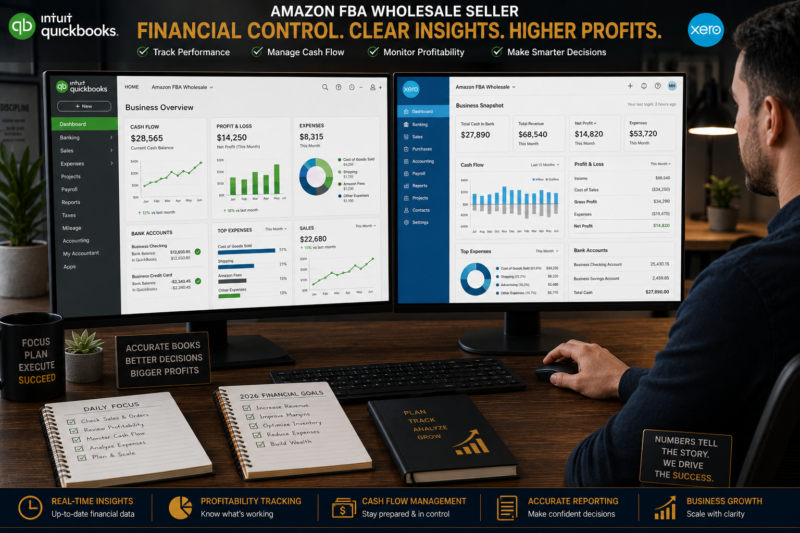
QuickBooks Online is the most widely used accounting software among Amazon FBA sellers in the USA — best for sellers who want the widest range of integrations and accountant familiarity. Xero is the stronger choice for UK sellers and for multi-currency operations across Amazon USA and UK simultaneously. A2X is not an accounting software — it is an Amazon settlement reconciliation layer that sits between your Amazon account and your accounting software, automatically mapping your disbursement data into the correct accounting format. Most FBA sellers above $5,000 monthly revenue need both an accounting software (QuickBooks or Xero) and A2X working together.
Why Amazon FBA Accounting is More Complex Than Standard Business Accounting
Amazon FBA accounting is genuinely more complex than accounting for most other types of small business — and understanding why is essential to appreciating the value of the tools covered in this guide. The complexity comes from five specific characteristics of how Amazon pays sellers and structures its fee deductions.
| Complexity Factor | What It Means for Your Accounting |
|---|---|
| Net Disbursements Not Gross Revenue | Amazon pays you after deducting all fees — your bank receives a net figure that must be reconciled back to gross revenue for accurate reporting |
| 14-Day Settlement Periods | Amazon settles every 14 days — each disbursement covers sales from a specific period that crosses calendar month boundaries creating accrual accounting complications |
| Multiple Fee Categories | Referral fees fulfilment fees storage fees advertising charges refunds reimbursements — all deducted within the same settlement and requiring separate accounting categories |
| Returns and Reimbursements | Customer refunds and Amazon reimbursements for lost or damaged inventory appear as credits and debits within settlement data requiring specific treatment |
| Multi-Currency Operations | Sellers on both Amazon USA and Amazon UK receive disbursements in USD and GBP requiring multi-currency reconciliation in your accounting software |
Without a tool designed specifically to handle Amazon’s settlement structure every disbursement requires manual decomposition into its component parts before it can be entered correctly into your accounting software. This is the problem A2X solves — and why it is the missing piece in most FBA sellers’ accounting setups.
QuickBooks Online — Full Review for FBA Sellers
QuickBooks Online is the most widely used small business accounting software in the USA and one of the two dominant options globally for Amazon FBA sellers. It provides a comprehensive cloud-based accounting platform covering invoicing expense tracking bank reconciliation profit and loss reporting balance sheet generation and tax preparation — with a vast ecosystem of third-party integrations including A2X for Amazon settlement reconciliation.
QuickBooks Plans and Pricing
| Plan | Monthly Price | Best For FBA Sellers |
|---|---|---|
| Simple Start | $30/month | Solo sellers — basic income expense and bank feed |
| Essentials | $60/month | Growing sellers — adds bill management and multi-user access |
| Plus — Recommended | $90/month | Best for FBA — adds inventory tracking project profitability and class tracking |
| Advanced | $200/month | Larger operations — custom reporting and dedicated account manager |
QuickBooks Strengths for FBA Sellers
Widest accountant familiarity — the majority of US-based accountants and CPAs use QuickBooks as their primary platform making it easier to find an experienced ecommerce accountant who already knows your software
Largest integration ecosystem — connects to more third-party apps than any competitor including A2X TaxJar inventory management tools and payment processors
Class tracking for multi-channel sellers — the Plus plan’s class tracking feature allows you to separate Amazon USA Amazon UK and eBay revenue streams within a single QuickBooks account for clear channel-by-channel profitability reporting
Strong mobile app — review reports approve expenses and check balances from anywhere without needing desktop access
QuickBooks Weaknesses for FBA Sellers
Higher price point — the Plus plan needed for FBA inventory tracking costs $90 per month — more expensive than Xero’s equivalent functionality
Weaker multi-currency support — managing both USD and GBP transactions in QuickBooks is less elegant than Xero’s native multi-currency handling making it less ideal for UK sellers operating on Amazon USA simultaneously
Less popular among UK accountants — while QuickBooks has a strong UK presence Xero has deeper penetration among UK-based ecommerce accountants making it harder to find a UK accountant who prefers QuickBooks
Xero — Full Review for FBA Sellers
Xero is QuickBooks’ strongest global competitor — particularly dominant among UK-based small businesses and their accountants. It offers a clean intuitive interface excellent multi-currency support direct bank feed connections to all major UK business banks including Starling and Monzo and a comprehensive ecosystem of third-party integrations including A2X for Amazon settlement reconciliation. For UK FBA sellers selling on both Amazon UK and Amazon USA simultaneously Xero’s native multi-currency handling makes it the more elegant solution.
Xero Plans and Pricing
| Plan | Monthly Price | Best For FBA Sellers |
|---|---|---|
| Starter | $13/month | Very early stage — limited to 20 invoices and 5 bills per month |
| Standard — Recommended | $37/month | Best entry point — unlimited invoices bills bank reconciliation |
| Premium | $70/month | Multi-currency sellers — essential for UK sellers on Amazon USA |
Xero Strengths for FBA Sellers
Superior multi-currency handling — Xero’s Premium plan manages multiple currencies natively with automatic exchange rate updates making it ideal for UK sellers receiving both GBP and USD disbursements
Better value at equivalent functionality — Xero Standard at $37 per month delivers the core accounting functionality that requires QuickBooks Plus at $90 per month making it significantly more cost-effective for sellers watching their fixed expense base
Preferred by UK ecommerce accountants — Xero has the widest adoption among UK-based ecommerce accountants giving UK FBA sellers a larger pool of specialist accountants already fluent in their accounting platform
Direct bank feeds with UK challenger banks — Starling Monzo and Revolut Business connect directly to Xero via live bank feeds making reconciliation seamless for the most popular UK FBA business bank accounts
Xero Weaknesses for FBA Sellers
Less US accountant familiarity — most US-based CPAs and tax accountants default to QuickBooks making it harder to find an experienced US ecommerce accountant already fluent in Xero
Smaller US integration ecosystem — while Xero connects to A2X and most essential tools its third-party integration library is smaller than QuickBooks in the US market — a minor limitation for most FBA sellers but relevant for complex multi-tool setups
A2X — Full Review for FBA Sellers
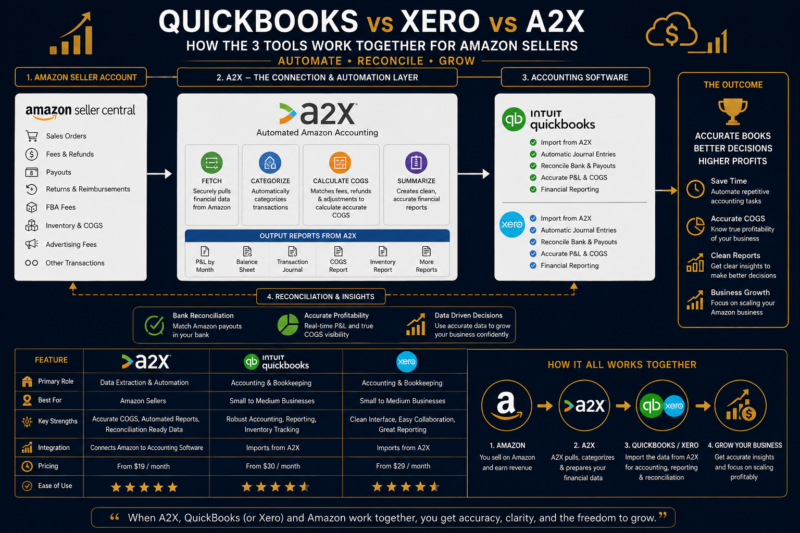
A2X occupies a completely different category from QuickBooks and Xero — it is not an accounting software but a reconciliation middleware that sits between your Amazon seller account and your accounting software. A2X automatically fetches your Amazon settlement reports every time a new disbursement is issued and maps every transaction within that settlement — gross sales referral fees FBA fulfilment fees storage fees advertising charges refunds and reimbursements — into the correct accounting categories in QuickBooks or Xero. Without A2X this decomposition must be done manually for every settlement — a process that takes 2 to 4 hours per settlement for active sellers.
A2X Plans and Pricing
| Plan | Monthly Price | Orders Per Month |
|---|---|---|
| Micro — Entry Point | $19/month | Up to 200 orders per month |
| Starter | $39/month | Up to 500 orders per month |
| Basic | $69/month | Up to 1,000 orders per month |
| Professional | $99/month | Up to 5,000 orders per month |
What A2X Does — Step by Step
Fetches Your Amazon Settlement Automatically
Every time Amazon closes a settlement period and issues a disbursement A2X automatically pulls the full settlement report from your Seller Central account. This includes every transaction within that settlement period — not just the net disbursement amount that appears in your bank account. A2X works with Amazon USA Amazon UK Amazon Canada Amazon Europe and Amazon Australia marketplaces simultaneously if you sell on multiple platforms.
Maps Every Transaction to an Accounting Category
A2X decomposes the settlement into its component parts — gross product sales, referral fees, FBA fulfilment fees, storage fees, advertising charges, returns, refunds and Amazon reimbursements — and maps each to the correct account in your QuickBooks or Xero chart of accounts. You set up the account mapping once during your initial A2X configuration and the mapping applies automatically to every subsequent settlement.
Posts a Single Journal Entry to Your Accounting Software
A2X posts a single summarised journal entry to QuickBooks or Xero covering the entire settlement period. This journal entry records gross revenue in the correct income account Amazon fees in the correct expense accounts and the net disbursement amount matched against your bank feed. Your accountant can then reconcile the journal entry against the bank deposit with a single click — replacing hours of manual work with a two-minute verification.
Produces Accurate Financial Reports Automatically
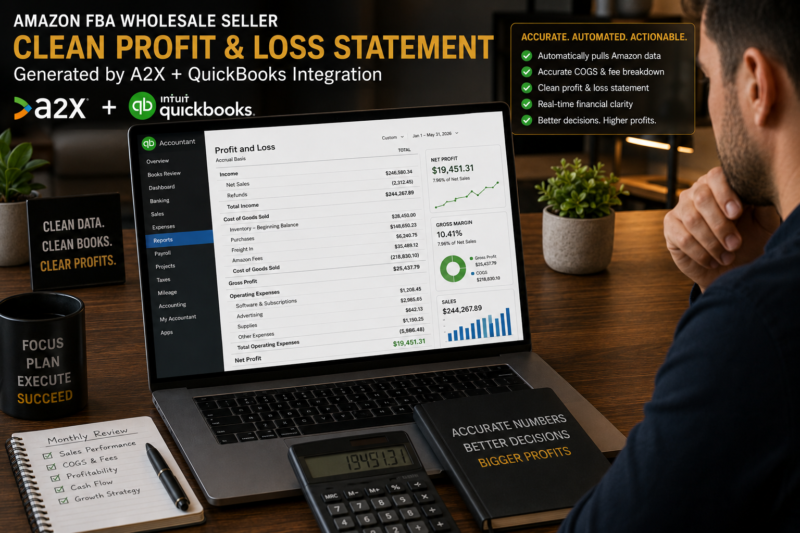
Because every settlement is correctly decomposed and posted your QuickBooks or Xero profit and loss statement shows true gross revenue — not net disbursements — with Amazon fees correctly separated by category. This produces the accurate financial statements your accountant needs for tax filing and the detailed channel-level profitability data you need to make informed business decisions.
QuickBooks vs Xero vs A2X — Full Comparison
| Factor | QuickBooks | Xero | A2X |
|---|---|---|---|
| Type of Tool | Full accounting software | Full accounting software | Amazon reconciliation layer |
| Entry Price | $30/month | $13/month | $19/month |
| Best Market | USA primary | UK primary | USA and UK — both |
| Multi-Currency | Limited | Excellent | Handles multiple marketplaces |
| Amazon Integration | Via A2X only | Via A2X only | Native Amazon connection |
| Accountant Familiarity USA | Excellent | Good | Works with either |
| Accountant Familiarity UK | Good | Excellent | Works with either |
| Standalone Usefulness for FBA | High — full accounting | High — full accounting | Low — needs QB or Xero to post into |
The Recommended Accounting Stack — By Stage
Stage 1 — New Seller (Under $5,000/month Revenue)
At this stage a well-maintained spreadsheet covering your monthly income expense COGS and profit is sufficient. The additional cost of accounting software is not yet justified by the complexity or volume of your transactions. Focus your limited budget on inventory and use a free spreadsheet template to track your finances manually. The discipline of building your accounts manually at this stage gives you the financial literacy to use accounting software correctly when you upgrade.
Stage 2 — Growing Seller ($5,000 to $20,000/month Revenue)
At this stage implement your accounting software plus A2X combination. USA sellers should use QuickBooks Simple Start or Essentials plus A2X Micro. UK sellers should use Xero Standard plus A2X Micro. The combined monthly cost of $50 to $60 is recovered within the first month through accountant time saved and the accuracy improvements in your financial reporting. Connect your business bank account direct feed to your accounting software and configure A2X with your chart of accounts before your next settlement arrives.
Stage 3 — Scaled Seller (Above $20,000/month Revenue)
Upgrade to QuickBooks Plus or Xero Premium for the advanced reporting inventory tracking and multi-user access needed at this revenue level. Upgrade A2X to match your order volume. Engage a specialist ecommerce accountant who works within your accounting platform and has Amazon FBA clients — ideally one who uses A2X themselves and can configure your account setup correctly from the start. At this revenue level the cost of an experienced ecommerce accountant is one of the highest-return investments you can make in your business.
Frequently Asked Questions
Do I Need Both Accounting Software and A2X?
Yes — for any seller generating more than $5,000 per month in revenue the combination of accounting software plus A2X delivers materially better financial reporting than either tool alone. QuickBooks or Xero without A2X requires hours of manual settlement decomposition each month. A2X without QuickBooks or Xero has nowhere to post its journal entries — it only functions as a layer connecting Amazon to a destination accounting platform. The two tools are complementary not competing and the combined cost of $50 to $100 per month is justified from the first month of use for any active FBA seller.
Can I Switch From QuickBooks to Xero Once I Have Started?
Yes — switching accounting platforms is possible but involves a migration process that requires exporting your historical data from one platform and importing it into the other — typically a task best handled by your accountant to ensure continuity and accuracy. The ideal time to switch is at the start of a new financial year when historical data requirements are minimised. Before committing to either platform ask your accountant which they prefer to work in — their familiarity with the platform has a direct impact on the quality and efficiency of the service they provide you.
Is A2X Worth It for Smaller Sellers?
A2X becomes worth its cost at the point where the time saved on manual reconciliation exceeds the monthly subscription cost. For a seller generating $5,000 per month in Amazon revenue receiving two settlements per month A2X saves approximately 3 to 5 hours of manual reconciliation work — worth significantly more than the $19 Micro plan subscription. For sellers below $2,000 per month in revenue the simpler transaction volume makes manual reconciliation manageable and the A2X subscription may not yet be cost-justified — though the accuracy benefits remain regardless of revenue level.
What About Linnworks or Other Inventory Management Tools?
Inventory management platforms like Linnworks SkuVault and Brightpearl serve a different function from accounting software — they manage stock levels order routing and multi-channel fulfilment rather than financial accounting. For FBA sellers who sell exclusively or primarily through Amazon FBA these platforms are typically unnecessary because Amazon manages your fulfilment entirely. They become relevant for sellers managing significant FBM volume alongside FBA or for multi-warehouse operations where inventory location tracking across multiple physical sites is required. At the wholesale FBA level your inventory tracker spreadsheet plus Seller Central’s inventory management tools cover the requirements without the additional platform cost.
Related Articles — Keep Learning
- How to Manage Cash Flow in Your Amazon FBA Wholesale Business
- How to Calculate Your True Amazon FBA Profit Margin
- How to Track Amazon FBA Inventory Costs and COGS
- How to Build a Wholesale FBA Budget from Scratch
- Amazon FBA Tax Guide for USA and UK Sellers
- How to Set Up Business Banking for Your Amazon FBA Business
- Browse the Brandhunterz Brands Directory — Free Access
- Amazon FBA and eBay Wholesale Courses by Brandhunterz
BUILD YOUR WHOLESALE BUSINESS ON SOLID FOUNDATIONS
Browse Verified Wholesale Brands — Free Access
Great accounting tells you exactly how profitable each brand in your portfolio is. The Brandhunterz Brands Directory gives you instant free access to verified wholesale brands with real trade contacts across USA and UK marketplaces — so you always have high-quality brands to measure.
About the Author
This article is written by the team at Brandhunterz Ltd — a UK registered Amazon FBA wholesale sourcing company (Company No: 15342697) registered in England and Wales since 2023. Visit brandhunterz.com to learn more.