
AMAZON FBA PRODUCT RESEARCH
How to Use SmartScout to Find Wholesale Brands for Amazon FBA
By Brandhunterz Ltd | Company No: 15342697 | 13 minute read
Affiliate Disclosure: This article contains affiliate links. If you purchase through our links we may earn a commission at no extra cost to you. We only recommend tools we genuinely use and believe in. Read our full disclaimer.
Finding profitable wholesale brands to sell on Amazon FBA is the most time-consuming part of building a wholesale business — if you are doing it manually. Searching product by product through Amazon Best Sellers cross-referencing brands and guessing which companies have wholesale accounts available takes hours and still leaves you with incomplete information about whether those brands are actually worth approaching. SmartScout solves this problem by giving Amazon FBA wholesale sellers direct access to a structured database of brands selling on Amazon — filtered sorted and ranked by revenue seller count and Amazon presence — so you can identify your next wholesale opportunity in minutes rather than hours.
We are Brandhunterz Ltd — a UK registered wholesale sourcing company (Company No: 15342697) — and in this complete guide we show you exactly how to use SmartScout to find wholesale brands for Amazon FBA — covering the brand database filters the seller research method the subcategory analysis tool and the precise workflow we use to identify and qualify new brands every week.
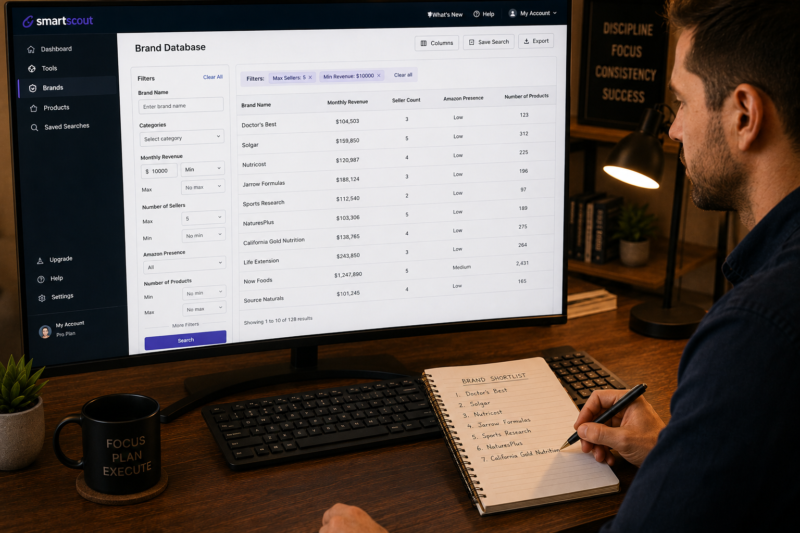
💡 Quick Summary
SmartScout’s brand database is the fastest way to find wholesale brands for Amazon FBA. Filter by category minimum monthly revenue maximum seller count and Amazon absence to generate a shortlist of brands worth approaching in minutes. Use the seller research feature to see exactly what brands your top competitors are selling — then approach those same brands for your own wholesale account. Always validate shortlisted products in Keepa before contacting any supplier. Try SmartScout free for 7 days at smartscout.com.
Why SmartScout is Built Specifically for Wholesale Brand Research
Most Amazon research tools are designed for private label sellers — helping them find products to develop their own brand around. SmartScout is fundamentally different. It is built around brands and sellers — not keywords and products — which makes it uniquely powerful for wholesale FBA sellers whose research question is not “what product should I create” but “which established brand should I source from next.”
| Standard Research Tool | SmartScout for Wholesale |
|---|---|
| Search by keyword to find product ideas | Search by brand to find wholesale sourcing opportunities |
| Shows product-level data only | Shows brand-level revenue seller count and Amazon presence |
| Cannot filter by how many sellers a brand has | Filter entire brand catalogue by maximum seller count in seconds |
| Cannot see competitor seller brand catalogues | See every brand a competing seller stocks — instantly replicate their sourcing |
| Research product by product — very slow for wholesale | Research entire brand catalogues simultaneously — very fast for wholesale |
Step 1 — Setting Up SmartScout for Wholesale Brand Research
Before running any searches in SmartScout set the marketplace to match your selling platform. UK sellers researching Amazon.co.uk products should select the UK marketplace. Sellers sourcing from USA brands for Amazon.com should select the US marketplace. The brand data SmartScout shows is marketplace-specific — UK and US have different brand landscapes seller populations and revenue figures.
Log Into SmartScout and Select Your Marketplace
Go to smartscout.com and log in. In the top navigation select your marketplace — Amazon UK or Amazon USA. All data including brand revenue seller counts and product prices will display in the correct currency and marketplace context for your selection.
Navigate to the Brands Section
Click Brands in the left navigation panel. This opens SmartScout’s brand database — a searchable filterable list of every brand selling on Amazon in your selected marketplace. This is the primary tool you will use for wholesale brand discovery. Every research session for new wholesale brands starts here.
Set Your Category Filter
Select your target category from the category filter on the left panel. Focus on one category per research session — do not research across multiple unrelated categories in the same session as this dilutes your supplier outreach focus and makes it harder to build deep expertise in any one area. Choose the category that matches your current sourcing strategy or the category you are planning to enter next.
Step 2 — Applying the Wholesale Brand Filter Combination
The real power of SmartScout for wholesale research comes from combining multiple filters simultaneously. The right filter combination returns a shortlist of brands that are proven sellers on Amazon with manageable competition and no Amazon interference — the three core criteria for a viable wholesale sourcing opportunity.
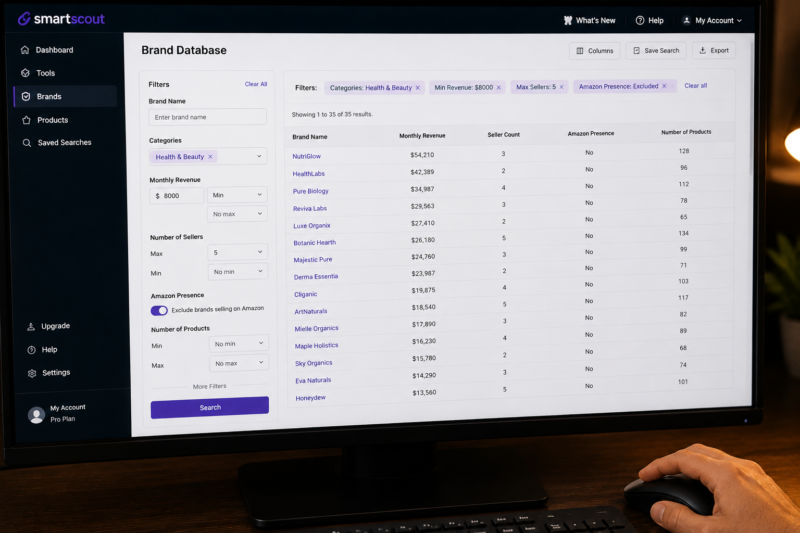
| Filter | Recommended Setting | Why This Setting |
|---|---|---|
| Minimum Monthly Revenue | $10,000 or £8,000 | Confirms meaningful Amazon demand — filters out micro brands with negligible sales |
| Maximum Number of Sellers | 5 or fewer | Ensures you can enter the Buy Box rotation without being squeezed out |
| Amazon Presence | Exclude — Amazon not selling | Eliminates listings where Amazon dominates the Buy Box and blocks third-party sellers |
| Category | Your target category | Focuses results on brands relevant to your current sourcing strategy |
| Number of Products | Minimum 5 products | Brands with larger ranges give you more options to find viable products within the account |
💡 Start Broad Then Narrow Down
When you first apply filters start with broader settings — minimum revenue £5,000 maximum sellers 8 — to get a larger initial list. Then progressively tighten the filters to find the best opportunities. If your filter combination returns fewer than 20 brands it may be too narrow for your category — loosen one filter at a time until you have a workable shortlist of 30 to 50 brands to investigate further.
Step 3 — Analysing Each Shortlisted Brand
Once your filters return a shortlist of brands click into each one to see its full detail view. SmartScout shows you the brand’s complete Amazon presence — every product it sells the estimated monthly revenue per product the number of sellers on each listing and whether Amazon is active on individual ASINs. Here is what to look for when analysing each brand in detail:
| What to Check in Brand Detail View | What You Are Looking For |
|---|---|
| Individual product revenue figures | Products generating £500 to £5,000 per month — strong individual line demand |
| Seller count per product | Products with 1 to 5 sellers — room for you to enter Buy Box rotation |
| Amazon presence on individual ASINs | No Amazon presence on your target ASINs — even if Amazon sells some brand products |
| Average selling price across the range | Products priced between £10 and £40 — FBA margin viable at these price points |
| Brand consistency across the range | Multiple products performing well — not just one outlier product driving all brand revenue |
Step 4 — The Competitor Seller Research Method
The competitor seller research method is one of the most powerful wholesale brand discovery techniques available in SmartScout — and it is unique to this tool. The concept is simple — find a top wholesale seller in your category look at every brand they stock and approach those same brands for your own wholesale account. You are essentially reverse-engineering a proven wholesale business to identify brands that are already confirmed as profitable by someone who is actively selling them.
Navigate to the Sellers Section in SmartScout
Click Sellers in the left navigation. Filter by your target category and sort by monthly revenue descending. This surfaces the highest-revenue sellers in your category at the top of the list. These are your research targets — established wholesale sellers who have already done the hard work of identifying profitable brands in your space.
Click Into a Top Seller and View Their Brand Portfolio
Click on any top seller to open their profile. SmartScout shows you the complete list of brands this seller stocks on Amazon — their entire wholesale catalogue visible in one place. Scroll through the brand list and note every brand you do not currently have a wholesale account with. Each one is a potential new sourcing opportunity that has already been validated by a seller generating significant monthly revenue.
Research Three to Five Different Sellers in the Same Category
Repeat this process across three to five of the top sellers in your category. Note any brand that appears in multiple sellers’ catalogues — if two or three top sellers all stock the same brand it is a strong signal that this brand is consistently profitable across multiple wholesale accounts. These recurring brands should be your highest priority outreach targets.
Validate Every Brand in Keepa Before Approaching Suppliers
Before contacting any supplier identified through SmartScout validate the specific products you intend to source using Keepa. SmartScout confirms a brand is worth approaching — Keepa confirms the specific products within that brand are worth ordering. You need both confirmations before any capital is committed.
Step 5 — Using SmartScout Subcategory Analysis
SmartScout’s subcategory analysis tool breaks Amazon’s broad category structure down to granular subcategory level — showing you the revenue concentration seller landscape and brand opportunity within each specific subcategory. This is particularly valuable when you are deciding which subcategory to focus your wholesale sourcing on within a broad category like Health and Beauty or Home and Kitchen.
| Subcategory Data Point | What It Tells You | Ideal for Wholesale |
|---|---|---|
| Total subcategory revenue | Size of the market — how much money is flowing through this subcategory | £100,000+ per month indicates strong viable market |
| Number of brands in subcategory | How many brands share the revenue — fewer brands means bigger opportunity per brand | Under 50 active brands suggests less fragmented market |
| Average seller count per listing | Competition intensity across all listings in the subcategory | Average under 6 sellers per listing is healthy for wholesale |
| Amazon revenue share | What percentage of subcategory revenue goes to Amazon as a seller | Under 20% Amazon revenue share leaves room for third-party sellers |
The Complete SmartScout to Supplier Outreach Workflow
Here is the exact end-to-end workflow from SmartScout research through to supplier outreach — the process we follow every week when building our wholesale supplier portfolio:
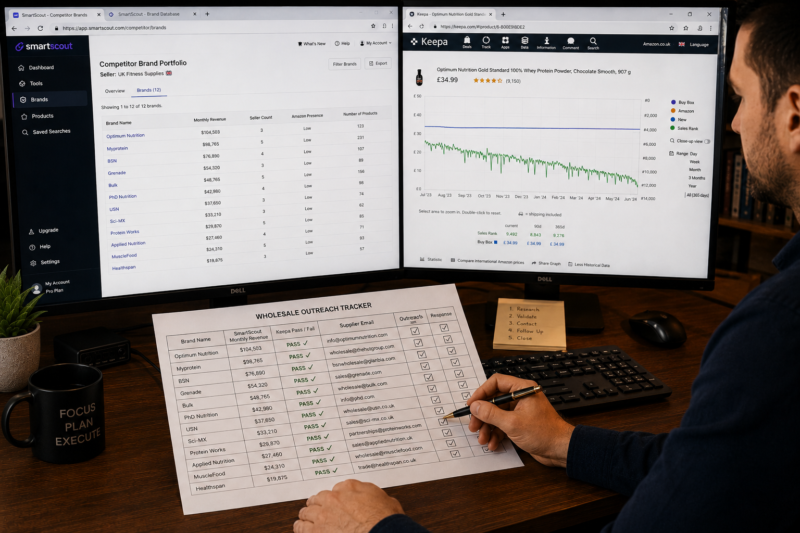
| Step | Action | Tool | Time |
|---|---|---|---|
| 1 | Open SmartScout — select category — apply wholesale filters | SmartScout | 5 mins |
| 2 | Review brand shortlist — note brands with strongest revenue and lowest seller count | SmartScout | 15 mins |
| 3 | Research top sellers in the category — note their brand catalogues | SmartScout | 20 mins |
| 4 | Validate top product ASINs from shortlisted brands in Keepa | Keepa | 30 mins |
| 5 | Calculate FBA margins on Keepa-validated products | AMZScout | 15 mins |
| 6 | Find trade contact details for confirmed brands in Brandhunterz Directory | Brands Directory | 10 mins |
| 7 | Send professional wholesale account application emails | Your business email | 20 mins |
SmartScout Pricing and Which Plan to Start With
| Plan | Price | Best For |
|---|---|---|
| Free Trial | 7 days free | Test the brand database and seller research before committing |
| Basic | From $49/month | New wholesale sellers beginning brand research systematically |
| Essentials | From $97/month | Active wholesale sellers building supplier portfolio of 5 plus brands |
Conclusion — SmartScout Finds Brands in Minutes That Would Take Hours Manually
SmartScout transforms wholesale brand research from a slow manual process into a fast systematic workflow. The brand database filters surface qualifying brands in minutes. The seller research method shows you exactly what proven wholesale sellers are sourcing. And the subcategory analysis guides you toward the most viable areas of Amazon to focus your sourcing efforts.
Start your 7-day free trial at SmartScout today. Validate every brand’s individual products with Keepa. Calculate your margins with AMZScout. And find verified trade contact details for every brand you identify through our Brands Directory.
FIND YOUR NEXT WHOLESALE BRAND TODAY
SmartScout + Brandhunterz Brands Directory
Use SmartScout to identify which brands are worth approaching — then find their verified trade contact details in our Brands Directory to send your wholesale application immediately.
About the Author
This article is written by the team at Brandhunterz Ltd — a UK registered Amazon FBA wholesale sourcing company (Company No: 15342697) registered in England and Wales since 2023. Visit brandhunterz.com to learn more.