
AMAZON FBA ACCOUNT HEALTH
How to Handle Amazon A-to-Z Guarantee Claims — Complete Guide for FBA Sellers
By Brandhunterz Ltd | Company No: 15342697 | 13 minute read
Affiliate Disclosure: This article contains affiliate links. If you purchase through our links we may earn a commission at no extra cost to you. We only recommend tools we genuinely use and believe in. Read our full disclaimer.
Amazon’s A-to-Z Guarantee exists to protect buyers when an order does not go as expected — whether because a product was not delivered was not as described or arrived in a condition different from what was listed. For Amazon FBA wholesale sellers A-to-Z claims are a fact of business — even the most diligent seller will occasionally face a claim from a customer who is genuinely dissatisfied or from one who is attempting to obtain a refund for a product they actually received correctly. What matters most is not whether you receive claims — it is how quickly and professionally you handle them and whether you have the systems in place to prevent the same issue from generating multiple claims across multiple orders.
We are Brandhunterz Ltd — a UK registered wholesale sourcing company (Company No: 15342697) — and in this complete guide we explain exactly how Amazon’s A-to-Z Guarantee claim process works how claims affect your account health what happens when a claim is granted or denied how to respond to active claims and what systemic changes wholesale FBA sellers should make to prevent claims from accumulating and pushing their Order Defect Rate above Amazon’s threshold.
💡 Quick Summary
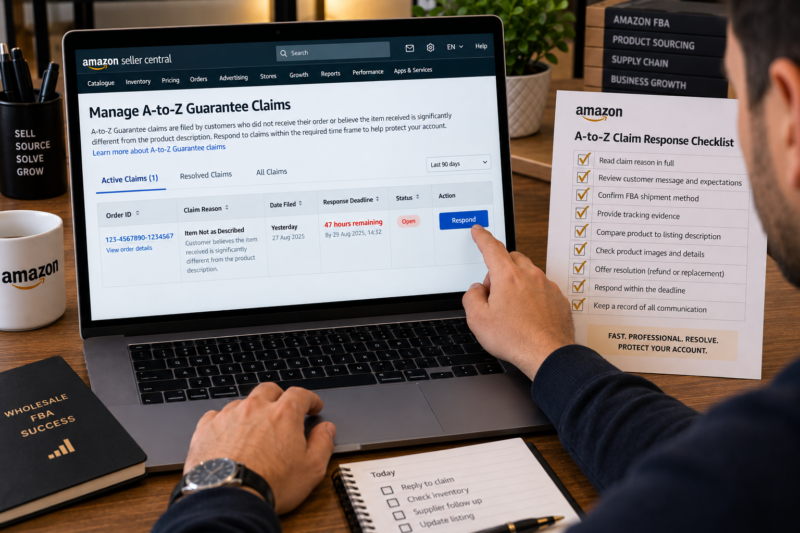
An A-to-Z Guarantee claim counts as an Order Defect Rate defect regardless of whether Amazon grants or denies it — simply having a claim filed against your order damages your ODR. For FBA sellers Amazon handles the fulfilment so most claims relate to product quality listing accuracy or damaged arrivals. Respond to every claim within 48 hours through the Seller Central Manage A-to-Z Claims page — provide shipment confirmation tracking information and a clear explanation of why the claim should be denied if appropriate. The most powerful long-term strategy is eliminating the sourcing and listing errors that cause claims in the first place rather than simply responding to them after the fact.
What Is an A-to-Z Guarantee Claim
The A-to-Z Guarantee is Amazon’s buyer protection programme that allows customers to escalate a dispute about an order directly to Amazon when they have not been able to resolve it with the seller. Buyers can file an A-to-Z claim when they have not received their order or when the item they received is materially different from what was described on the listing. The claim triggers a review by Amazon’s customer service team who then decide whether to grant a refund to the buyer at the seller’s expense or deny the claim.
| Claim Reason | What It Means | Common for FBA Wholesale Sellers |
|---|---|---|
| Item not received | Buyer says the order was not delivered to them | Occasional — Amazon delivery issue |
| Item not as described | Product received does not match the listing — wrong variant wrong size wrong product | Most common — listing or ASIN mismatch |
| Item arrived damaged | Product packaging or product itself was damaged on arrival | Common — prep or product quality issue |
| Item materially different | Product is a different brand colour model or version from what was listed | Common — wrong ASIN or supplier error |
How A-to-Z Claims Affect Your Account Health
The most important fact about A-to-Z claims for sellers to understand is that every claim counts as an Order Defect in your ODR calculation — regardless of whether Amazon grants or denies the claim. This is one of the most counterintuitive aspects of Amazon’s account health system and one that catches many sellers off guard. Even if you provide evidence that the item was delivered correctly and Amazon rules in your favour — the claim still counts as a defect in your ODR for the 60-day window in which it was filed.
| Claim Outcome | Counts as ODR Defect | Refund Issued at Seller Expense |
|---|---|---|
| Claim granted — buyer refunded | Yes | Yes — seller bears cost |
| Claim denied — seller wins | Yes — still counts | No — seller not charged |
| Claim withdrawn by buyer | No — removed from ODR | No |
| Claim granted — funded by Amazon | No — removed from ODR | No — Amazon absorbs cost |
💡 When Amazon Funds the Claim — The FBA Seller Advantage
For FBA sellers when Amazon determines that a claim arises from an error in their fulfilment process — a delivery failure a warehouse picking error or a damaged item caused by Amazon’s packing — Amazon funds the refund itself rather than charging the seller. This claim is also removed from your ODR calculation. This is one of the key protections of using FBA over merchant-fulfilled selling — you are not held financially or account-health-wise responsible for Amazon’s own fulfilment errors. When Amazon funds a claim and removes it from your ODR it will show in your claim history with the status Funded by Amazon.
How to Find and Monitor Active A-to-Z Claims in Seller Central
Active A-to-Z claims require a response within a specific timeframe — typically 48 to 72 hours from when the claim is filed. Missing the response window means Amazon will almost certainly grant the claim by default without reviewing your position. Here is exactly how to find and monitor your claims:
Go to Performance — A-to-Z Guarantee Claims in Seller Central
In Seller Central click Performance in the top navigation bar and select A-to-Z Guarantee Claims from the dropdown. This opens the Manage A-to-Z Claims page which shows all active pending and closed claims on your account. The Active Claims tab shows claims that require your response — check this page every day without exception even when you believe you have no open claims.
Enable Email Notifications for New Claims
Go to Settings — Notification Preferences and confirm that A-to-Z Guarantee Claim notifications are enabled for your registered email address. New claim notifications are also sent as push notifications through the Amazon Seller app if you have it installed and notifications enabled. Never rely only on remembering to check Seller Central — configure automatic notifications so you are alerted immediately when a new claim is filed.
Note the Response Deadline for Each Active Claim
Each active claim shows a response deadline — the date and time by which you must submit your response before Amazon makes a decision without your input. For most claim types this is 48 to 72 hours from filing. Note the deadline for every active claim on your first review and set a calendar reminder to respond with at least 12 hours to spare before the deadline.
How to Respond to an Active A-to-Z Claim
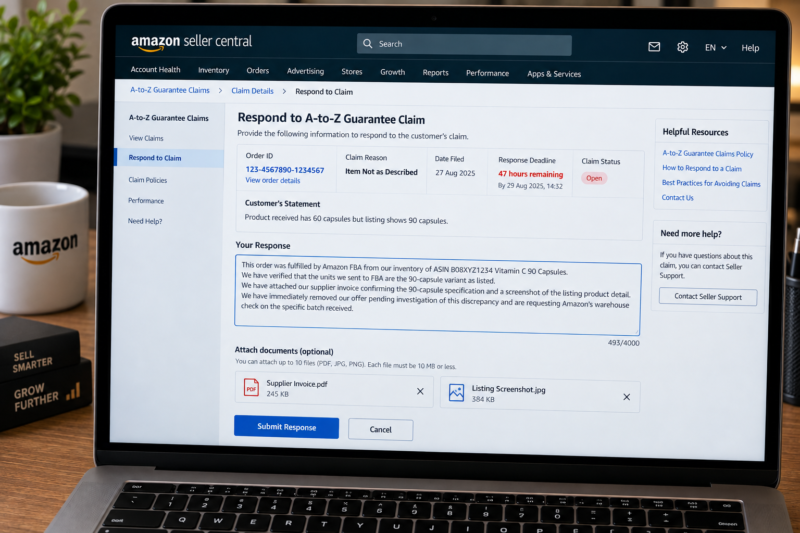
Your response to an A-to-Z claim should be professional factual and supported by evidence. The response is read by Amazon’s customer service team who will use it alongside the buyer’s statement and the order data to make their decision. Here is how to structure your response based on the type of claim:
Responding to an Item Not Received Claim
For FBA orders Amazon’s tracking data is automatically linked to the claim — Amazon can see whether the order was delivered and when. Your response should confirm that you are an FBA seller and that fulfilment and delivery are Amazon’s responsibility for this order. Provide the tracking number and delivery confirmation if visible in your order details. If the tracking shows delivered and the buyer says they did not receive it Amazon typically investigates the delivery independently — your role is to confirm the FBA fulfilment method and provide all available order information.
Responding to an Item Not as Described Claim
This is the most common and most impactful claim type for wholesale FBA sellers. Your response must directly address the buyer’s specific complaint about how the product differs from the listing. If the product does match the listing your response should include specific evidence — a comparison between the listing description and the product specification confirmation of the EAN match and if possible a photograph of the product that demonstrates compliance with the listing. If the product genuinely does not match the listing acknowledge the issue remove your offer from that ASIN and offer a full refund to the buyer immediately.
| ✅ Strong Claim Response Elements | ❌ Weak Claim Response Elements |
|---|---|
| Specific reference to the order ID and claim reason stated by buyer | Generic response that does not address the buyer’s specific complaint |
| Tracking confirmation showing delivery or shipment data | No supporting evidence — response based only on assertion |
| Confirmation that the product matches the listing with specific comparison | Disputing the buyer’s claim aggressively without evidence |
| Offer of resolution — refund return or replacement as appropriate | No offer of resolution — response focused only on denying the claim |
| Professional factual tone — no emotional language | Emotional or aggressive language — complaints about the buyer or Amazon’s process |
Responding to a Damaged Item Claim
For a damaged item claim your response should confirm that the item was sent in new condition and provide any evidence of your prep process — photographs of packed boxes if available or a description of your packing standards. For FBA sellers if the damage occurred in Amazon’s warehouse or during Amazon’s delivery process Amazon will typically fund the refund and remove the claim from your ODR. If the damage appears to have originated with your supplier or in your prep process acknowledge this investigate and implement corrective action.
When to Offer a Refund Proactively — Before a Claim Is Filed
For FBA sellers one of the most effective strategies for reducing A-to-Z claim counts is proactively resolving customer issues before they escalate to a claim. A customer who receives a damaged product and contacts Amazon customer service before filing a claim can often be resolved at the returns stage — Amazon issues a replacement or refund and no A-to-Z claim is filed. While FBA sellers do not directly handle customer service messages in the same way merchant-fulfilled sellers do they can monitor their FBA returns and damaged unit reports in Seller Central to identify patterns of customer dissatisfaction before those patterns escalate into clusters of A-to-Z claims.
Appealing a Granted A-to-Z Claim
When Amazon grants a claim and issues a refund at your expense you have the right to appeal the decision. Not all granted claims are eligible for successful appeal — but claims where you have clear evidence that the product was delivered correctly and matches the listing have a reasonable chance of being overturned. Here is how to appeal a granted claim:
Navigate to the Closed Claim in Manage A-to-Z Claims
Go to Performance — A-to-Z Guarantee Claims — Closed Claims. Find the granted claim you wish to appeal. The closed claim will show the reason Amazon granted the claim which is the specific point your appeal must address.
Click Appeal This Decision and Provide Specific Evidence
Click the Appeal This Decision button and submit your counter-evidence. The most persuasive appeals for not received claims include proof of delivery showing the address and delivery date. For not as described appeals include a specific comparison between the listing and the product showing they match — EAN confirmation ASIN product detail page screenshot and supplier invoice confirming the exact product.
Understand What a Successful Appeal Recovers
A successful appeal on a granted claim recovers the refund amount that was deducted from your account but does not remove the claim from your ODR. The ODR impact remains even if the financial outcome is reversed. This further reinforces why prevention is always superior to response — the ODR cost of a claim cannot be appealed away regardless of how the financial outcome resolves.
The Root Cause Prevention System — Eliminating Claim Sources
Responding well to claims is important — but the most powerful long-term strategy for wholesale FBA sellers is eliminating the conditions that cause claims in the first place. Here are the four systemic changes that prevent the most common claim types:
| Claim Type Prevented | Systemic Prevention Action |
|---|---|
| Item not as described — wrong ASIN | Verify EAN to ASIN match in Amazon’s catalogue before every new listing — check title images description and product details against your physical product |
| Item arrived damaged — packaging failure | Implement and maintain full prep compliance — bubble wrap fragile products — correct box void fill — inspect all supplier deliveries before prepping |
| Item materially different — supplier error | Count and inspect every unit received from supplier before prepping — compare physical product against purchase order and ASIN listing before labelling |
| Repeated claims from same ASIN — product quality issue | Remove the ASIN if it generates two or more claims in a 60-day period — investigate whether the product itself generates consistent dissatisfaction regardless of listing accuracy or prep quality |
Your A-to-Z Claim Management Checklist
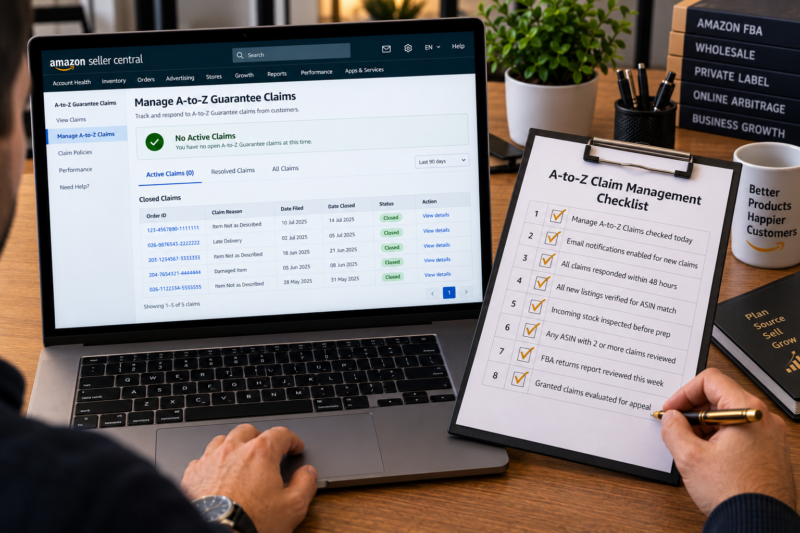
| A-to-Z Claim Management Check | Confirmed |
|---|---|
| Manage A-to-Z Claims page checked today — zero active claims confirmed | ☐ |
| Email and app notifications enabled for new A-to-Z claims | ☐ |
| All active claims have response submitted within 48 hours of filing | ☐ |
| All new listings verified for ASIN match before going live | ☐ |
| Incoming stock inspected before prep — no damaged units sent to FBA | ☐ |
| Any ASIN generating two or more claims reviewed for removal | ☐ |
| FBA returns report reviewed this week — any patterns identified | ☐ |
| Granted claims evaluated for appeal eligibility if financial impact significant | ☐ |
| All A-to-Z claim checks confirmed — account and ODR protected | ✅ Clear |
Conclusion — Respond Fast and Fix the Source
A-to-Z claims are unavoidable in any meaningful volume of FBA selling — what separates sellers who manage them well from those who see their ODR and account health deteriorate is the combination of a fast professional response to every individual claim and a systematic approach to eliminating the root causes that generate clusters of claims from the same product. Respond to every claim within 48 hours — provide evidence rather than assertions — and for any ASIN generating multiple claims remove it investigate the cause and fix the issue before relisting. The claim itself always counts as a defect but a handled claim with no further claims from the same source is the best outcome you can achieve once one has been filed.
Find your next wholesale brand through our Brands Directory. Research every product with Keepa. Confirm every margin with AMZScout. And manage every A-to-Z claim using the response and prevention process in this guide.
FIND YOUR NEXT WHOLESALE BRAND — KEEP YOUR CLAIMS LOW
Browse 5,000+ Verified Wholesale Brands Free
Find verified wholesale trade contacts in the Brandhunterz Brands Directory — source high-quality products from authorised suppliers and sell on Amazon FBA with a consistently low A-to-Z claim rate.
About the Author
This article is written by the team at Brandhunterz Ltd — a UK registered Amazon FBA wholesale sourcing company (Company No: 15342697) registered in England and Wales since 2023. Visit brandhunterz.com to learn more.