
AMAZON FBA ACCOUNT HEALTH
Amazon Order Defect Rate — What It Is and How to Keep It Low
By Brandhunterz Ltd | Company No: 15342697 | 13 minute read
Affiliate Disclosure: This article contains affiliate links. If you purchase through our links we may earn a commission at no extra cost to you. We only recommend tools we genuinely use and believe in. Read our full disclaimer.
The Order Defect Rate — ODR — is Amazon’s single most important customer-facing performance metric and one of the most closely monitored numbers on your Account Health dashboard. It measures the percentage of your orders that result in a negative customer experience — specifically negative feedback an A-to-Z Guarantee claim or a credit card chargeback — within a rolling 60-day window. Amazon enforces a strict threshold of under 1 percent for all sellers and breaching this threshold is one of the fastest routes to account suspension. For wholesale FBA sellers who rely on Amazon’s fulfilment network the ODR is particularly important because it reflects both your product quality decisions and the accuracy of your listing descriptions — two areas entirely within your control as the seller making the sourcing and listing decisions.
We are Brandhunterz Ltd — a UK registered wholesale sourcing company (Company No: 15342697) — and in this complete guide we explain exactly what the Order Defect Rate is how each of its three components is calculated what causes ODR to rise for wholesale FBA sellers and the specific habits and sourcing practices that keep your ODR consistently low and well within Amazon’s safe threshold.
💡 Quick Summary
Your Order Defect Rate is calculated as the percentage of orders in a rolling 60-day window that receive a negative feedback rating of 1 or 2 stars an A-to-Z Guarantee claim or a credit card chargeback. Amazon requires this to stay below 1 percent — a breach triggers account suspension risk. For wholesale FBA sellers the most common causes of ODR spikes are product quality issues listing inaccuracies damaged units reaching customers and A-to-Z claims on orders where the product does not match its description. Keep ODR low by sourcing high-quality products maintaining accurate listings never sending damaged units to FBA and resolving all customer issues proactively.
How the Order Defect Rate Is Calculated
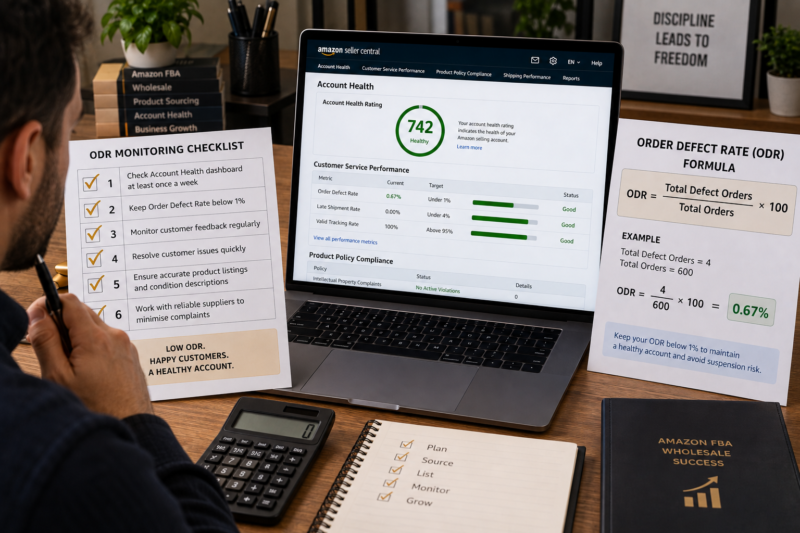
The ODR is expressed as a percentage calculated over a rolling 60-day window. It is not a snapshot — it moves every day as new orders complete their delivery and fulfilment cycle and as old orders age out of the 60-day window. Here is the basic calculation:
ORDER DEFECT RATE FORMULA
Orders With a Defect ÷ Total Orders in 60-Day Window × 100
Example: 4 defect orders ÷ 600 total orders × 100 = 0.67% ODR — within threshold
An order is counted only once in the ODR calculation regardless of how many types of defect it generates — an order that receives both negative feedback and an A-to-Z claim counts as a single defect order not two. This means that the key variable in keeping your ODR low is the total number of defect orders — not the total number of complaint events.
ODR Component 1 — Negative Feedback
Negative feedback is defined as any seller feedback rating of 1 or 2 stars left by a buyer on a completed order. Seller feedback is separate from product reviews — seller feedback rates the overall experience of buying from you including delivery speed communication and product accuracy. For FBA sellers Amazon controls the delivery experience so most negative seller feedback relates either to product quality or to a mismatch between what the customer expected and what they received.
| Common Cause of Negative Feedback for FBA Sellers | Root Cause | Prevention |
|---|---|---|
| Product arrived damaged | Insufficient packaging prep — fragile items not bubble-wrapped — poor box packing | Review prep standards — ensure fragile units individually wrapped — use correct box void fill |
| Product did not match listing description | Listing on wrong ASIN — incorrect product variant — listing content inaccurate | Verify ASIN match before listing — check product title images and description match your product exactly |
| Product quality below expectation | Poor supplier quality control — products below standard reaching customers | Inspect incoming stock — reject damaged or substandard units — review supplier quality reliability |
| Wrong item received by customer | Amazon picking error — FNSKU label mix-up — multiple ASINs in same box with label errors | Scan-test all FNSKU labels — verify correct label applied to correct product before boxing |
✅ Negative Feedback Removal — When Amazon Will Remove It
Amazon will automatically remove negative seller feedback that relates to a product review rather than the selling experience — for example feedback that comments only on the product quality without any reference to the seller or delivery. Amazon will also remove feedback that includes obscene language or personal information. If you believe a feedback entry qualifies for removal request it through the Feedback Manager in Seller Central. Successfully removed feedback does not count toward your ODR.
ODR Component 2 — A-to-Z Guarantee Claims
An A-to-Z Guarantee claim is filed by a buyer when they believe their order was not fulfilled correctly — typically because the item was not delivered the item received was not as described or the item was damaged on arrival. The key fact that many sellers overlook is that an A-to-Z claim counts as an ODR defect regardless of whether Amazon grants or denies the claim. Even a claim that Amazon rules in your favour as the seller still counts as a defect order in your ODR calculation. This makes A-to-Z claims the most impactful ODR component for most FBA sellers — a cluster of claims from a problematic product can rapidly push ODR above threshold even when Amazon finds in your favour on each individual case.
| A-to-Z Claim Cause | Prevention for FBA Sellers |
|---|---|
| Item not received — Amazon delivery failure | FBA delivery failures are Amazon’s responsibility — respond to claims promptly with shipment tracking information |
| Item not as described — product mismatch | Verify your product matches the ASIN listing completely before shipping — check title images and product details |
| Item arrived damaged | Improve packaging prep — ensure fragile units are individually protected — review box packing standards |
| Return not refunded by seller | FBA handles returns automatically — ensure your return settings are correctly configured in Seller Central |
ODR Component 3 — Credit Card Chargebacks
A credit card chargeback occurs when a buyer disputes a charge with their bank or credit card provider rather than going through Amazon’s returns or A-to-Z process. Chargebacks are relatively rare for FBA sellers compared to negative feedback and A-to-Z claims — but each one still counts as a defect order. Most chargebacks occur when a buyer does not recognise the Amazon charge on their statement or when a genuine fraud case arises. For most wholesale FBA sellers chargebacks are not a significant ODR driver — but if you see a cluster of chargebacks investigate immediately as it may indicate a compromised listing or fraudulent order pattern.
How to View Your ODR Detail in Seller Central
Your ODR summary figure on the Account Health dashboard shows your current rate — but the detail view shows you the individual orders generating defects which is the information you need to identify and fix the root cause. Here is how to access it:
Go to Performance — Account Health in Seller Central
Navigate to Performance — Account Health. In the Customer Service Performance section find the Order Defect Rate row. The figure shows your current ODR percentage and a coloured status bar indicating your distance from the 1 percent threshold.
Click the ODR Percentage to Open the Detail View
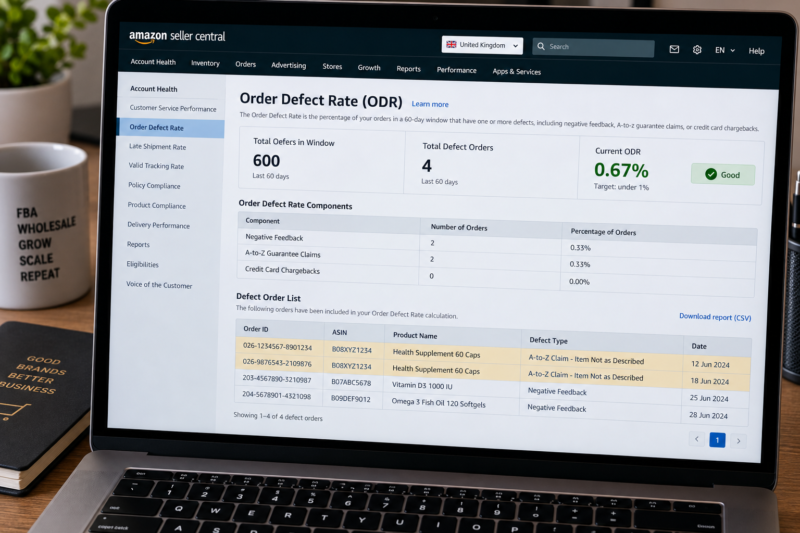
Click on the ODR percentage figure or the View Details link beside it. This opens the ODR detail page showing the three component breakdowns — Negative Feedback count A-to-Z Guarantee Claims count and Chargeback count — along with the total orders in the window and a list of the specific defect orders.
Review Each Defect Order — Identify the ASIN and the Defect Type
For each defect order in the list note the ASIN the order date the defect type and the customer’s stated reason. Look for patterns — if three out of four defect orders relate to the same ASIN that product is the source of your ODR problem and requires immediate investigation. A single problematic product causing multiple defects is far easier to fix than a broad ODR problem spread across many different ASINs.
The Most Common ODR Causes for Wholesale FBA Sellers — and How to Fix Them
| ODR Cause | How It Affects ODR | Fix |
|---|---|---|
| Wrong ASIN — product not matching listing | Generates not as described A-to-Z claims and negative feedback | Remove listing immediately — verify correct ASIN match before relisting — check EAN against Amazon ASIN database |
| Damaged packaging on units reaching customers | Generates damaged item A-to-Z claims and negative feedback | Improve prep — bubble wrap fragile products — increase box void fill — check supplier packaging quality |
| Expired product reaching customers | Generates product condition complaints A-to-Z claims and negative feedback | Check all expiry dates on inbound stock — create removal orders for any FBA stock approaching expiry |
| Inaccurate listing description or images | Generates not as described returns and A-to-Z claims | Review listing content against the physical product — remove all inaccurate claims — update images if needed |
| Low quality products generating consistent dissatisfaction | Steady stream of negative feedback and A-to-Z claims across all orders | Remove listing — stop reordering the product — choose a different brand or product with better customer reception |
Understanding the 60-Day Rolling Window
The 60-day rolling window means your ODR is constantly changing as new orders enter and old orders exit the window. This has two important practical implications for managing your ODR:
| Rolling Window Implication | What It Means for Your ODR Management |
|---|---|
| Old defects age out automatically after 60 days | A spike caused by a problematic batch of products will naturally resolve over 60 days if you remove the problematic product — but only if no new defects are generated in the same period |
| High sales volume dilutes individual defect orders | The same number of defect orders has a smaller percentage impact on a higher total order volume — growing your clean order volume is a genuine ODR management strategy alongside reducing defects |
ODR IMPACT — HOW TOTAL ORDER VOLUME AFFECTS THE CALCULATION
| Scenario | Defect Orders | Total Orders | ODR |
| Small seller — low volume | 3 | 200 | 1.5% — at risk |
| Same defects — higher order volume | 3 | 600 | 0.5% — safe |
Lower volume sellers have less buffer against individual defect orders — each defect has a larger percentage impact
Proactive ODR Protection Habits for Wholesale FBA Sellers
Keeping your ODR consistently low is not a reactive task — it is a set of proactive habits built into your sourcing listing and prep process. Here are the specific habits that provide the strongest ODR protection for wholesale FBA sellers:
| ODR Protection Habit | What It Prevents | Frequency |
|---|---|---|
| Verify ASIN match before every new listing | Not as described A-to-Z claims — the largest single ODR driver for wholesale sellers | Every new ASIN |
| Inspect incoming stock from supplier before prepping | Damaged or substandard units reaching customers and generating defects | Every delivery |
| Check ODR detail view weekly — identify any new defect orders by ASIN | Allows early identification of a problem ASIN before multiple defects accumulate | Weekly — Monday |
| Respond to every A-to-Z claim within 48 hours | While claim still counts as a defect — a prompt professional response reduces escalation risk | Within 48 hours |
| Remove or create removal orders for FBA stock approaching expiry | Expired products reaching customers — a significant A-to-Z claim source for food and supplement sellers | Monthly inventory check |
| Request feedback removal when feedback relates to product not seller | Reduces negative feedback count — removable feedback that stays in your ODR unnecessarily inflates your rate | Each new negative feedback |
What to Do When Your ODR Is Approaching the 1 Percent Threshold
If your ODR is above 0.75 percent you are in a high-risk zone and need to act immediately — not next week. Here is the priority action sequence:
Open the ODR Detail View and Identify Every Defect Order
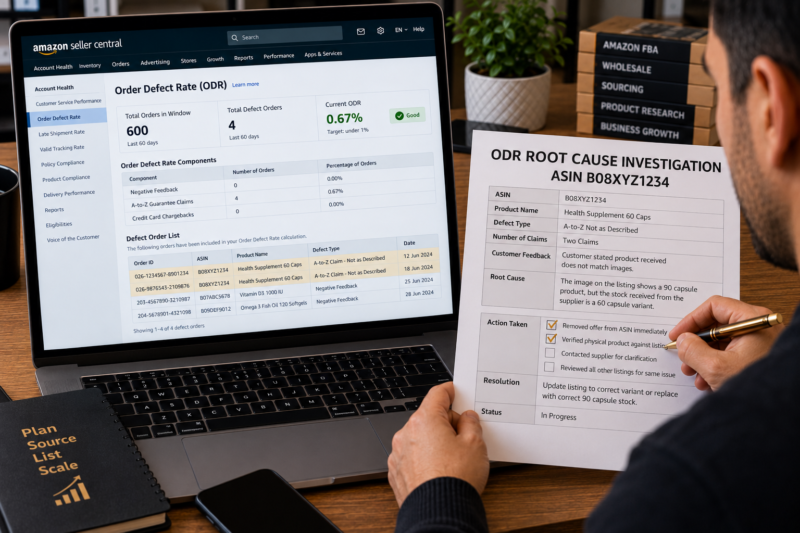
Click through to the ODR detail and list every defect order by ASIN. If two or more defect orders come from the same ASIN that product is your immediate priority — it must be removed from active sale before it generates any further defects.
Remove or Suppress Listings Generating Defects Immediately
Remove your offer from any ASIN generating multiple defect orders while you investigate the root cause. A listing that is suppressed cannot generate new defects — and stopping new defects from entering the 60-day window is the fastest way to stabilise your ODR. Do not leave a problematic listing active while you investigate — remove first investigate second.
Investigate Root Cause — Fix Before Relisting
Investigate the cause of each defect — wrong ASIN product quality issue packaging damage or listing inaccuracy. Fix the root cause before relisting. If the product is fundamentally problematic — consistently attracting defects regardless of prep improvements — consider removing it from your catalogue permanently rather than relisting and repeating the cycle.
Monitor ODR Daily Until It Drops Back Below 0.5 Percent
Once you have removed the problematic listing and fixed the root cause monitor your ODR in Seller Central daily rather than weekly until it has recovered to below 0.5 percent. The 60-day window means old defects will age out gradually — your ODR should begin declining within 2 to 4 weeks of removing the defect source assuming no new defects are generated.
Your ODR Monitoring Checklist
| ODR Check | Threshold | Status |
|---|---|---|
| Current ODR percentage confirmed | Under 0.5% ideal — under 1% required | ☐ |
| ODR detail view reviewed — all defect orders identified by ASIN | No pattern of multiple defects from same ASIN | ☐ |
| All open A-to-Z claims responded to within 48 hours | Zero unresponded claims outstanding | ☐ |
| Any negative feedback checked for eligibility for removal | Product-related feedback requested for removal | ☐ |
| Listing accuracy verified for any ASIN generating defects | Title images description match physical product exactly | ☐ |
| FBA inventory expiry dates checked for food and supplement ASINs | All active FBA stock has minimum 90 days remaining shelf life | ☐ |
| ODR checks complete — rate healthy and under control | ✅ Clear | |
Conclusion — Your ODR Is a Direct Reflection of Your Sourcing and Listing Decisions
For FBA wholesale sellers the Order Defect Rate is ultimately a measure of how good your sourcing and listing decisions are. Sellers who source high-quality products from reliable authorised suppliers who verify their ASIN match before every listing and who inspect their incoming stock before sending it to FBA almost never see their ODR rise above 0.3 percent. The sellers who struggle with ODR are typically those who list on ASINs without verifying the match who send damaged or substandard stock to FBA without inspection or who sell products that generate consistent customer dissatisfaction. Fix the source not the symptom and your ODR will take care of itself.
Find your next wholesale brand through our Brands Directory. Research every product with Keepa. Confirm every margin with AMZScout. And protect your ODR using the monitoring checklist and habits in this guide.
FIND YOUR NEXT WHOLESALE BRAND — KEEP YOUR ODR LOW
Browse 5,000+ Verified Wholesale Brands Free
Find verified wholesale trade contacts in the Brandhunterz Brands Directory — source high-quality products from authorised suppliers and sell on Amazon FBA with a consistently healthy Order Defect Rate.
About the Author
This article is written by the team at Brandhunterz Ltd — a UK registered Amazon FBA wholesale sourcing company (Company No: 15342697) registered in England and Wales since 2023. Visit brandhunterz.com to learn more.