
AMAZON FBA ACCOUNT HEALTH
How to Appeal an Amazon Account Suspension — Step by Step Guide
By Brandhunterz Ltd | Company No: 15342697 | 14 minute read
Affiliate Disclosure: This article contains affiliate links. If you purchase through our links we may earn a commission at no extra cost to you. We only recommend tools we genuinely use and believe in. Read our full disclaimer.
Receiving an Amazon account suspension notification is one of the most stressful experiences a wholesale FBA seller can face. Your listings go dark your FBA inventory becomes inaccessible and your revenue stops immediately. But a suspension is not necessarily the end of your Amazon selling journey — the majority of suspensions can be successfully appealed and accounts reinstated when the appeal is prepared correctly. The key distinction between sellers who successfully reinstate their accounts and those who do not is almost never about what happened to cause the suspension — it is about how clearly thoroughly and professionally the appeal addresses Amazon’s specific stated concern. A poorly written appeal that defends the seller’s behaviour disputes Amazon’s finding or fails to include supporting documentation will almost always be rejected — even when the suspension itself was arguably unjustified.
We are Brandhunterz Ltd — a UK registered wholesale sourcing company (Company No: 15342697) — and in this complete step by step guide we explain exactly how to appeal an Amazon account suspension — how to read and understand your suspension notice how to build a strong Plan of Action what documentation to include how and where to submit your appeal and what to do if your first appeal is rejected.
💡 Quick Summary
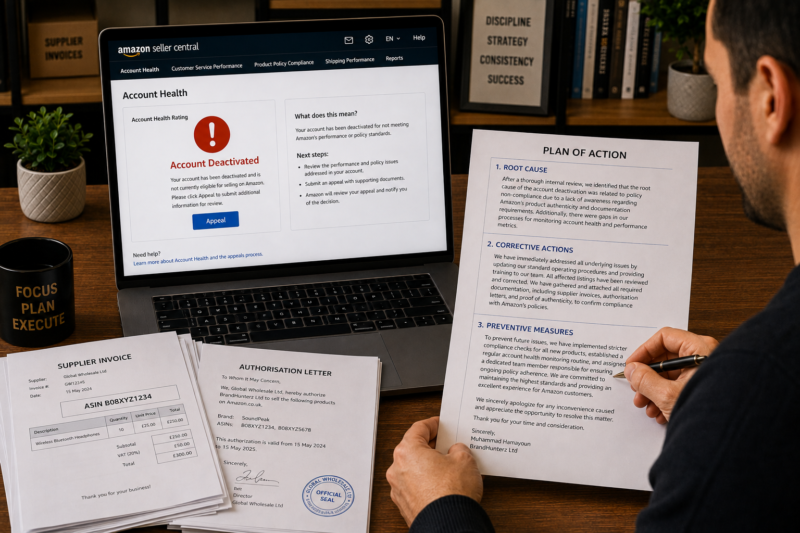
A successful Amazon account suspension appeal has three components — a clear identification of the root cause of the suspension an explanation of the immediate corrective actions you have taken and a credible preventive action plan that shows Amazon the problem will not recur. Every appeal must be supported by relevant documentation such as supplier invoices authorisation letters and photographs. Submit through the Account Health dashboard appeal button — not through Seller Support. Write professionally and concisely — do not dispute Amazon’s finding and do not include emotional language. Most first appeals receive a decision within 2 to 7 business days.
Step 1 — Read Your Suspension Notice Carefully and Completely
The most common mistake sellers make at the start of the appeal process is not reading the suspension notice thoroughly enough. The notice contains specific information that your entire appeal must be built around — the stated reason for suspension the specific policy or metric that triggered it and in many cases the specific ASINs or orders involved. If your appeal does not address the exact stated reason in the notice it will almost certainly be rejected regardless of how well written it is.
| What to Extract From the Suspension Notice | Why It Matters for Your Appeal |
|---|---|
| The specific stated reason for suspension | Your Plan of Action must directly address this reason — not a different reason you think is more likely |
| The specific policy or metric cited | Your appeal must show you understand which policy was breached and how your actions will change to comply |
| The specific ASINs or orders mentioned | Your documentation must correspond to the exact ASINs or orders Amazon has flagged |
| Whether Amazon is requesting specific documents | Some notices explicitly request invoices or authorisation letters — provide exactly what is requested |
| The appeal deadline if one is stated | Some suspension types have time-limited appeal windows — missing the deadline may forfeit your right to appeal |
Step 2 — Gather Your Supporting Documentation
Before writing a single line of your appeal gather all documentation relevant to the stated suspension reason. An appeal submitted without supporting documentation is far less likely to succeed than one that includes concrete evidence. The specific documents you need depend on the type of suspension:
| Suspension Type | Key Documents to Gather |
|---|---|
| Product authenticity complaint | Supplier invoices for the affected ASIN — must show supplier name product name quantity and date — distributor authorisation letter if available — supplier business registration or accreditation |
| Intellectual property complaint | Brand authorisation letter — purchase invoices from authorised distributor — retraction request submitted to brand owner — evidence of brand communication |
| Order Defect Rate breach | List of orders generating defects — root cause analysis — evidence of corrective action taken on each defect type — supplier quality confirmation |
| Product condition complaint | Photographs of your prep process — supplier invoice showing new condition products — prep centre confirmation if applicable — updated prep SOP |
| Restricted product violation | Confirmation the listing has been removed — evidence of the category approval process being initiated if applicable — updated listing review SOP |
Step 3 — Write Your Plan of Action
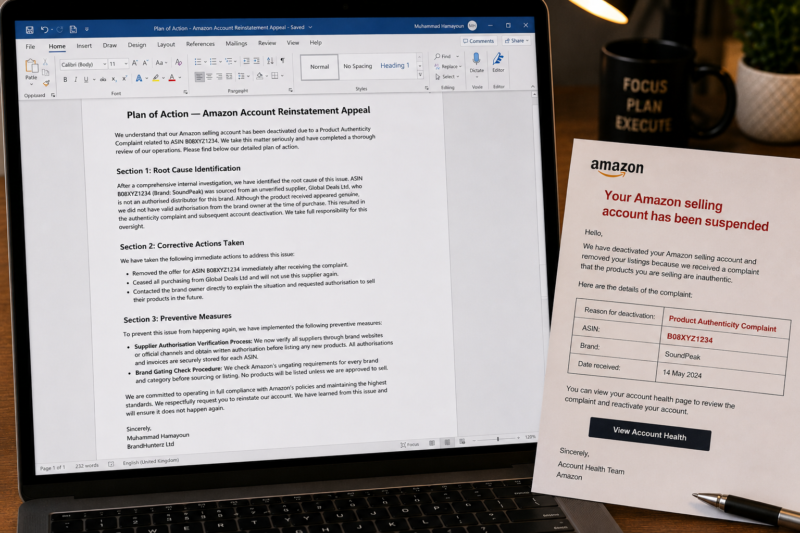
The Plan of Action — POA — is the written component of your appeal. It is a structured document that Amazon’s Seller Performance team uses to assess whether your account should be reinstated. A strong POA has three clearly defined sections — root cause identification immediate corrective actions and preventive measures. Here is exactly how to write each section:
Section 1 — Root Cause Identification
The root cause section must clearly and specifically identify what caused the violation or metric breach that led to the suspension. Amazon expects you to identify the actual underlying cause — not a vague or generic statement. Compare these examples:
| ❌ Weak Root Cause Statement | ✅ Strong Root Cause Statement |
|---|---|
| We believe the complaint was made in error and our products are genuine. | The product authenticity complaint for ASIN B08XYZ1234 arose because we sourced this product from a distributor who was not an authorised reseller for this brand. We have since confirmed through direct contact with the brand owner that this distributor does not hold a current authorisation agreement. |
| Our Order Defect Rate increased due to customer issues beyond our control. | Our Order Defect Rate increased from 0.4 percent to 1.2 percent between April and June due to three A-to-Z claims on ASIN B09ABC5678 where customers received units with damaged outer packaging. Investigation confirmed the damage occurred during our own prep process where insufficient void fill in the shipping boxes allowed units to shift during transit. |
Section 2 — Immediate Corrective Actions
The corrective actions section must describe the specific steps you have already taken — not steps you plan to take — to resolve the immediate problem. Use past tense throughout this section. Amazon needs to see that you acted immediately and decisively:
| Suspension Type | Example Corrective Action Statement |
|---|---|
| Authenticity complaint | We immediately removed our offer from ASIN B08XYZ1234 and have ceased all purchasing from the non-authorised distributor. We have contacted the brand owner directly to explain the situation and have requested a retraction of the complaint. |
| High ODR from packaging damage | We removed ASIN B09ABC5678 from active sale immediately. We reviewed and updated our packing process to require a minimum of 2 inches of void fill around all units and have added a sealed box shake-test to our prep checklist. We have retrained all staff involved in packing. |
Section 3 — Preventive Measures
The preventive measures section is where you explain what systematic changes you have implemented to ensure the same problem cannot occur again. This section is often under-developed by sellers who focus too much on the immediate fix and not enough on the long-term prevention. Amazon wants to see that you have changed your process — not just your behaviour:
| Suspension Type | Example Preventive Measure Statement |
|---|---|
| Authenticity complaint | We have implemented a supplier authorisation verification process requiring written confirmation of authorised distributor status before any new wholesale relationship is established. We have also created a restricted brand list and conduct a brand gating check in Seller Central for every new ASIN before listing. |
| High ODR from packaging damage | We have implemented a mandatory pre-shipment packing compliance checklist that includes a sealed-box shake test for every box before dispatch. We review our ODR figure every Monday in Seller Central and investigate any new defect orders within 24 hours of identification. |
Step 4 — Format Your Appeal Correctly
The format and tone of your appeal are almost as important as the content. Amazon’s Seller Performance team reviews a very high volume of appeals and a clearly formatted professional response stands out positively. Follow these formatting rules:
| ✅ Appeal Format Do | ❌ Appeal Format Do Not |
|---|---|
| Use clear section headers — Root Cause — Corrective Actions — Preventive Measures | Write a single unformatted paragraph covering all three sections mixed together |
| Use specific facts — product names ASIN numbers dates quantities | Use vague or generic language — we always try our best — we take this very seriously |
| Write in professional business English — concise and precise | Include emotional language — this is destroying my business — I have a family to feed |
| Accept the finding and focus on resolution — do not dispute Amazon’s decision | Dispute Amazon’s finding or accuse Amazon of making an error |
| Keep total length to 400 to 600 words — concise and focused | Write a lengthy multi-page document that buries the key points in extensive background |
| List preventive actions as clearly numbered or bulleted steps | Promise future intentions without specifying the concrete steps taken |
Step 5 — Submit Your Appeal Through the Correct Channel
Submitting your appeal through the correct channel is essential — appeals routed through the wrong team are delayed or not acted upon at all. Here is exactly where to submit:
Go to Performance — Account Health in Seller Central
Log in to Seller Central and navigate to Performance — Account Health. Even when your account is suspended you can still access the Account Health dashboard. The dashboard will display your account status and the specific reason for suspension with an Appeal button visible at the top of the page.
Click the Appeal Button — Not the Seller Support Button
Click the Appeal or Reactivate Your Account button on the Account Health page. Do not use the Contact Us or Seller Support route — these channels go to general support staff who do not have authority over account reinstatements and who will typically redirect you back to the Account Health appeal process anyway — losing you days in the process.
Paste Your Plan of Action Into the Appeal Form
The appeal form provides a text field where you paste your Plan of Action. Write your POA in a word processor first — review it against the criteria above — then paste it into the form. Do not write your appeal directly in the form field where a browser crash or accidental navigation could lose your work.
Upload Your Supporting Documentation
Use the document upload section of the appeal form to attach your supporting documentation. Label each document clearly — Supplier Invoice — ASIN B08XYZ1234 — Date — Authorisation Letter — Brand Name — Date. Amazon reviewers handle many appeals simultaneously and clearly labelled documents make their review faster and more likely to result in a positive outcome.
Submit and Record the Submission Date and Reference Number
Submit your appeal and record the date time and any case reference number generated. Most first appeals receive an initial response within 2 to 7 business days. Do not submit a second appeal or contact Seller Support to chase a response within this window — multiple submissions on the same case can confuse the review process and delay your outcome.
What to Do If Your First Appeal Is Rejected
A rejected first appeal is not the end of the process — it is feedback that your initial response did not fully address Amazon’s concern. Read the rejection notice carefully — Amazon often provides specific guidance about what was missing or insufficient. Here is how to approach a second appeal:
| Rejection Signal | What to Change in Second Appeal |
|---|---|
| Amazon requests additional invoices or documentation | Provide exactly what is requested — check invoice format includes all required fields — supplier name product name date quantity and price |
| Amazon says the POA did not address the root cause | Rewrite root cause section with more specific detail — name the exact ASIN date and nature of the problem — avoid vague language |
| Amazon says preventive measures are insufficient | Add more specific concrete process changes — name the exact checks tools or procedures you have implemented — avoid promises — describe what you have already done |
| Generic rejection with no specific feedback | Review your entire POA against the criteria in this guide — strengthen every section — add more documentation — consider requesting an Account Health Support call |
Account Health Support — Using Amazon’s Direct Appeal Assistance
Amazon offers an Account Health Support service that allows sellers with an active Account Health Rating to schedule a call with an Amazon specialist who can discuss the suspension reason in detail and provide guidance on what a successful appeal requires. If your first appeal has been rejected and you are unsure how to strengthen your second appeal this call can provide specific actionable feedback. The Account Health Support call option appears on your Account Health dashboard when your account is in At Risk or suspended status — look for the Call Me Now or Schedule a Call button beside your AHR score.
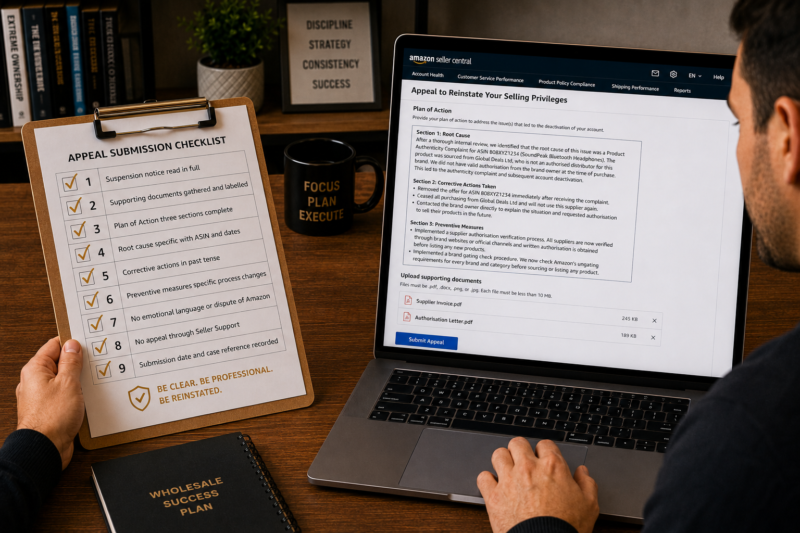
Your Appeal Submission Checklist
| Appeal Submission Check | Confirmed |
|---|---|
| Suspension notice read in full — specific reason identified | ☐ |
| All supporting documentation gathered and clearly labelled | ☐ |
| Plan of Action written with three clear sections — Root Cause — Corrective Actions — Preventive Measures | ☐ |
| Root cause is specific — names ASINs dates and exact nature of problem | ☐ |
| Corrective actions described in past tense — already taken — not planned | ☐ |
| Preventive measures describe specific process changes — not general promises | ☐ |
| No emotional language or disputing of Amazon’s finding in POA | ☐ |
| Appeal submitted through Account Health dashboard — not Seller Support | ☐ |
| Submission date and case reference number recorded | ☐ |
| Appeal submitted — awaiting Amazon response | ✅ Done |
Conclusion — A Strong First Appeal Is Always Better Than a Fast One
The temptation when facing a suspension is to submit the fastest possible response to get your account reinstated as quickly as possible. Resist this. A weak first appeal that is rejected resets the clock extends the suspension and makes subsequent appeals harder — because Amazon notes the number of appeals submitted and a pattern of multiple weak attempts signals a seller who does not fully understand the issue. Take the time to read the notice completely gather your documentation write a specific and well-structured Plan of Action and submit one strong appeal. A single thorough appeal submitted the day after suspension is almost always better than a rushed appeal submitted within hours.
Find your next wholesale brand through our Brands Directory. Research every product with Keepa. Confirm every margin with AMZScout. And if a suspension occurs use the step by step appeal process in this guide to reinstate your account as quickly as possible.
FIND YOUR NEXT WHOLESALE BRAND — SELL WITH A PROTECTED ACCOUNT
Browse 5,000+ Verified Wholesale Brands Free
Find verified wholesale trade contacts in the Brandhunterz Brands Directory — source your product apply for your account and sell on Amazon FBA with the suspension prevention and appeal knowledge from this guide.
About the Author
This article is written by the team at Brandhunterz Ltd — a UK registered Amazon FBA wholesale sourcing company (Company No: 15342697) registered in England and Wales since 2023. Visit brandhunterz.com to learn more.