
AMAZON FBA ACCOUNT HEALTH
How to Avoid Amazon Seller Account Suspension — Complete Warning Signs Guide
By Brandhunterz Ltd | Company No: 15342697 | 14 minute read
Affiliate Disclosure: This article contains affiliate links. If you purchase through our links we may earn a commission at no extra cost to you. We only recommend tools we genuinely use and believe in. Read our full disclaimer.
An Amazon seller account suspension is one of the most damaging events that can happen to a wholesale FBA business. When your account is suspended every listing is immediately deactivated your FBA inventory becomes inaccessible and your revenue drops to zero — sometimes overnight and without prior warning. Reinstating a suspended account is a time-consuming uncertain process that can take days weeks or in some cases months. For a wholesale seller with stock in FBA supplier orders placed and capital deployed across multiple products the financial and operational impact of a suspension can be severe. The good news is that the overwhelming majority of suspensions are preventable — they occur because specific warning signs were missed ignored or not acted on quickly enough before Amazon escalated to enforcement action.
We are Brandhunterz Ltd — a UK registered wholesale sourcing company (Company No: 15342697) — and in this complete guide we cover every major cause of Amazon seller account suspension the specific warning signs that appear before suspension occurs the proactive habits that eliminate the most common suspension causes and what to do immediately if you receive a suspension notification.
💡 Quick Summary
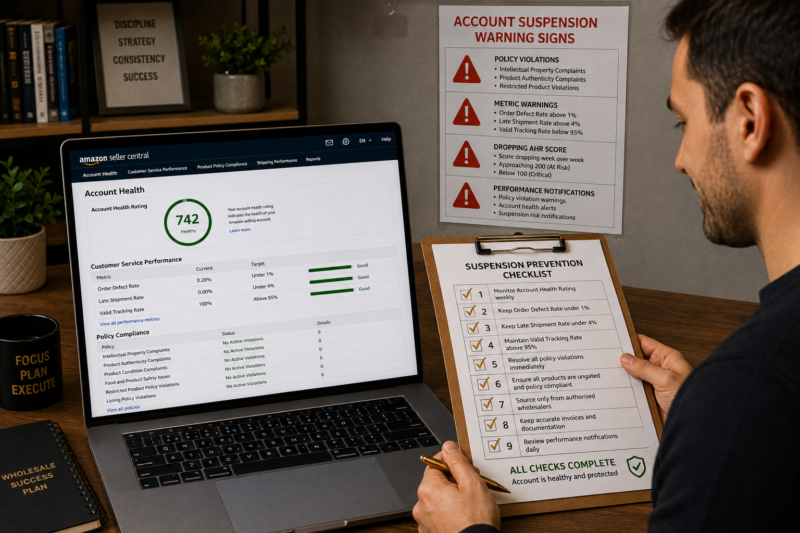
Amazon suspensions are caused by four main categories of problem — policy violations such as intellectual property complaints and restricted product listings performance metric breaches such as Order Defect Rate exceeding 1 percent related account issues where Amazon links your account to a previously suspended account and selling agreement violations such as operating multiple accounts without permission. Every category has clear warning signs that appear before suspension — a dropping Account Health Rating amber metric warnings policy violation notices and Seller Central performance notifications. Responding to every warning sign within 24 hours dramatically reduces suspension risk.
The Four Main Causes of Amazon Seller Account Suspension
Understanding the specific causes of suspension is the starting point for avoiding them. Amazon does not suspend accounts randomly — every suspension is triggered by a specific violation or metric failure. Here are the four main categories that account for the vast majority of wholesale FBA seller suspensions:
| Suspension Cause Category | What Triggers It | Common for Wholesale Sellers |
|---|---|---|
| Policy Violations | IP complaints — product authenticity — restricted product listings — listing policy breaches | Yes — most common cause |
| Performance Metric Breaches | ODR above 1% — Late Shipment Rate above 4% — Valid Tracking Rate below 95% | Occasional — preventable with monitoring |
| Related Account Issues | Amazon links current account to a previously suspended account via shared device IP or bank details | Less common — often historical |
| Selling Agreement Violations | Multiple accounts without permission — review manipulation — inauthentic product claims | Yes — high severity when triggered |
Warning Sign Category 1 — Policy Violation Notices
Policy violation notices are the clearest and most actionable warning signs of impending suspension. When Amazon adds a policy violation to your account health dashboard it is giving you an explicit opportunity to resolve the issue before escalating to suspension. Sellers who fail to respond to policy violations — or who respond inadequately — are those who typically end up suspended. Here are the most common policy violation types that precede wholesale FBA seller suspensions:
Intellectual Property Complaints
An IP complaint means a brand owner has filed a complaint with Amazon alleging that your listing infringes their trademark copyright or patent. For wholesale sellers IP complaints most commonly arise from selling on listings that a brand owner has restricted — either through Amazon Brand Registry or through a specific exclusivity arrangement with another seller. A single unresolved IP complaint significantly reduces your AHR score. Multiple IP complaints across different ASINs within a short period are one of the fastest paths to account suspension.
| IP Complaint Warning Sign | Immediate Action Required |
|---|---|
| New IP complaint appears on Account Health dashboard | Read complaint in full — identify the ASIN — check if the brand is registered — contact brand owner directly to resolve |
| Brand owner requests retraction of complaint | Ask brand owner to submit a retraction directly to Amazon — a retraction is the fastest route to removal |
| Multiple IP complaints across different ASINs | Stop listing on all flagged ASINs immediately — resolve each complaint with documentation — do not add new restricted ASINs |
Product Authenticity Complaints
A product authenticity complaint means a customer or brand owner has alleged that the product you sold is counterfeit or not genuine. For wholesale sellers who source from legitimate authorised distributors this should never be a problem — but it does arise when sourcing from non-authorised suppliers or when supplier stock contains batch inconsistencies. Authenticity complaints are treated very seriously by Amazon and even a single unresolved complaint can trigger a listing deactivation and account review.
Restricted Product Violations
Listing a product in a gated category without the required approval or listing a product that makes restricted claims is a restricted product violation. For wholesale sellers this most commonly occurs when listing health supplement products that carry structure-function claims not approved for Amazon UK or when listing in gated brand categories without completing the ungating process. Always verify that a product and its category are open to you before creating or adding to a listing.
Warning Sign Category 2 — Performance Metric Warnings
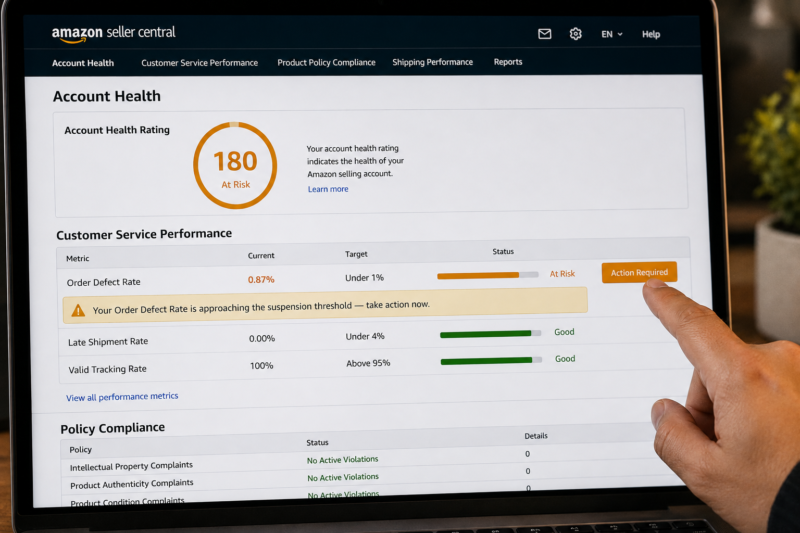
Performance metric warnings appear in your Account Health dashboard when a metric approaches or breaches its threshold. Amazon displays these warnings in amber before the metric hits the red threshold — giving you a window to intervene before a breach becomes a suspension trigger. Here is what each metric warning looks like and what action it demands:
| Metric Warning | Threshold | Immediate Action |
|---|---|---|
| ODR approaching 1% — amber warning | Above 0.75% | Identify defect orders — investigate cause — resolve outstanding A-to-Z claims — remove problematic ASINs if necessary |
| ODR breaching 1% — red critical | At or above 1% | Remove all listings generating defects immediately — contact Seller Support — prepare appeal documentation |
| Late Shipment Rate approaching 4% | Above 2% | Review all merchant-fulfilled orders — confirm dispatch processes — switch problem ASINs to FBA |
| Valid Tracking Rate dropping below 95% | Below 97% | Confirm tracking upload process for all merchant-fulfilled orders — fix any orders missing tracking numbers |
Warning Sign Category 3 — Dropping Account Health Rating Score
A dropping AHR score is one of the most important early warning signs of approaching suspension risk — even when the score is still technically in the Healthy band. If your AHR score was 650 last week and is 320 this week something significant has happened on your account — a new policy violation a spike in A-to-Z claims or a deteriorating ODR. Do not wait for the score to enter the At Risk band before investigating. A sudden drop of 100 or more points in a single week demands immediate investigation regardless of what band the score is still in.
| Score Drop Pattern | Likely Cause | Where to Investigate |
|---|---|---|
| Large sudden drop — 100 or more points in one week | New policy violation added — typically IP complaint or authenticity issue | Policy Compliance section of Account Health dashboard |
| Gradual decline over 2 to 4 weeks | ODR rising — multiple negative feedbacks or A-to-Z claims accumulating | Customer Service Performance section — ODR detail view |
| Score enters At Risk band — below 200 | Multiple issues — policy violations plus metric deterioration | Full dashboard review — prioritise policy violations first |
Warning Sign Category 4 — Performance Notification Emails
Amazon sends email notifications when your account health requires attention — these notifications arrive both in your registered email inbox and in the Notifications section of Seller Central. Every performance notification deserves same-day attention. Here are the types of notification and what each one signals:
| Notification Type | What It Signals | Response Urgency |
|---|---|---|
| Policy Warning — listing deactivated | A specific listing has been removed for a policy violation — action required to reinstate | Same day |
| Performance Alert — metric approaching threshold | One of your performance metrics is approaching its suspension threshold — window to act is open | Same day |
| Account at Risk of Deactivation notice | Account suspension is imminent — this is a final warning before deactivation | Immediately — within hours |
| Account Deactivated notification | Account has been suspended — all listings deactivated — appeal process begins | Begin appeal within 24 hours |
The Proactive Habits That Prevent Suspension
The sellers who never experience suspension are not lucky — they have built specific habits into their daily and weekly operations that systematically eliminate the conditions that lead to suspension. Here are the habits that provide the most powerful protection:
| Protection Habit | What It Prevents | Frequency |
|---|---|---|
| Check Account Health dashboard every Monday | Catches new violations and metric changes within days — before they compound | Weekly |
| Check brand gating status before listing any new ASIN | Eliminates IP complaints from gated brands — primary cause of wholesale seller violations | Every new listing |
| Keep supplier invoices for every wholesale order | Provides documentation for authenticity complaints — essential for appeal responses | Every order |
| Never send damaged or opened units to FBA | Eliminates product condition complaints — a common ODR defect source | Every shipment prep |
| Respond to every Seller Central notification same day | Prevents policy violations from accumulating unaddressed — Amazon acts faster on ignored violations | Daily inbox check |
| Operate only one seller account unless Amazon has given permission for more | Eliminates related account suspension risk — one of the most severe violation types | Always |
What to Do Immediately If You Receive a Suspension Notice
If your account is suspended despite your prevention efforts the speed and quality of your response directly affects how quickly you can reinstate it. Here is the immediate action sequence to follow if you receive an Account Deactivated notification:
Read the Suspension Notice in Full — Do Not Assume the Reason
Open the full suspension notice in Seller Central and read every line carefully. The notice will specify the reason for suspension — the exact policy or metric that triggered it and the specific ASINs or orders involved. Many sellers make the mistake of assuming they know the reason and submitting a generic appeal — appeals that do not address the specific stated reason are almost always rejected.
Gather All Relevant Documentation Before Responding
Before writing your appeal gather everything relevant to the stated reason — supplier invoices for the affected ASINs authorisation letters or distributor agreements photographs of the products in question your prep process documentation and any previous correspondence with Amazon about the same issue. A strong appeal is built on evidence not on explanations.
Write a Plan of Action — Not an Explanation or a Complaint
Amazon’s appeals team responds to Plans of Action — structured responses that identify the root cause of the problem explain what immediate corrective action you have taken and detail what preventive steps you have implemented to ensure the problem does not recur. A Plan of Action that defends your behaviour or disputes Amazon’s finding is very unlikely to succeed. Accept the stated problem address it directly and focus entirely on what you have done to fix it and prevent recurrence.
Submit Through the Correct Channel — Account Health Dashboard Appeal
Submit your appeal through the Account Health dashboard in Seller Central — not through Seller Support chat or email. The Appeal button on the Account Health page routes your response to the correct team — the Seller Performance team — who handle account reinstatements. Appeals submitted through other channels frequently go to the wrong team and are either ignored or returned with instructions to resubmit through the correct route.
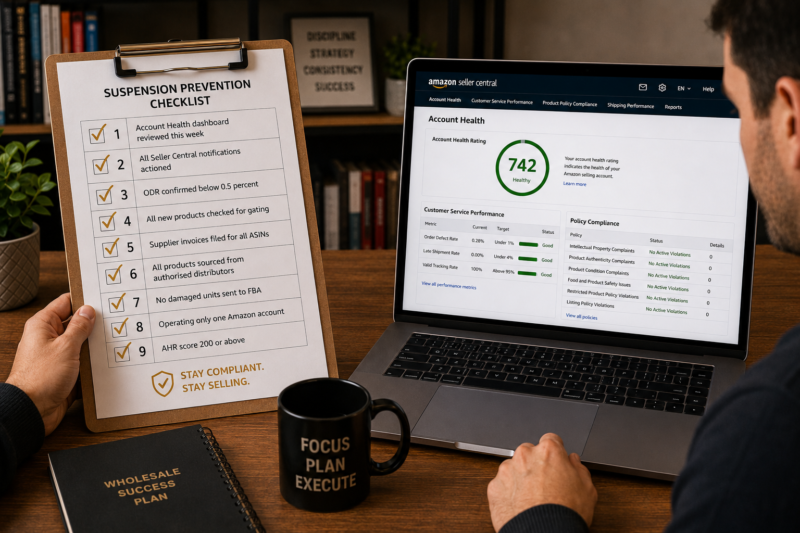
The Complete Suspension Prevention Checklist
| Suspension Prevention Check | Confirmed |
|---|---|
| Account Health dashboard reviewed this week — no new violations | ☐ |
| All Seller Central performance notifications read and actioned | ☐ |
| ODR confirmed below 0.5% — well within safe range | ☐ |
| All new products checked for brand gating before listing | ☐ |
| Supplier invoices filed for every active ASIN | ☐ |
| All products sourced from authorised distributors only | ☐ |
| No damaged or opened units sent to FBA in last shipment | ☐ |
| Operating only one Amazon seller account — no related accounts | ☐ |
| AHR score confirmed 200 or above — Healthy status | ☐ |
| All checks confirmed — suspension risk minimised | ✅ Protected |
Conclusion — Every Suspension Has a Warning Sign You Can Act On
Account suspensions rarely arrive without warning. The sellers who get suspended are almost always those who saw the warning signs — a policy violation notice an amber metric warning a dropping AHR score — and either did not act on them at all or did not act quickly or thoroughly enough. Building the weekly review habit responding to every notification the same day it arrives keeping your sourcing clean and maintaining your documentation are not bureaucratic exercises — they are the specific actions that keep your account safe and your FBA business operational.
Find your next wholesale brand through our Brands Directory. Research every product with Keepa. Confirm every margin with AMZScout. And protect your account using the prevention checklist in this guide.
FIND YOUR NEXT WHOLESALE BRAND — SELL WITHOUT SUSPENSION RISK
Browse 5,000+ Verified Wholesale Brands Free
Find verified wholesale trade contacts in the Brandhunterz Brands Directory — source your product apply for your account and protect your seller account using the suspension prevention system in this guide.
About the Author
This article is written by the team at Brandhunterz Ltd — a UK registered Amazon FBA wholesale sourcing company (Company No: 15342697) registered in England and Wales since 2023. Visit brandhunterz.com to learn more.