
AMAZON FBA ACCOUNT HEALTH
How to Remove Negative Feedback on Amazon — Complete Guide for Wholesale Sellers
By Brandhunterz Ltd | Company No: 15342697 | 13 minute read
Affiliate Disclosure: This article contains affiliate links. If you purchase through our links we may earn a commission at no extra cost to you. We only recommend tools we genuinely use and believe in. Read our full disclaimer.
Negative seller feedback on Amazon affects two things simultaneously — your Order Defect Rate which feeds into your Account Health Rating and your seller reputation which affects buyer confidence and buy box eligibility. Every negative feedback entry — any seller rating of 1 or 2 stars — counts as an ODR defect for the 60-day rolling window in which it was left. While not all negative feedback can be removed there are specific categories of feedback that Amazon will remove on request and a clear process for pursuing removal that every wholesale FBA seller should know and follow consistently. Beyond removal the most powerful long-term strategy is preventing negative feedback from being left in the first place — through the sourcing listing and prep decisions that determine whether customers receive what they expected in the condition they expected it.
We are Brandhunterz Ltd — a UK registered wholesale sourcing company (Company No: 15342697) — and in this complete guide we explain what negative seller feedback is how it differs from product reviews when Amazon will remove it how to request removal correctly how to respond publicly to feedback that cannot be removed and what sourcing and listing practices wholesale FBA sellers should adopt to prevent negative feedback from accumulating in the first place.
💡 Quick Summary
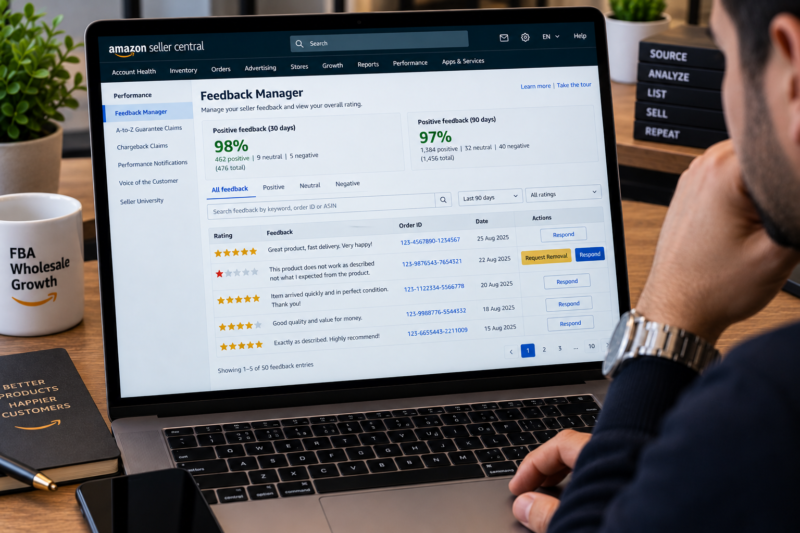
Amazon will remove seller feedback that is a product review rather than a seller review that contains obscene language or personal information or that relates to an FBA fulfilment or delivery issue that was Amazon’s responsibility. Request removal through the Feedback Manager in Seller Central by clicking Request Removal beside the relevant entry. For feedback Amazon will not remove respond publicly through the Seller Central feedback manager to demonstrate professional account management. Prevent future negative feedback by verifying ASIN match before every listing inspecting incoming stock and ensuring your prep standards protect products in transit.
Seller Feedback vs Product Reviews — Understanding the Difference
The distinction between seller feedback and product reviews is one of the most misunderstood aspects of Amazon’s rating system for new sellers. Both appear to rate an experience on Amazon but they measure fundamentally different things and have different implications for your account health:
| Type | What It Rates | Account Health Impact | Where It Appears |
|---|---|---|---|
| Seller Feedback | The buyer’s overall experience of buying from you — delivery speed communication product accuracy | Direct — 1 or 2 star rating counts as ODR defect | Seller profile — Feedback Manager in Seller Central |
| Product Review | The buyer’s experience of the product itself — quality performance features whether it matches description | None — product reviews do not affect ODR or AHR | Product listing page — star rating under the product title |
The distinction matters because buyers frequently confuse the two — a buyer who intends to leave a product review sometimes leaves seller feedback instead and vice versa. When a buyer leaves seller feedback that is clearly commenting on the product rather than the seller experience — for example a 1-star seller feedback entry that says the product quality is poor without any reference to delivery or seller behaviour — this feedback may be eligible for Amazon to remove as a misplaced product review.
When Amazon Will Remove Negative Seller Feedback
Amazon has a clear and published set of criteria under which it will remove seller feedback on request. Understanding these criteria precisely is the key to knowing which feedback entries are worth requesting removal for and which are not. Amazon will remove seller feedback in the following circumstances:
| Amazon Will Remove If | Example Feedback Content |
|---|---|
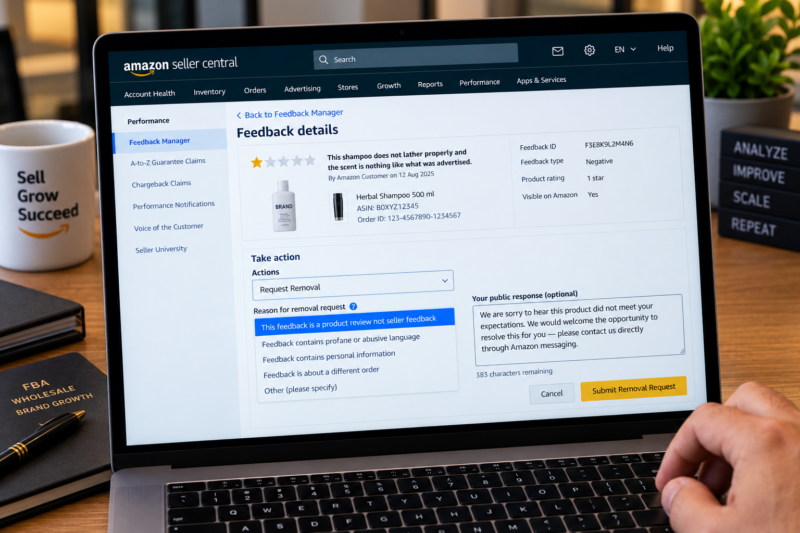
| The feedback is a product review — comments only on the product not the seller | This shampoo does not lather well and smells strange — not what I expected from the product — no mention of seller or delivery |
| The feedback contains obscene or profane language | Any feedback containing language that violates Amazon’s community guidelines |
| The feedback includes personally identifiable information | Feedback that includes a person’s full name address phone number or email address |
| The feedback relates to an FBA fulfilment or delivery issue that was Amazon’s responsibility | Item arrived late — delivery was damaged — item was not delivered — where the issue was Amazon’s courier or warehouse fault |
🚫 Amazon Will NOT Remove Feedback If
The feedback genuinely relates to the seller’s behaviour — product condition listing accuracy or seller communication — even if the seller believes the feedback is unfair or inaccurate. Amazon does not remove feedback simply because the seller disagrees with it. The only grounds for removal are the specific criteria above — all other feedback regardless of its content remains on your account for 90 days before ageing out of your seller rating calculation.
How to Request Feedback Removal in Seller Central
The feedback removal request process is straightforward but must be done through the correct channel — the Feedback Manager in Seller Central. Do not contact Seller Support or send buyer messages requesting feedback removal — both approaches violate Amazon’s policies and can generate additional account health issues. Here is the correct process:
Navigate to Performance — Feedback in Seller Central
Log in to Seller Central and click Performance in the top navigation bar. Select Feedback from the dropdown. This opens the Feedback Manager page which shows all seller feedback left on your account — positive neutral and negative — in reverse chronological order.
Review Every Negative Feedback Entry Against Amazon’s Removal Criteria
Read the full text of every negative feedback entry — 1 or 2 star ratings. For each one assess whether it meets Amazon’s removal criteria — is it entirely a product review with no mention of seller behaviour delivery or communication? Does it contain inappropriate language? Does it relate to an FBA delivery failure? Be honest in your assessment — requesting removal for feedback that clearly relates to seller behaviour will be rejected and repeated invalid removal requests may attract negative attention to your account.
Click the Actions Dropdown and Select Request Removal
For any feedback entry that meets the removal criteria click the Actions dropdown in the right column of the feedback row and select Request Removal. You will be asked to confirm the reason for your removal request — select the most accurate applicable reason from the options provided. Amazon’s review team assesses the request typically within 1 to 3 business days.
Monitor the Removal Request Status
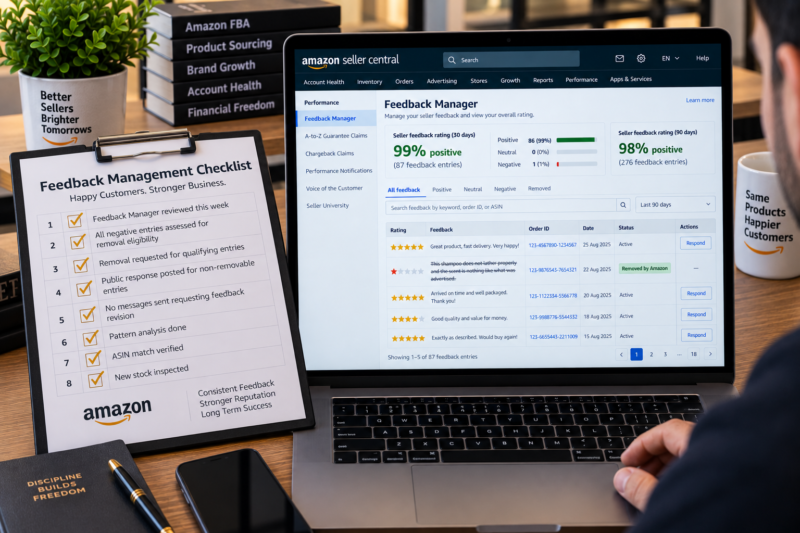
Once submitted the feedback entry shows a Removal Requested status in the Feedback Manager. Amazon will either approve the removal — in which case the feedback is struck through and marked as Removed by Amazon and your ODR improves accordingly — or deny the request in which case the feedback remains active. If a removal request is denied you cannot resubmit the same request — instead focus your effort on the public response outlined below.
How to Respond Publicly to Negative Feedback You Cannot Remove
For negative feedback entries that do not meet Amazon’s removal criteria your best available action is to post a professional public response visible to anyone who reads your seller feedback page. A well-written public response cannot remove the feedback or improve your ODR directly — but it demonstrates to prospective buyers that you take customer issues seriously and respond professionally. Here is how to write an effective public response:
| ✅ Effective Public Response | ❌ Ineffective Public Response |
|---|---|
| Acknowledge the customer’s experience — we are sorry to hear this order did not meet your expectations | Dispute the customer’s account — this feedback is inaccurate and unfair |
| Offer to resolve — please contact us directly so we can make this right for you | Ask the buyer to change their feedback — this violates Amazon’s policies |
| State your quality commitment — we hold every order to our strict quality standards | Explain why the customer is wrong — making the response combative |
| Keep it brief — two to three sentences maximum — professional and empathetic | Write a lengthy defensive response that draws more attention to the negative feedback |
EXAMPLE PUBLIC RESPONSE — PRODUCT CONDITION COMPLAINT
We sincerely apologise that the product you received did not arrive in the condition you expected. We take product quality very seriously and inspect all stock before it is sent to Amazon FBA. We would welcome the opportunity to resolve this for you — please contact us through Amazon’s messaging system and we will ensure this is made right. Thank you for taking the time to leave your feedback.
Never Ask Buyers to Change or Remove Their Feedback
Amazon’s seller policies strictly prohibit contacting buyers to request feedback revision or removal. Sending a buyer a message — whether through Amazon’s messaging system or any other channel — asking them to change update or delete their feedback is a direct policy violation that can result in a warning or account action against you. The only permitted action involving the buyer in relation to feedback is the general offer to resolve their issue through Amazon’s messaging system — which may result in the buyer voluntarily revising or removing their feedback without prompting — but you cannot explicitly request this revision.
How Feedback Ages Out of Your Seller Rating
All seller feedback — positive and negative — is included in different seller rating windows. Understanding these windows helps you understand how quickly your rating will recover after a period of negative feedback even when removal is not possible:
| Feedback Window | What It Covers | Where It Appears |
|---|---|---|
| 30 days | All feedback left in the past 30 days — most recent snapshot | Seller profile — shown to buyers as 30-day rating |
| 90 days | All feedback left in the past 90 days — ODR relevant window also 60 days | Seller profile — shown to buyers as 90-day rating |
| 12 months | All feedback left in the past 12 months — broader reputation view | Seller profile — shown to buyers as 12-month rating |
| Lifetime | All feedback ever left on your account — complete history | Seller profile — shown to buyers as lifetime rating and total feedback count |
Negative feedback that cannot be removed does not affect your ODR forever — it only counts as an ODR defect within the 60-day rolling window. After 60 days it exits the ODR calculation entirely. However it remains in your seller feedback history and contributes to your 90-day and 12-month ratings visible on your seller profile. Accumulating positive feedback through high-volume clean selling is the most effective way to dilute the impact of negative entries that cannot be removed.
Preventing Negative Feedback Through Better Sourcing and Listing Decisions
The most powerful negative feedback strategy is prevention — ensuring the conditions that cause buyers to leave negative feedback in the first place do not exist. For wholesale FBA sellers the most common sources of negative feedback are entirely within the seller’s control:
| Negative Feedback Source | Prevention Action |
|---|---|
| Product does not match listing — wrong ASIN | Verify EAN-to-ASIN match before every new listing — check title images and product details match your physical product |
| Damaged product received by customer | Improve prep — bubble wrap all fragile products — use correct void fill — inspect supplier stock before prepping |
| Product quality below customer expectation | Source from authorised distributors — order test units before placing large orders on new products — monitor feedback patterns by ASIN |
| Expired product reaching customer | Check expiry dates on all food and supplement deliveries — create removal orders for FBA stock approaching expiry |
| Listing description inaccurate or misleading | Review all listing content regularly — remove any claims not verified by the product — update if supplier changes product specification |
Your Feedback Management Checklist
| Feedback Management Check | Confirmed |
|---|---|
| Feedback Manager reviewed this week — all negative entries read in full | ☐ |
| Every new negative entry assessed against Amazon’s removal criteria | ☐ |
| Removal requested for all eligible product review feedback entries | ☐ |
| Public response posted for all non-removable negative entries — professional and empathetic | ☐ |
| No messages sent to buyers requesting feedback revision or removal | ☐ |
| Pattern analysis done — any ASIN generating multiple feedback entries identified | ☐ |
| All new product listings verified for ASIN match before going live | ☐ |
| Incoming stock inspected — no damaged or substandard units sent to FBA | ☐ |
| All feedback management checks complete — ODR and seller rating protected | ✅ Done |
Conclusion — Remove What You Can and Prevent What You Cannot Remove
Negative seller feedback management for wholesale FBA sellers has two distinct components — the reactive process of assessing removal eligibility and requesting removal for qualifying entries and the proactive process of eliminating the sourcing listing and prep mistakes that cause buyers to leave negative feedback in the first place. The reactive process is a five-minute weekly task once you know the removal criteria and the request process. The proactive process is built into your core wholesale sourcing and prep habits. Together they keep your seller feedback profile healthy your ODR low and your Account Health Rating in the safe zone consistently.
Find your next wholesale brand through our Brands Directory. Research every product with Keepa. Confirm every margin with AMZScout. And manage your seller feedback using the process in this guide.
FIND YOUR NEXT WHOLESALE BRAND — BUILD A POSITIVE FEEDBACK PROFILE
Browse 5,000+ Verified Wholesale Brands Free
Find verified wholesale trade contacts in the Brandhunterz Brands Directory — source high-quality products from authorised suppliers and build a strong positive seller feedback profile on Amazon FBA.
About the Author
This article is written by the team at Brandhunterz Ltd — a UK registered Amazon FBA wholesale sourcing company (Company No: 15342697) registered in England and Wales since 2023. Visit brandhunterz.com to learn more.