
AMAZON FBA WHOLESALE TIPS
Amazon FBA Reimbursements — How to Claim Money Amazon Owes You
By Brandhunterz Ltd | Company No: 15342697 | 11 minute read
Affiliate Disclosure: This article contains affiliate links. If you purchase through our links we may earn a commission at no extra cost to you. We only recommend tools we genuinely use and believe in. Read our full disclaimer.
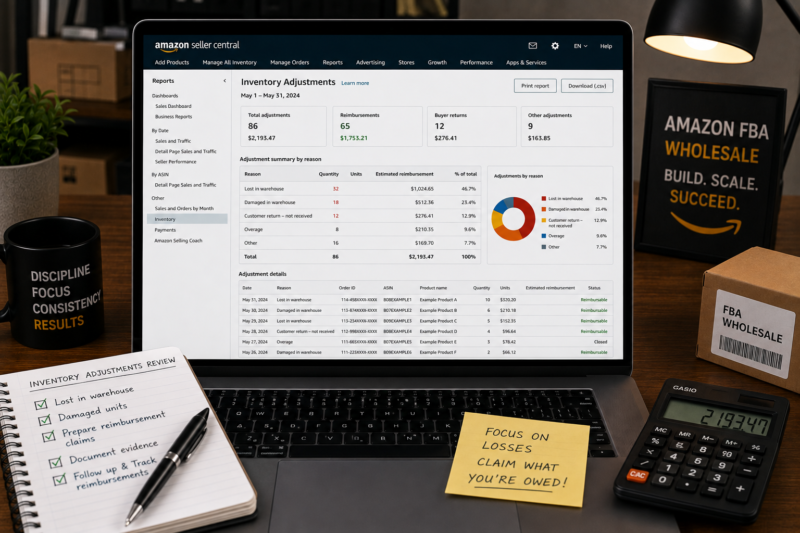
Most Amazon FBA sellers have money sitting unclaimed in their accounts right now. Amazon loses, damages and misprocesses inventory on a regular basis — and while they do reimburse sellers for these errors automatically in many cases, a significant number of valid reimbursements go unclaimed simply because sellers do not know how to find and claim them.
We are Brandhunterz Ltd — a UK registered wholesale sourcing company (Company No: 15342697) — and reimbursement auditing is something we recommend every Amazon FBA wholesale seller does at minimum once per quarter. In this guide we explain every type of reimbursement available, how to find unclaimed amounts and exactly how to claim what Amazon owes you.
💡 Quick Summary
Amazon owes sellers reimbursements for lost inventory, warehouse-damaged stock, customer refunds on items never returned, inbound shipment discrepancies and FBA fee overcharges. All claims must be submitted within 18 months of the incident. Conduct a full reimbursement audit every quarter — the average active FBA seller has hundreds of pounds in unclaimed reimbursements at any given time.
Why Amazon Owes You Money
Amazon’s fulfilment network processes millions of orders every day across hundreds of warehouses. At that scale errors are inevitable — items get lost during putaway, damaged by warehouse equipment, misrouted between fulfilment centres or refunded to customers who never actually return the product. In every one of these situations Amazon is contractually obligated to compensate you as the seller at the estimated sale value of the item.
The problem is Amazon’s automated reimbursement system does not catch every valid case. Reimbursement specialists consistently estimate that between 1 and 3 percent of all FBA inventory is affected by errors at any given time — representing significant unclaimed money for active wholesale sellers who do not audit regularly.
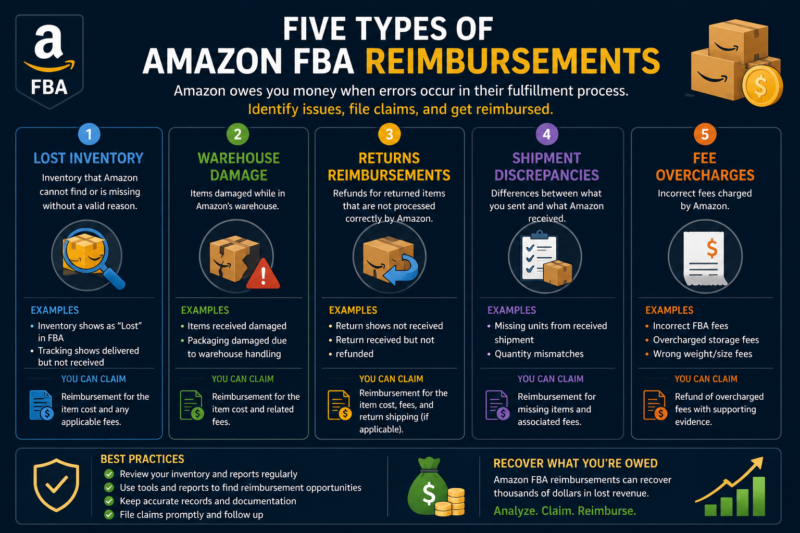
The Five Types of FBA Reimbursements
Type 1 — Lost Inventory
| What it is | Units that arrive at an Amazon warehouse but cannot be located |
| When to claim | After 30 days of the item showing as lost in your inventory report |
| Reimbursement value | Estimated sale price minus applicable Amazon fees |
Lost inventory is the most common reimbursement type. Items can be lost during receiving, misplaced during putaway or mislaid during inter-warehouse transfers. Amazon typically conducts a search for the item before issuing reimbursement — if found it is returned to your inventory. If not found after investigation Amazon issues a reimbursement at the estimated sale value. Always wait the full 30 days before opening a case — early claims are often rejected while the search is still ongoing.
Type 2 — Warehouse Damaged Inventory
| What it is | Stock damaged by Amazon staff or equipment inside the fulfilment centre |
| When to claim | When item appears as warehouse damaged in your inventory adjustment report |
| Reimbursement value | Estimated sale price minus applicable Amazon fees |
Amazon warehouses are busy environments where forklifts, conveyors and automated systems handle large volumes of stock. Occasionally your products are damaged in this process. Amazon’s automated system catches many of these cases and reimburses automatically — but not all. Your Inventory Adjustments report flags these incidents and any not already reimbursed are claimable.
Type 3 — Customer Returns Not Received
| What it is | Amazon issued a customer refund but the item was never physically returned |
| When to claim | After 45 days from the refund date if the item has not been received back |
| Reimbursement value | Full refund amount credited back to your account |
This is one of the most frequently missed reimbursement types and one of the most valuable to audit. When Amazon issues a customer refund they expect the customer to return the product within 45 days. If the item is never returned Amazon should automatically reimburse you the refund amount — but their automated system does not always catch every case. Regular checks of your Returns report against your refunds report identifies these missed reimbursements quickly.
Type 4 — Inbound Shipment Discrepancies
| What it is | Amazon checked in fewer units than declared in your shipment |
| When to claim | After shipment is closed and unit count discrepancy confirmed |
| Reimbursement value | Estimated sale value of missing units |
Every time you close a shipment in Seller Central compare the units you declared versus the units Amazon confirmed received. Discrepancies of even 2 to 3 units per shipment accumulate to significant sums over dozens of shipments. Keep your packing lists and box count records for every shipment — you need these as supporting evidence when opening a case for a shipment discrepancy claim.
Type 5 — FBA Fee Overcharges
| What it is | Amazon charged the wrong FBA fulfilment fee based on incorrect product dimensions |
| When to claim | When Amazon measures your product incorrectly into a higher size tier |
| Reimbursement value | Difference between charged fee and correct fee for all affected units |
Amazon measures products in their fulfilment centres to determine the size tier and therefore the FBA fulfilment fee. If a product is measured incorrectly — assigned to a larger size tier than it actually occupies — you are overcharged on every unit sold until the error is corrected. Requesting a measurement review through Seller Central corrects the fee going forward and can result in reimbursement for the overcharge on historical sales. Use Helium 10 to cross-check Amazon’s recorded dimensions against your product’s actual measurements.
How to Audit Your Account for Unclaimed Reimbursements
Here is the complete manual process for auditing your FBA account for unclaimed reimbursements. Run this process every quarter:
Download Your Inventory Adjustments Report
Go to Seller Central then Reports then Fulfilment then Inventory then Inventory Adjustments. Download the report covering the past 18 months — the full eligible claim window. This report lists every inventory adjustment including items marked lost, damaged, found or transferred. Filter for negative adjustments — these are potential reimbursement events.
Download Your Reimbursements Report
Go to Reports then Fulfilment then Payments then Reimbursements. Download for the same 18-month period. This is the list of everything Amazon has already reimbursed you for. Cross-reference every negative adjustment in Step 1 against this list — any negative adjustment without a corresponding reimbursement entry is a potential claim.
Audit Customer Returns for Unreturned Refunds
Go to Reports then Fulfilment then Customer Concessions then Returns. Download the past 6 months. Identify all refunds issued more than 45 days ago. Check whether the corresponding item was received back at the warehouse — any refunded order with no return receipt after 45 days is eligible for a reimbursement claim.
Review All Closed Inbound Shipments
Go to Inventory then Manage FBA Shipments then Closed. For each shipment closed in the past 18 months compare the units you declared in the shipment plan against the units Amazon confirmed received. Any shortfall not already reimbursed — and not explained by a clear packing error on your side — is claimable. Cross-reference your original packing list records for supporting evidence.
Check Product Dimensions for Fee Overcharges
Go to Manage Inventory and check the recorded dimensions for each of your products. Compare Amazon’s recorded dimensions against your product’s actual measurements. If any product is recorded in a larger size tier than it physically occupies you are being overcharged on every sale. Request a measurement review through Seller Support and claim a refund for the difference on all historical sales.
Open Cases for All Valid Unclaimed Reimbursements
For each identified claim go to Help then Contact Us in Seller Central and select FBA Issue as the contact reason. Provide the specific FNSKU or ASIN, the relevant order ID or shipment ID, the date of the incident and the exact number of units and estimated value involved. Be specific and factual. Amazon typically responds within 7 to 14 business days — follow up if you have not received a response after 14 days.
💡 Critical — The 18 Month Claim Window
All reimbursement claims must be submitted within 18 months of the incident date. After this window closes the claim is permanently invalid — Amazon will not process it regardless of its merit. Never let more than 6 months pass without running a full reimbursement audit. Missing the window means accepting a permanent loss on money you are legally owed.
Tools That Automate Reimbursement Auditing
Manual auditing is effective but time-consuming for sellers with large catalogues or high order volumes. These tools automate much of the process:
| Tool | Cost Model | Best For |
|---|---|---|
| Helium 10 Refund Genie | Included in Helium 10 subscription | Sellers already using Helium 10 — generates ready-to-submit reports |
| GETIDA | 25% of recovered amount — no upfront cost | Sellers wanting fully managed service with no time investment |
| Seller Investigators | 25% of recovered amount | High-volume sellers wanting human review and expert case submission |
| Manual Audit | Free — your time only | New and smaller sellers with manageable order volumes |
For most wholesale sellers starting out the best approach is using Helium 10 Refund Genie — it is included in your Helium 10 subscription at no additional cost and generates the specific case content you need to submit claims directly in Seller Central. As your order volume grows and the manual process becomes unmanageable a professional service like GETIDA that works purely on a percentage of recovered funds becomes the most practical option.
How Much Can You Realistically Recover?
Recovery amounts vary by sales volume, product values and how long since your last audit. Here are realistic expectations based on typical FBA wholesale seller experience:
| Monthly Revenue | Typical Annual Reimbursements | Recommended Approach |
|---|---|---|
| Under £1,000 | £50 to £150 | Manual audit every 6 months |
| £1,000 to £5,000 | £150 to £600 | Helium 10 Refund Genie quarterly |
| £5,000 to £20,000 | £600 to £2,500 | Helium 10 or professional service |
| Above £20,000 | £2,500 to £10,000+ | Professional reimbursement service |
Common Reimbursement Mistakes to Avoid
| Mistake | Consequence | Prevention |
|---|---|---|
| Waiting over 18 months | Claim window expires — money permanently lost | Run full audit every 6 months without exception |
| Claiming already reimbursed items | Account warning for duplicate or fraudulent claims | Always cross-reference reimbursements report before submitting |
| Vague or incomplete case descriptions | Case rejected — must resubmit with full details | Always include FNSKU date quantity and specific incident type |
| Not keeping shipment records | Cannot prove discrepancy without supporting documentation | Keep all packing lists and box count records for 24 months |
| Claiming before Amazon’s investigation period | Claim rejected — item may still be being searched for | Wait 30 days for lost inventory before opening a case |
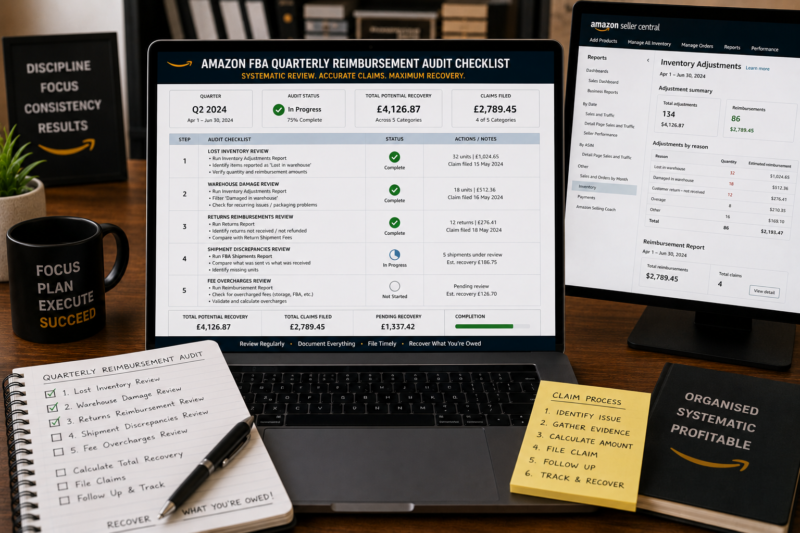
Your Quarterly Reimbursement Audit Checklist
Schedule this as a recurring quarterly task — block 2 to 3 hours in your calendar every 3 months and work through every item:
| Audit Task | Where to Find the Data | Period to Check |
|---|---|---|
| Inventory Adjustments vs Reimbursements | Reports → Fulfilment → Inventory | Past 18 months |
| Unreturned customer refunds | Reports → Customer Concessions → Returns | Past 6 months |
| Shipment unit discrepancies | Inventory → Manage FBA Shipments → Closed | Past 18 months |
| Product dimension accuracy | Manage Inventory → product dimensions | All active ASINs |
| Open case follow-ups | Help → Manage Your Cases | Any case over 14 days old |
Conclusion — Reimbursements Are Money You Are Owed — Claim Them
FBA reimbursements are not a bonus — they are money Amazon contractually owes you for inventory it has lost, damaged or misprocessed. Leaving them unclaimed is the equivalent of leaving cash on the table every month your business operates. A quarterly audit process that takes a few hours of your time consistently recovers hundreds to thousands of pounds per year depending on your sales volume.
Use the manual audit process outlined above alongside Helium 10 Refund Genie to systematically identify and claim every valid reimbursement within the 18-month window. Use Keepa to track your inventory trends and identify unexpected drops that might indicate unreimbursed losses. And use AMZScout to keep your product research sharp so you continue sourcing profitable products while your reimbursement process runs in the background.
For the complete Amazon FBA wholesale system browse our course library or find your next wholesale product in the Brandhunterz Brands Directory.
MAXIMISE YOUR AMAZON FBA PROFITS
Get the Complete FBA Wholesale System
Our courses cover everything from finding wholesale suppliers to managing your FBA business profitably — including the reimbursement strategies and operational systems in this article and throughout this series.
About the Author
This article is written by the team at Brandhunterz Ltd — a UK registered Amazon FBA wholesale sourcing company (Company No: 15342697) registered in England and Wales since 2023. Visit brandhunterz.com to learn more.