
AMAZON FBA PRODUCT RESEARCH
How to Find Products With Low Competition on Amazon FBA
By Brandhunterz Ltd | Company No: 15342697 | 13 minute read
Affiliate Disclosure: This article contains affiliate links. If you purchase through our links we may earn a commission at no extra cost to you. We only recommend tools we genuinely use and believe in. Read our full disclaimer.
The single most important competitive advantage any Amazon FBA wholesale seller can have is finding products where demand is strong but the number of sellers competing for the Buy Box is low. A listing with 50 units selling per month shared between 2 sellers means each seller averages 25 sales per month. The same listing with 15 sellers means each seller averages just 3 sales — and that is before accounting for the fact that Buy Box rotation is not perfectly equal and the lowest-priced seller always gets the majority share. Finding low-competition products is not about finding obscure products nobody wants — it is about finding popular products that have not yet been discovered by large numbers of wholesale sellers.
We are Brandhunterz Ltd — a UK registered wholesale sourcing company (Company No: 15342697) — and in this complete guide we show you exactly how to find low-competition Amazon FBA products using Keepa SmartScout and AMZScout — covering what low competition actually looks like in the data how to measure it accurately and the specific research techniques that surface listings with strong demand and a thin seller pool every time.
💡 Quick Summary
Low competition on an Amazon FBA listing means fewer than 6 active FBA sellers no Amazon presence and a stable Buy Box price that has not been driven down by seller undercutting. Find these listings by filtering SmartScout’s brand database to a maximum of 5 sellers checking the seller count history on Keepa and looking for brands where the same 2 to 3 sellers have held the listing consistently for 12 months. These are the listings where a new wholesale seller can enter and immediately begin receiving meaningful Buy Box share.
What Low Competition Actually Means on an Amazon FBA Listing
Low competition does not simply mean few sellers today. It means few sellers consistently over time — confirmed by historical data rather than a snapshot observation. A listing might show 3 sellers today but have had 20 sellers 3 months ago when prices crashed and 15 sellers dropped out. Entering that listing now feels like low competition but you are actually entering at the bottom of a price war cycle — and prices will likely recover only if demand outpaces supply again. True low competition means the seller count has been consistently low over the past 6 to 12 months with stable prices throughout.
| Seller Count Scenario | What It Actually Means | Safe to Source |
|---|---|---|
| 2 to 3 sellers — stable for 12 months — prices flat | Genuine low competition — protected listing — strong opportunity | ✅ Yes |
| 3 sellers today — was 18 sellers 3 months ago | Post-price-war recovery — sellers exited after margin collapse | ❌ Avoid |
| 5 sellers — slowly rising from 3 over 6 months | Growing interest — competition building — enter now or it closes | ⚠️ Move fast |
| 1 seller only — same seller for 12 months | May be brand-gated or restricted — check before approaching supplier | ⚠️ Verify first |
| 10 or more sellers — stable at that level | Saturated listing — Buy Box share too diluted for healthy margins | ❌ Avoid |
Method 1 — Finding Low Competition Products Using SmartScout
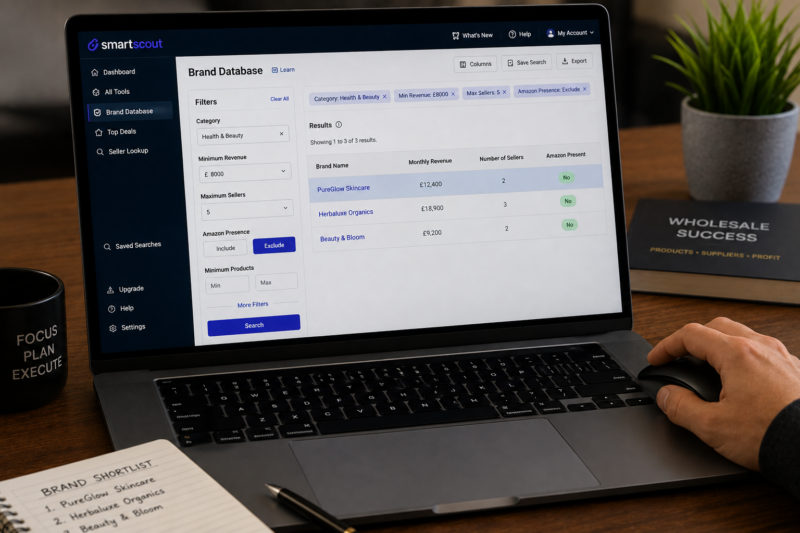
SmartScout is the fastest tool for finding low-competition wholesale listings because it allows you to filter the entire Amazon catalogue by seller count at the brand level — returning a shortlist of brands where the average number of sellers per listing is below your set threshold. Here is the exact filter combination to use:
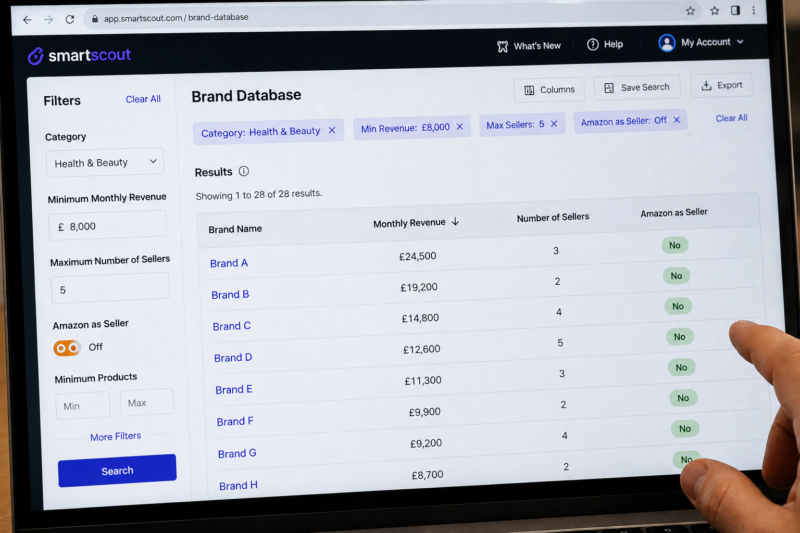
Open SmartScout — Navigate to Brands — Select Category
Log in to SmartScout and open the Brands section. Select your target category from the left filter panel — for example Health and Beauty or Pet Supplies. This filters the brand database to show only brands selling within that category on your selected Amazon marketplace.
Set Maximum Sellers Filter to 5
In the filter panel set the maximum number of sellers to 5. This tells SmartScout to return only brands where the average number of sellers across their product range is 5 or fewer. Every brand returned by this filter is a low-competition sourcing opportunity by definition — you are not manually reviewing individual listings but filtering at scale across thousands of brands simultaneously.
Set Minimum Monthly Revenue to £8,000
Set the minimum brand monthly revenue to £8,000. This ensures the brands returned have meaningful Amazon demand — they are not low-competition because nobody wants their products but because few sellers have discovered them yet. The combination of high revenue and low seller count is the exact profile you are looking for in every wholesale sourcing opportunity.
Toggle Off Amazon as a Seller
Use SmartScout’s Amazon seller exclusion toggle to filter out any brand where Amazon itself is active on the listing. Even a brand with only 2 third-party sellers is not a viable opportunity if Amazon holds the Buy Box — because Amazon’s presence pushes all third-party sellers out of meaningful sales volume regardless of their price or fulfilment method.
Sort Results by Revenue Descending — Work Top to Bottom
Sort the filtered results by monthly revenue from highest to lowest. The brands at the top of the list have the highest confirmed Amazon demand with the fewest competing sellers — making them your highest-priority research targets. Work through the list from top to bottom clicking into each brand to check individual product seller counts and revenue figures before adding the brand to your outreach shortlist.
Method 2 — Confirming Low Competition History on Keepa
SmartScout tells you what the competition looks like today. Keepa tells you what the competition has looked like over the past 12 to 24 months. Both confirmations are required before sourcing any product. Here is how to use Keepa specifically to verify that a listing’s low competition is genuine and sustained rather than a temporary post-price-war trough:
| Keepa Check for Low Competition | What You Are Looking For | Signal |
|---|---|---|
| New seller count line — flat and low across 12 months | Seller count has been consistently low — not a recent drop from a higher level | ✅ Genuine low competition |
| New seller count line — sharp drop 2 to 3 months ago | Sellers recently exited — likely after a price war — competition temporarily low | ❌ Post-price-war trough |
| Blue Buy Box price — flat across 12 months at same level | Price has been protected — no undercutting pressure from additional sellers | ✅ Healthy market price |
| Blue price dropped sharply then recovered | Previous price war that resolved — risk of recurrence if more sellers enter | ⚠️ Proceed cautiously |
| Orange Amazon line — absent for all 12 months | Amazon has never competed — full Buy Box available to third-party sellers | ✅ Essential pass |
Method 3 — The Seller Stalking Technique Using AMZScout
The seller stalking technique involves finding a consistently low-competition listing and then researching every other product sold by the same small group of sellers on that listing. Sellers who have found and held a low-competition listing for 12 months or more almost always have other similarly positioned listings in their portfolio — giving you a direct shortcut to multiple low-competition opportunities from a single starting point.
Identify a Confirmed Low-Competition Listing
Start with any listing that passes your full research criteria — consistent Keepa BSR drops no orange line stable blue price and 2 to 4 sellers consistently over 12 months. Note the names of every seller currently listed on the offer page for that ASIN.
Search Each Seller in SmartScout Sellers Section
Go to the Sellers section in SmartScout and search for each seller by their seller name or storefront ID. Click into their profile to see every brand and product they are selling across Amazon. This reveals their full wholesale portfolio — every brand they have sourced from and are currently selling.
Identify Other Brands They Stock With Low Seller Counts
Scan through each seller’s brand portfolio looking for brands where the seller count is similarly low — 2 to 4 sellers per listing. Every brand in this category is a potential low-competition sourcing opportunity that the successful seller has already validated. Add each qualifying brand to your research shortlist for Keepa validation and margin calculation.
Validate Every Brand in Keepa Before Approaching Suppliers
Never approach a supplier based solely on SmartScout data. Run every product from every shortlisted brand through the full Keepa validation — 12 months BSR consistency no orange line stable blue price. Only brands that pass every Keepa check proceed to supplier outreach. The seller stalking technique generates leads quickly — Keepa validation ensures you only pursue the genuinely strong opportunities within that lead pool.
Why Some Listings Stay Low Competition — The Protective Moats
Understanding why some listings remain low-competition despite strong demand is as valuable as knowing how to find them. Listings that stay protected from high seller counts almost always have one or more of the following structural characteristics:
| Protective Factor | How It Limits Competition |
|---|---|
| Brand requires an authorised dealer application | Most sellers cannot get approved — only authorised wholesalers can stock it |
| Brand enforces MAP pricing strictly | Minimum Advertised Price prevents race-to-bottom — keeps margins viable for all sellers |
| Product is ungated but not well known among sellers | Research tools have not surfaced it prominently — early mover advantage still available |
| High minimum order quantity from supplier | Capital barrier prevents smaller sellers from entering — only established sellers can meet MOQ |
| Category requires ungating or invoice approval | Approval process filters out sellers who cannot provide a valid wholesale invoice |
The Low Competition Product Checklist — Go or No-Go
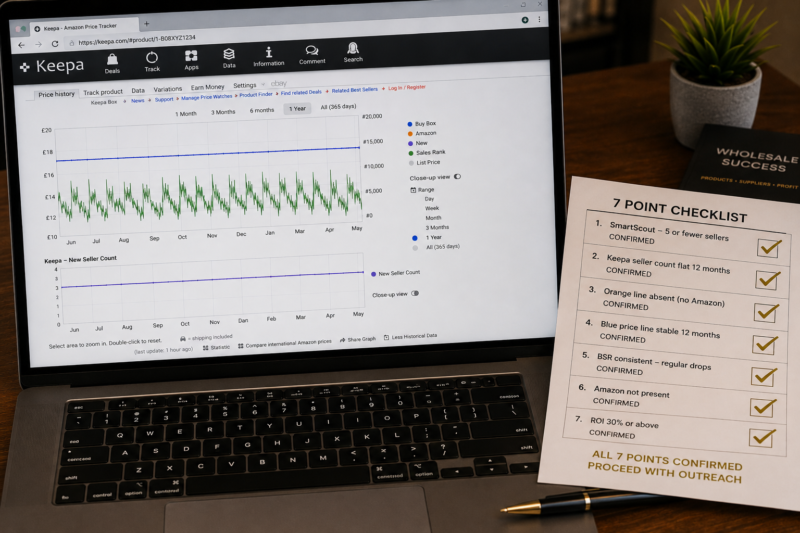
| Low Competition Checklist Item | Required to Proceed |
|---|---|
| SmartScout shows 5 or fewer sellers on brand listings | ✅ Yes |
| Keepa new seller count line — flat and low across 12 months | ✅ Yes |
| Keepa orange line absent for full 12 months | ✅ Yes |
| Keepa blue Buy Box price — stable or rising over 12 months | ✅ Yes |
| No sharp seller count drop in past 3 to 6 months on Keepa | ✅ Yes |
| BSR under 50,000 — consistent drops every 1 to 3 days | ✅ Yes |
| Minimum 30% ROI confirmed on AMZScout after all fees | ✅ Yes |
| All 7 checks passed — proceed to supplier outreach | ✅ GO |
How Many Low-Competition Products Should You Source Initially
When you find a listing that passes all seven checklist items do not immediately order a large quantity of stock. Place a test order of the minimum quantity available from the supplier — typically 6 to 24 units — to validate real sales velocity before committing larger capital. A listing with 3 sellers and 30 monthly units means you can expect to capture roughly 10 units per month as a new fourth seller. That is enough to validate the opportunity without overcommitting capital before real performance data is available.
| Stage | Units to Order | Goal |
|---|---|---|
| Test order — first order with new supplier | Minimum available — typically 6 to 24 units | Confirm real sales velocity before committing larger capital |
| Scale order — after test order sells through profitably | 30 to 60 day cover based on actual velocity | Build consistent stock level — avoid out-of-stock gaps |
| Volume order — after 3 profitable reorders confirmed | 60 to 90 day cover — negotiate volume discount | Maximise margin through volume pricing — defend listing position |
Conclusion — Low Competition is Found With Data Not Guesswork
Finding low-competition Amazon FBA products is entirely a data exercise. SmartScout surfaces the candidates at scale. Keepa confirms the historical seller count and price stability. AMZScout confirms the margin. The combination of these three tools applied in sequence gives you a systematic repeatable process for identifying low-competition wholesale opportunities every single week — without relying on guesswork intuition or tips from other sellers.
Start your SmartScout search at smartscout.com. Validate every candidate with Keepa. Confirm your margin with AMZScout. Then find the verified wholesale supplier contact through our Brands Directory and apply for your trade account immediately.
FIND YOUR NEXT LOW-COMPETITION WHOLESALE BRAND
Browse 5,000+ Verified Wholesale Brands Free
Once you have identified a low-competition product that passes every data check find its verified wholesale supplier in the Brandhunterz Brands Directory and send your trade application today.
About the Author
This article is written by the team at Brandhunterz Ltd — a UK registered Amazon FBA wholesale sourcing company (Company No: 15342697) registered in England and Wales since 2023. Visit brandhunterz.com to learn more.