
AMAZON FBA PRODUCT RESEARCH
How to Use Helium 10 for Amazon FBA Wholesale Product Research
By Brandhunterz Ltd | Company No: 15342697 | 14 minute read
Affiliate Disclosure: This article contains affiliate links. If you purchase through our links we may earn a commission at no extra cost to you. We only recommend tools we genuinely use and believe in. Read our full disclaimer.
Helium 10 is one of the most widely used Amazon seller research platforms available — and while it is most commonly associated with private label product development it contains several tools that are directly applicable and genuinely valuable for Amazon FBA wholesale sellers. The specific Helium 10 tools that matter for wholesale research are not the same ones private label sellers use most — wholesale sellers need accurate sales volume estimates fast margin calculations and a reliable way to scan large numbers of ASINs simultaneously to identify which products from a supplier’s price list are worth ordering. Helium 10 delivers all three.
We are Brandhunterz Ltd — a UK registered wholesale sourcing company (Company No: 15342697) — and in this complete guide we show you exactly which Helium 10 tools to use for wholesale product research how to use each one correctly and the precise workflow that combines Helium 10 with Keepa to make faster more accurate sourcing decisions on every product you evaluate.
💡 Quick Summary
The four Helium 10 tools most valuable for Amazon FBA wholesale research are Black Box for product discovery Xray for real-time sales volume and revenue data on any listing the Profitability Calculator for accurate FBA margin calculation and Magnet for understanding the keyword demand behind any product. Use Xray on every product you are considering sourcing to confirm monthly sales volume before committing to a wholesale order. Start your Helium 10 trial at helium10.com.
Why Wholesale Sellers Use Helium 10 Differently to Private Label Sellers
Private label sellers use Helium 10 primarily for keyword research — finding high-volume search terms to build their listing around and optimise their PPC campaigns. Wholesale FBA sellers have a completely different research need. They are not creating listings — they are joining existing ones. Their critical questions are how many units does this listing sell per month who is selling on it what price does it sell at and what will my exact margin be after all FBA fees. Helium 10 answers all four questions — but the tools used to answer them are different from the ones private label sellers reach for first.
| Private Label Uses Helium 10 For | Wholesale Uses Helium 10 For |
|---|---|
| Keyword research and PPC optimisation | Monthly sales volume confirmation on specific ASINs |
| Listing creation and optimisation | Exact FBA fee and profit margin calculation |
| Finding product gaps and private label opportunities | Bulk ASIN scanning of supplier price lists |
| Review analysis for product improvement | Competitor seller analysis on target listings |
| Launch strategy and ranking campaigns | Demand validation before supplier outreach |
Tool 1 — Helium 10 Xray — Sales Volume Validation on Any Listing
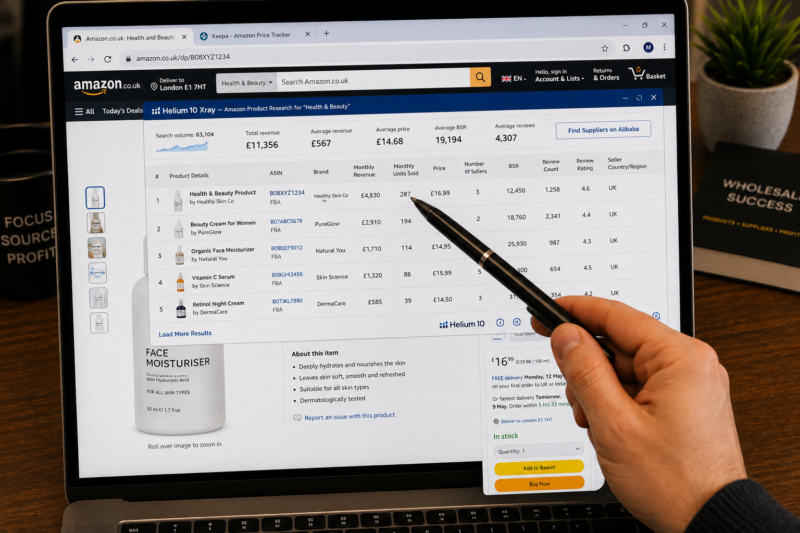
Xray is the Helium 10 Chrome extension tool that overlays real-time sales data directly onto any Amazon search results page or product page. For wholesale FBA sellers it is the fastest way to confirm how many units per month a specific product is selling and how much revenue the listing is generating — without leaving the Amazon page you are already browsing.
Here is exactly how to use Xray for wholesale product validation:
Install the Helium 10 Chrome Extension
Go to helium10.com and install the Chrome browser extension. Once installed the Helium 10 icon appears in your browser toolbar. The extension works directly on Amazon.co.uk and Amazon.com pages — no switching between tabs or copying ASINs into a separate tool. The Xray button appears as an overlay when you are browsing any Amazon page.
Open the Target Product Page on Amazon
Navigate to the Amazon listing for the product you are researching. Go to the full product page — not the search results page — to run Xray on a specific ASIN. Click the Helium 10 extension icon in your Chrome toolbar then select Xray from the dropdown menu. Xray opens a data overlay panel at the top of the page.
Read the Monthly Sales Volume and Revenue Data
The Xray overlay shows you the estimated monthly sales volume in units — for example 287 units per month — the estimated monthly revenue — for example £4,830 — the current Buy Box price the BSR and the number of sellers. For wholesale research the monthly sales volume figure is the most important number. It tells you the total demand available on this listing to be shared among all sellers currently on the offer page.
Calculate Your Expected Monthly Sales Share
Divide the Xray monthly sales volume by the number of active FBA sellers plus one — accounting for your entry onto the listing. If Xray shows 240 units per month and there are currently 3 FBA sellers entering as the fourth seller gives you an estimated 60 units per month as your Buy Box share. At a net profit of £6.00 per unit that is £360 per month net profit from a single product line — before you have placed even your second reorder.
Cross-Reference Xray Data With Keepa
Xray gives you a current sales volume estimate. Keepa gives you the 12-month historical context that confirms whether that volume is consistent or a recent anomaly. Always cross-reference Xray data with Keepa before making any sourcing decision — if Xray shows strong current sales but Keepa shows an erratic BSR history the Xray figure may be misleading. Both tools together give you the complete picture.
Tool 2 — Helium 10 Profitability Calculator — Exact FBA Margin in Seconds
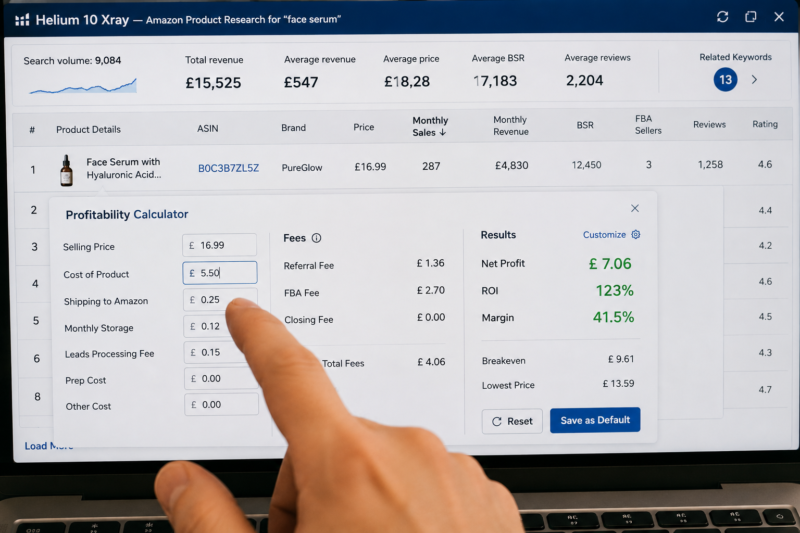
The Helium 10 Profitability Calculator is built directly into the Xray Chrome extension overlay — meaning you can calculate your exact FBA margin without leaving the Amazon product page you are already viewing. It pulls the product’s exact dimensions and weight directly from the Amazon listing and calculates the precise FBA fulfilment fee for that specific product automatically.
| Profitability Calculator Field | What to Enter | Where to Get the Figure |
|---|---|---|
| Product selling price | 12-month average Buy Box price | Keepa blue line 12-month average — not today’s price |
| Cost of product | Your wholesale buy price per unit | Supplier price list — or estimated at 40 to 60% below retail |
| FBA fees | Auto-calculated from product dimensions | Helium 10 pulls from Amazon listing data automatically |
| Shipping to Amazon | Your inbound shipping cost per unit | Estimate £0.20 to £0.40 per unit for standard shipments |
| Monthly storage cost | Estimate based on size tier | Estimate £0.10 to £0.25 per unit per month for standard products |
HELIUM 10 PROFITABILITY CALCULATOR — WORKED EXAMPLE
| Input or Fee | Amount |
| Selling Price — 12-month Keepa average Buy Box | £16.99 |
| Amazon Referral Fee — auto-calculated by Helium 10 — 8% | – £1.36 |
| FBA Fulfilment Fee — auto-calculated from dimensions | – £2.70 |
| Wholesale Cost Price — entered manually | – £5.50 |
| Inbound Shipping to FBA — entered manually | – £0.25 |
| Monthly Storage Fee — estimated per unit | – £0.12 |
| Net Profit Per Unit | £7.06 |
| ROI | 123% ✅ |
| Estimated Monthly Profit — 60 units as 4th seller | £423.60 ✅ |
Tool 3 — Helium 10 Black Box — Wholesale Product Discovery
Black Box is Helium 10’s product database search tool — a searchable filterable catalogue of Amazon products that allows you to apply specific criteria and surface products matching your exact sourcing requirements. For wholesale FBA sellers Black Box is most useful as a discovery tool — helping you identify product types and categories where demand is strong and competition is manageable before narrowing down to specific brands and ASINs.
| Black Box Filter | Wholesale Setting | Why This Setting |
|---|---|---|
| Category | Your target category | Focus results on your sourcing area |
| Monthly Revenue Minimum | £3,000 | Confirms meaningful consistent demand on the listing |
| Number of Sellers Maximum | 6 | Keeps competition low enough for viable Buy Box share |
| Review Rating Minimum | 4.0 stars | Filters out poor-quality listings with high return rates |
| Price Minimum | £10.00 | Ensures selling price is high enough for viable FBA margin |
| Price Maximum | £50.00 | Keeps products within a manageable wholesale buy price range |
Tool 4 — Helium 10 Magnet — Understanding Product Demand Depth
Magnet is Helium 10’s keyword research tool and while wholesale sellers do not use it to build listing content it does serve one specific and valuable purpose in the wholesale research workflow — confirming the depth and breadth of customer demand behind any product you are researching. A product with only one or two closely related search terms has shallow demand that could disappear quickly if buying behaviour shifts. A product with dozens of related high-volume search terms has broad deep demand that is structurally more resilient.
Enter the Product’s Primary Search Term Into Magnet
Open Magnet inside your Helium 10 dashboard and enter the main search term for the product you are researching — for example “vitamin c serum” or “dog grooming brush”. Magnet returns a ranked list of all related search terms customers use to find that product type along with their monthly search volumes on Amazon.
Check the Total Search Volume Across All Related Terms
Look at the combined monthly search volume across the top 10 related keywords. A product type with 50,000 or more combined monthly searches across multiple terms has deep broad demand — the kind that sustains consistent sales year-round across a large number of different customer search journeys. A product with under 5,000 combined searches across all related terms has shallow demand — one trend shift or competitor product launch could collapse it.
Check Search Volume Trend — Rising Stable or Declining
Magnet shows a trend indicator for each keyword — whether search volume is rising stable or declining over recent months. For wholesale sourcing always prefer products where the primary keyword search volume is stable or rising. A declining search volume trend signals weakening consumer interest in that product type — which eventually translates into falling BSR and lower sales velocity on the listing.
The Complete Helium 10 Wholesale Research Workflow
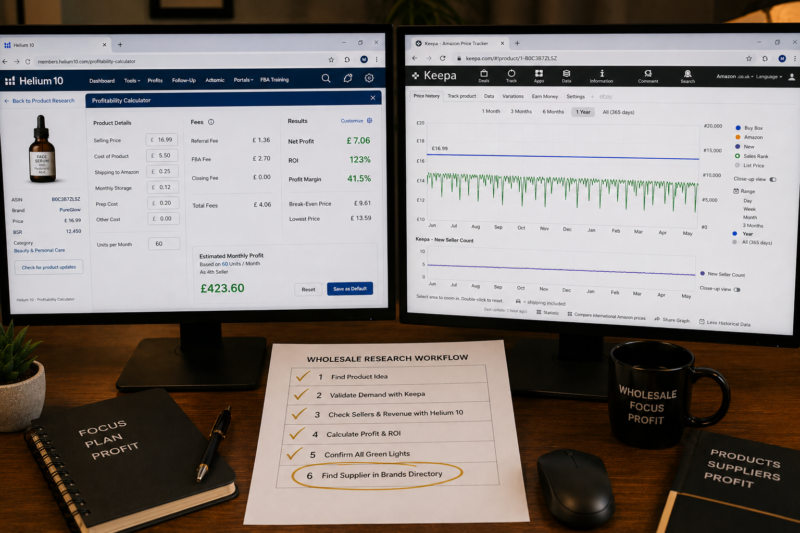
Here is the exact sequence for using Helium 10 in your wholesale product research process — from initial product discovery through to final sourcing decision:
| Step | Action | Helium 10 Tool | What You Confirm |
|---|---|---|---|
| 1 | Run Black Box with wholesale filters applied | Black Box | Product discovery shortlist — revenue over £3k — sellers under 6 |
| 2 | Open each shortlisted product page — run Xray | Xray Extension | Monthly units sold — revenue — current seller count — Buy Box price |
| 3 | Open same product in Keepa — check 12-month history | Keepa | BSR consistency — no orange line — stable blue price |
| 4 | Run Magnet on product’s primary keyword | Magnet | Total search volume — demand depth — rising or stable trend |
| 5 | Enter buy price into Profitability Calculator on Xray overlay | Profitability Calculator | Net profit per unit — ROI — monthly profit estimate |
| 6 | Find supplier trade contact in Brandhunterz Directory | Brands Directory | Verified trade email — apply for wholesale account immediately |
Helium 10 Pricing — Which Plan Wholesale Sellers Need
| Plan | Price | Wholesale Tools Included |
|---|---|---|
| Free | £0 | Limited Xray uses per day — basic Black Box access — not sufficient for regular wholesale research |
| Starter | From $29/month | Xray — Profitability Calculator — Black Box — Magnet — sufficient for most wholesale sellers |
| Platinum | From $99/month | All tools unlimited — bulk ASIN processing — best for sellers with 5 or more active supplier accounts |
Conclusion — Use Helium 10 to Confirm What Keepa Suggests
Helium 10 and Keepa are complementary tools — not competing ones. Keepa provides the historical context that confirms consistent performance over time. Helium 10 Xray provides the current snapshot that confirms present-day sales volume and competitive landscape. Using both together gives you a complete picture of any product — past and present — that no single tool can provide on its own.
Start your Helium 10 free trial at helium10.com. Validate every product’s price history with Keepa. Find the wholesale supplier behind every validated product through our Brands Directory and apply for your trade account the same day.
RESEARCH SMARTER — SOURCE WITH CONFIDENCE
Browse 5,000+ Verified Wholesale Brands Free
Once Helium 10 and Keepa confirm a product is a strong wholesale opportunity find its verified supplier contact in the Brandhunterz Brands Directory and send your trade account application today.
About the Author
This article is written by the team at Brandhunterz Ltd — a UK registered Amazon FBA wholesale sourcing company (Company No: 15342697) registered in England and Wales since 2023. Visit brandhunterz.com to learn more.