
UK AMAZON SELLERS
Amazon UK Seller Central — Complete Navigation and Settings Guide
By Brandhunterz Ltd | Company No: 15342697 | 14 minute read
Affiliate Disclosure: This article contains affiliate links. If you purchase through our links we may earn a commission at no extra cost to you. We only recommend tools we genuinely use and believe in. Read our full disclaimer.
Amazon Seller Central is the control centre of your entire Amazon UK FBA business — every listing every shipment every payment every account health metric and every seller setting is managed from within this single platform. For new sellers the sheer volume of menus pages reports and settings available in Seller Central can feel overwhelming — and the most important pages are not always the most obvious ones to find. Understanding exactly where everything is and what each section does is not just a convenience — it is the difference between running your FBA business proactively and reactively. Sellers who know their way around Seller Central check the right reports at the right frequency catch problems early and configure their account correctly from the start. Sellers who do not frequently miss important notifications mis-configure key settings and discover account health issues only after they have already escalated.
We are Brandhunterz Ltd — a UK registered wholesale sourcing company (Company No: 15342697) — and in this complete navigation and settings guide we walk through every major section of Amazon UK Seller Central — covering what each menu contains where to find the most important pages for wholesale FBA sellers and which settings to configure correctly from the moment your account goes live.
💡 Quick Summary
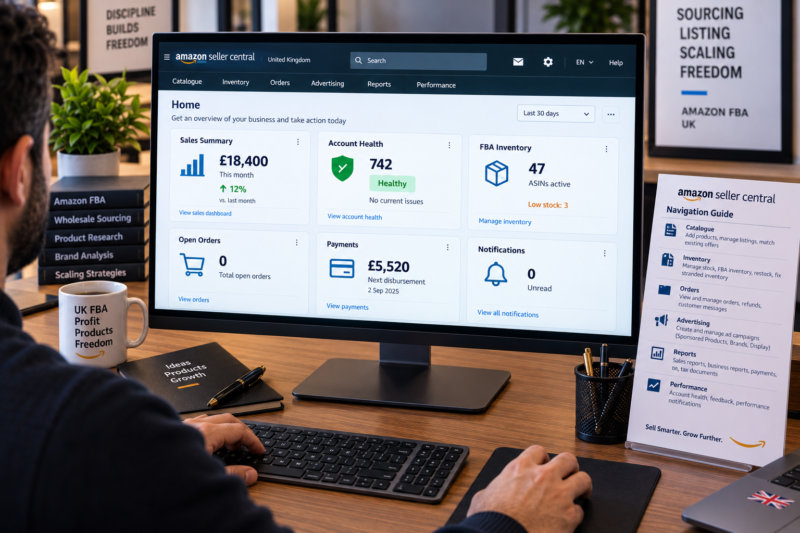
Amazon UK Seller Central is organised around six main navigation areas — Catalogue Inventory Orders Advertising Reports and Performance — plus the Settings menu accessed from the top right. For wholesale FBA sellers the most important daily and weekly pages are Performance — Account Health Inventory — Manage Inventory and FBA — Manage FBA Inventory Orders — Manage Orders Reports — Business Reports and Payments — Transaction View. Configure Settings on day one — particularly Tax Settings Shipping Settings Notification Preferences and Return Settings — to ensure your account operates correctly from your first listing.
The Seller Central Home Dashboard
When you log into Seller Central you land on the Home dashboard — a customisable overview page that displays summary widgets for your most important metrics. By default it shows recent sales figures open orders account health status and inventory alerts. You can add or remove widgets to customise the dashboard for your most frequently needed information. For wholesale FBA sellers the most useful widgets to keep on the home dashboard are Sales Summary — Account Health — FBA Inventory — Open Orders and Payments Summary. The home dashboard is an at-a-glance health check — it tells you immediately whether anything requires your attention before you open any specific page.
The Six Main Navigation Menus
The top navigation bar in Seller Central contains six main dropdown menus — each covering a different aspect of your selling operation. Here is what each menu contains and which pages within each menu are most important for wholesale FBA sellers:
1 — Catalogue
| Catalogue Page | What It Does | Use Frequency |
|---|---|---|
| Add a Product | Search for an existing ASIN and add your offer — or create a new listing if the product does not yet exist on Amazon UK | Every new product |
| Add Products via Upload | Bulk upload multiple listings simultaneously using a flat file spreadsheet — useful when adding 10 or more products at once | Bulk listing sessions |
| View Selling Applications | Check status of any brand or category gating approval applications you have submitted | When awaiting approval |
2 — Inventory
| Inventory Page | What It Does | Use Frequency |
|---|---|---|
| Manage Inventory | View all active and inactive listings — edit prices — print FNSKU labels — suppress or reactivate offers | Daily |
| Manage FBA Inventory | View FBA stock levels by ASIN — check units available reserved and inbound — identify low stock situations | Daily |
| Send to Amazon | Create FBA shipment plans — enter box contents and dimensions — print box labels — book Partnered Carrier collection | Every FBA shipment |
| Fix Stranded Inventory | Identify FBA units that cannot be sold due to a listing issue — resolve the listing problem to make the units sellable again | Weekly check |
| Manage FBA Returns | Review units returned by buyers to Amazon fulfilment centres — check condition — decide whether to relist or request removal | Weekly check |
| Manage Excess Inventory | View ASINs Amazon flags as having more stock than current demand supports — helps prevent aged inventory surcharge | Monthly check |
3 — Orders
| Orders Page | What It Does | Use Frequency |
|---|---|---|
| Manage Orders | View all orders — FBA and merchant-fulfilled — see order status tracking information and buyer details for each order | Daily for MF sellers |
| Order Reports | Download detailed order data in spreadsheet format — useful for accountancy software and VAT return preparation | Monthly — quarterly |
| Upload Order-Related Files | Bulk confirm shipments for merchant-fulfilled orders — less relevant for pure FBA sellers | MF sellers only |
4 — Reports
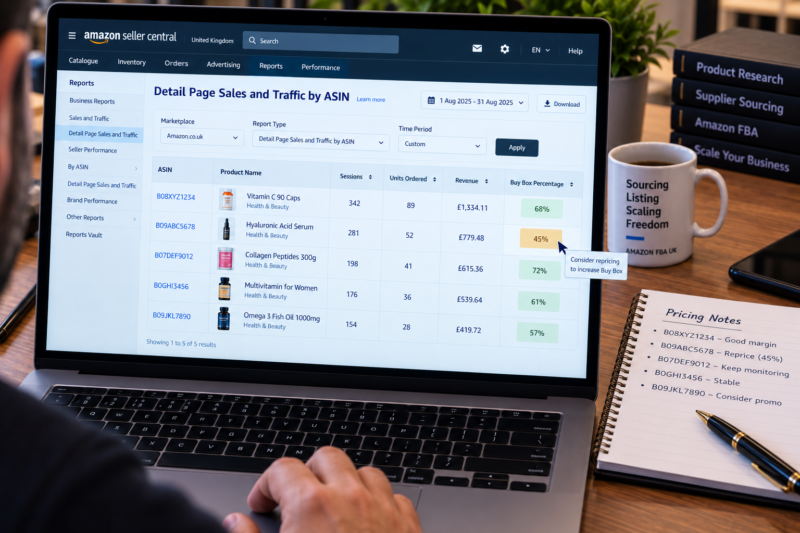
The Reports menu contains the data that drives your business decisions. For wholesale FBA sellers the most important reports pages are:
| Reports Page | What It Shows | Use Frequency |
|---|---|---|
| Business Reports — Sales Dashboard | Overall sales revenue sessions and conversion rate — high-level business performance overview | Daily or weekly |
| Business Reports — Detail Page Sales and Traffic by ASIN | Sessions units ordered revenue and Buy Box percentage broken down by ASIN — the most important report for monitoring per-product performance | Weekly — every Monday |
| Payments — Transaction View | Every financial transaction — sales proceeds fee deductions refunds and disbursements — essential for bookkeeping and VAT returns | Monthly — quarterly |
| Tax — VAT Transaction Report | Detailed VAT data for every transaction — the report your accountant needs to prepare your quarterly VAT return | Each VAT quarter |
| Fulfilment — Inventory Event Detail | Full log of FBA inventory movements — received sold returned adjusted — useful for reconciling stock discrepancies | When investigating discrepancies |
| Fulfilment — Amazon Fulfilled Shipments | Detailed breakdown of every FBA order dispatched — tracking data product details and fees per shipment | As needed |
5 — Performance
The Performance menu contains the account health and customer service pages that are critical for protecting your selling privileges. For wholesale FBA sellers this is the most important menu to check regularly:
| Performance Page | What It Shows | Use Frequency |
|---|---|---|
| Account Health | AHR score all customer service metrics and full Policy Compliance section — the complete account health picture in one page | Weekly — every Monday |
| Feedback | All seller feedback entries — positive neutral and negative — with options to request removal or post a public response | Weekly |
| A-to-Z Guarantee Claims | All active pending and closed A-to-Z claims — respond to active claims within 48 hours from this page | Daily check |
| Voice of the Customer | Customer experience ratings by ASIN — shows which products are generating poor experiences before they escalate to formal complaints | Weekly |
The Settings Menu — Configure These on Day One
The Settings menu is accessed from the top right of Seller Central — click your account name or the gear icon. This is where all account-level configurations are made. For wholesale FBA sellers there are six settings pages that must be correctly configured from the moment your account is verified:
| Settings Page | What to Configure | Priority |
|---|---|---|
| Account Info | Confirm business name address and contact details are correct — update if any details have changed since registration | Day 1 |
| Tax Settings | Add your UK VAT number — select correct VAT calculation method — essential for correct VAT treatment on your sales | Day 1 |
| Notification Preferences | Enable email notifications for Account Health — A-to-Z Claims — Feedback — Policy Violations — Shipment Alerts and Payment Notifications | Day 1 |
| Shipping Settings | Set default handling time and working days — configure holiday settings before any planned closure — affects merchant-fulfilled orders only but important to configure correctly | Day 1 |
| Return Settings | Review your FBA return settings — ensure automatic return processing is correctly configured — check your return address is current | Day 1 |
| Login Settings — Two-Step Verification | Enable two-step verification on your account — essential security measure — protects against unauthorised account access | Day 1 |
Essential FBA-Specific Pages Every Seller Must Know
Beyond the main navigation menus there are several FBA-specific pages that wholesale sellers need to access regularly. These are found within the main menus but are worth calling out specifically because of how frequently FBA sellers need them:
| FBA Page | Where to Find It | What to Use It For |
|---|---|---|
| FBA Revenue Calculator | Inventory — FBA — Revenue Calculator | Calculate FBA fees and estimated profit for any ASIN before listing — always cross-check with AMZScout for a more complete margin picture |
| Restock Inventory | Inventory — Manage FBA Inventory — Restock Inventory tab | Amazon’s automated restock recommendation tool — shows suggested reorder quantities based on sales velocity and lead time — a useful starting point for weekly reorder planning |
| Manage FBA Shipments | Inventory — Manage FBA Shipments | Track the status of every inbound FBA shipment — from Working through Shipped to Receiving and Closed — check for any discrepancies between what you sent and what Amazon received |
| Aged Inventory Report | Inventory — Manage Excess Inventory — Aged Inventory | Identify any units approaching the 181-day aged inventory surcharge threshold — take action to sell or remove before the surcharge applies |
| FBA Customer Returns | Reports — Fulfilment — Customer Concessions — Returns | Full detail of every customer return — reason code condition of returned unit and refund amount — use to identify patterns by ASIN |
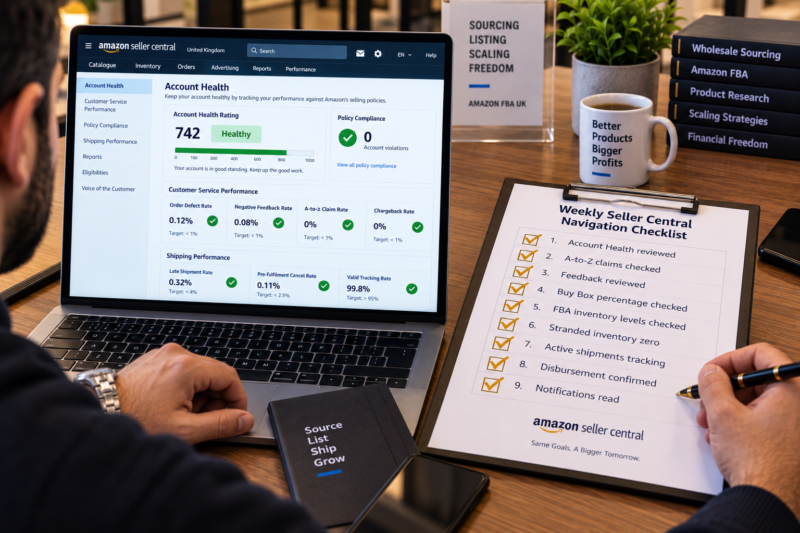
Your Seller Central Weekly Navigation Checklist
| Seller Central Navigation Check | Frequency | Done |
|---|---|---|
| Performance — Account Health — AHR and all metrics reviewed | Weekly | ☐ |
| Performance — A-to-Z Claims — active claims checked and responded to | Daily | ☐ |
| Performance — Feedback — new entries reviewed and removal requested if eligible | Weekly | ☐ |
| Business Reports — Detail Page Sales — Buy Box percentage reviewed by ASIN | Weekly | ☐ |
| Inventory — Manage FBA Inventory — stock levels checked — low stock flagged for reorder | Daily | ☐ |
| Inventory — Fix Stranded Inventory — zero stranded units confirmed | Weekly | ☐ |
| Inventory — Manage FBA Shipments — all active shipments tracking correctly | Per shipment | ☐ |
| Payments — Transaction View — disbursement received and amount confirmed | Each payment | ☐ |
| Notifications bell — all unread performance notifications read and actioned | Daily | ☐ |
| All Seller Central checks complete — account operating correctly and fully monitored | Ongoing | ✅ Clear |
Conclusion — Know Your Platform and It Works for You
Amazon UK Seller Central is a powerful and comprehensive platform — but its power is only available to sellers who know where to find the right information at the right time. Configure your Settings correctly on day one enable all relevant notifications check your Account Health and Buy Box percentage every week monitor your FBA inventory levels daily and use the reports section to make data-driven decisions about which products to restock expand or remove. Sellers who approach Seller Central as a tool to be actively managed rather than a background system that runs itself are the ones who catch problems early maintain clean account health and build growing profitable businesses on Amazon UK.
Find your next wholesale product through our Brands Directory. Research every opportunity with Keepa. Confirm every margin with AMZScout. And manage your account using the Seller Central navigation system in this guide.
FIND YOUR NEXT WHOLESALE PRODUCT FOR AMAZON UK
Browse 5,000+ Verified UK Wholesale Brands Free
Find verified wholesale trade contacts in the Brandhunterz Brands Directory — source your next product list it correctly in Seller Central and manage your Amazon UK FBA business with confidence using this complete navigation guide.
About the Author
This article is written by the team at Brandhunterz Ltd — a UK registered Amazon FBA wholesale sourcing company (Company No: 15342697) registered in England and Wales since 2023. Visit brandhunterz.com to learn more.