
AMAZON FBA ACCOUNT HEALTH
How to Check Your Amazon Seller Account Health — Complete Guide
By Brandhunterz Ltd | Company No: 15342697 | 13 minute read
Affiliate Disclosure: This article contains affiliate links. If you purchase through our links we may earn a commission at no extra cost to you. We only recommend tools we genuinely use and believe in. Read our full disclaimer.
Your Amazon seller account health is one of the most important indicators of the long-term viability of your FBA wholesale business. Amazon uses a combination of performance metrics policy compliance rates and customer feedback signals to assess whether each seller is meeting the standards required to continue selling on the platform. When those metrics fall below Amazon’s thresholds the consequences range from listing suppression and buy box loss through to account suspension — any of which can bring your entire FBA operation to a halt. The good news is that account health problems are almost entirely preventable when you know where to look what the metrics mean and how frequently you need to check them.
We are Brandhunterz Ltd — a UK registered wholesale sourcing company (Company No: 15342697) — and in this complete guide we walk you through exactly how to check your Amazon seller account health — where to find the Account Health dashboard in Seller Central what every metric means what the acceptable and at-risk thresholds are for each one and how frequently wholesale FBA sellers should be reviewing their account health to catch and resolve problems before they escalate.
💡 Quick Summary
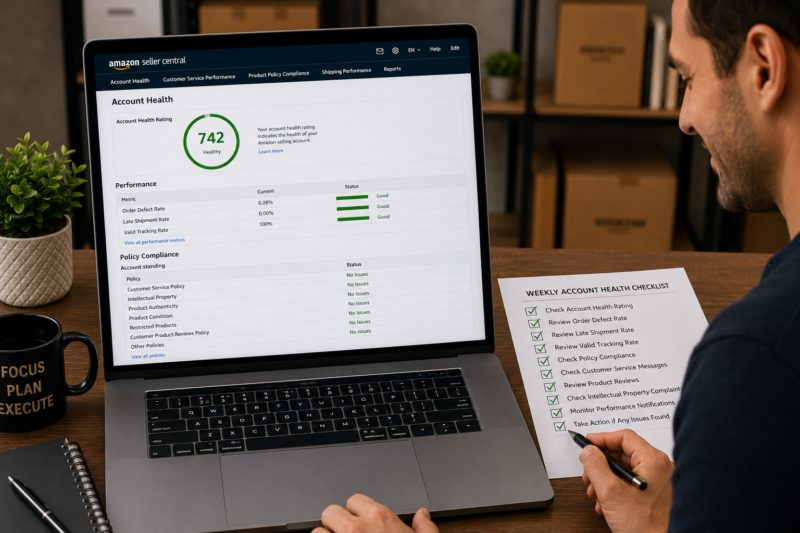
Your Amazon seller account health is monitored through the Account Health dashboard in Seller Central — accessible via Performance — Account Health. The dashboard shows your Account Health Rating as a numerical score your Order Defect Rate your Late Shipment Rate your Valid Tracking Rate and your policy compliance status covering intellectual property complaints product authenticity issues and restricted product violations. Check your Account Health dashboard at least once per week — and immediately any time you receive a performance notification from Amazon. Most account health problems are preventable and resolvable when caught early.
Where to Find the Account Health Dashboard in Seller Central
The Account Health dashboard is found in a specific location within Seller Central — it is not the same as your general seller dashboard or your inventory page. Here is exactly how to navigate to it:
Log In to Seller Central
Go to sellercentral.amazon.co.uk for UK sellers or sellercentral.amazon.com for US sellers and log in to your account. Make sure you are logged in to the correct marketplace — your account health metrics are specific to each marketplace you sell in. If you sell on both Amazon UK and Amazon US you must check account health separately for each marketplace.
Click Performance in the Top Navigation Bar
In the main navigation bar at the top of Seller Central click Performance. A dropdown menu appears with several options including Account Health Feedback Customer Satisfaction and Voice of the Customer. Click Account Health to open the dashboard.
Review the Full Account Health Dashboard
The Account Health page loads with your current Account Health Rating prominently displayed at the top followed by your individual performance metrics and your policy compliance status. Each section shows your current figure your target threshold and your current status — green amber or red depending on whether you are within or outside the acceptable range. Scroll through the entire page on every review — do not only check the top-line score.
The Account Health Rating — What Your Score Means
The Account Health Rating — AHR — is a single numerical score that summarises your overall account health. Amazon introduced it to give sellers a simple at-a-glance indicator of how their account is performing across all health dimensions. The score ranges from zero to over 1000 and is divided into three status bands:
| AHR Score Range | Status | What It Means |
|---|---|---|
| 200 and above | 🟢 Healthy | Account is in good standing — no immediate risk — continue monitoring weekly |
| 100 to 199 | 🟡 At Risk | One or more metrics approaching threshold — action required — review each metric to identify the issue |
| 99 and below | 🔴 Critical | Account at immediate risk of suspension — urgent action required on all flagged metrics |
A high AHR score also provides an additional layer of protection — sellers with consistently high AHR scores are less likely to be suspended immediately when a single metric spikes and are more likely to receive a warning or appeal opportunity before action is taken. Building and maintaining a high AHR score is therefore both a current protection and a long-term insurance policy for your selling account.
Customer Service Performance Metrics
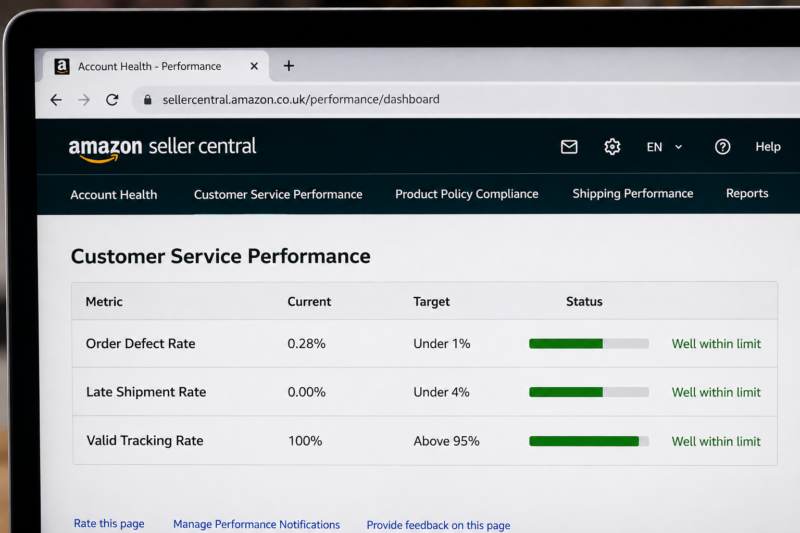
The Customer Service Performance section of the Account Health dashboard contains three metrics that measure how well your orders are being fulfilled and how your customers are experiencing buying from you. For FBA wholesale sellers Amazon handles all customer service on your behalf — so these metrics reflect both your product quality decisions and Amazon’s fulfilment performance:
Metric 1 — Order Defect Rate
Your Order Defect Rate — ODR — is the percentage of your orders that have received a negative feedback an A-to-Z Guarantee claim or a credit card chargeback within a rolling 60-day window. It is the single most important customer-facing metric on your account and Amazon enforces it strictly.
| ODR Component | What Counts as a Defect |
|---|---|
| Negative feedback | Any seller feedback rating of 1 or 2 stars left by a buyer |
| A-to-Z Guarantee claim | Any A-to-Z claim filed by a buyer — whether granted or not — counts as a defect |
| Credit card chargeback | Any chargeback filed by a buyer through their bank or card provider |
ORDER DEFECT RATE THRESHOLDS
🟢 Target: Under 1%
🟡 At Risk: Approaching 1%
🔴 Critical: At or above 1% — account suspension risk
Metric 2 — Late Shipment Rate
Your Late Shipment Rate measures the percentage of seller-fulfilled orders that were shipped after the expected ship date — calculated over a rolling 10-day and 30-day window. For FBA wholesale sellers this metric is almost always zero because Amazon handles fulfilment and ships orders on your behalf. However if you also operate any merchant-fulfilled listings alongside your FBA listings you must monitor this metric carefully.
LATE SHIPMENT RATE THRESHOLDS
🟢 Target: Under 4%
🔴 Critical: At or above 4% — account suspension risk
Metric 3 — Valid Tracking Rate
Your Valid Tracking Rate measures the percentage of seller-fulfilled orders that have a valid tracking number uploaded before the expected ship date. Like Late Shipment Rate this metric primarily affects merchant-fulfilled sellers — FBA sellers have valid tracking handled automatically by Amazon. If you operate any merchant-fulfilled listings ensure every order has a valid tracking number uploaded at the time of dispatch.
VALID TRACKING RATE THRESHOLDS
🟢 Target: Above 95%
🔴 Critical: Below 95% — account suspension risk
Policy Compliance — The Other Half of Account Health
Below the customer service performance metrics the Account Health dashboard shows your Policy Compliance status. This section covers violations and complaints relating to the products you sell and how you sell them — rather than how your orders are being fulfilled. For wholesale FBA sellers policy compliance is often the more significant risk area because it relates directly to the products you choose to source and list.
| Policy Compliance Category | What It Covers | Common Cause for Wholesale Sellers |
|---|---|---|
| Intellectual Property Complaints | Copyright trademark or patent complaints filed by brand owners against your listings | Listing on a brand’s ASIN without authorisation — selling in a brand’s gated category without approval |
| Product Authenticity Complaints | Customer or brand complaints alleging the product received is counterfeit or not genuine | Sourcing from non-authorised distributors — product condition issues — damaged packaging on received items |
| Product Condition Complaints | Customer complaints that the product received does not match its listed condition | Sending damaged or opened units to FBA — listing used items as new |
| Restricted Product Policy Violations | Listing products that require approval or are prohibited on Amazon without the necessary authorisation | Listing in gated categories without approval — listing products with restricted claims or ingredients |
| Listing Policy Violations | Violations of Amazon’s product listing rules — incorrect category title or image requirements | Adding to existing listings with incorrect product match — altering listing titles or images |
The Account Health Rating Score — What Adds and Removes Points
Understanding what affects your AHR score helps you prioritise the actions that protect it most effectively. Amazon has not published the exact weighting formula but based on how the score behaves these are the factors that most significantly affect it:
| ✅ What Increases Your AHR Score | ❌ What Decreases Your AHR Score |
|---|---|
| Consistently low Order Defect Rate — well under 1% | Any new policy compliance violation added to your account |
| Successfully resolving and appealing policy violations | A-to-Z Guarantee claims filed against your account |
| Time — older resolved violations reduce in impact over time | Negative seller feedback — particularly multiple in a short period |
| High order volume with no defects — builds score over time | Intellectual property complaints — even if later resolved |
How Often to Check Your Account Health
The frequency with which you review your account health directly affects how quickly you can respond to problems before they escalate. Here is the recommended review schedule for wholesale FBA sellers at different stages:
| Review Trigger | Frequency | What to Check |
|---|---|---|
| Routine scheduled review | Weekly — every Monday | Full dashboard — AHR score — all metrics — all policy compliance entries |
| After receiving a Seller Central notification | Immediately — same day | Identify the specific metric or violation triggering the notification — read the full notification detail |
| After listing a new product | Within 48 hours of going live | Check for any new IP complaints or policy flags relating to the new listing |
| After AHR score drops — even if still green | Immediately on noticing the drop | Identify which metric or policy entry changed — investigate the cause before the next regular review |
Setting Up Account Health Notifications
Amazon sends email and Seller Central notifications when your account health metrics change significantly or when a policy violation is added to your account. Ensuring these notifications reach you promptly — and that you act on them the same day — is one of the most practical steps you can take to protect your account. Here is how to confirm your notification settings are correctly configured:
Go to Settings — Notification Preferences in Seller Central
Click Settings in the top right of Seller Central and select Notification Preferences from the dropdown. This page shows every type of Amazon notification and allows you to turn each one on or off and specify the email addresses they are sent to.
Confirm Performance Notifications Are Enabled
In the Notification Preferences page scroll to the Performance Notifications section. Confirm that email notifications are enabled for Account Health — Policy Warnings Customer Performance Alerts and Critical Account Health Alerts. These are the notifications that alert you to emerging problems on your account before they escalate to enforcement action.
Add the Amazon Seller App to Your Phone
The Amazon Seller app for iOS and Android sends push notifications directly to your phone when account health alerts are issued. This is the fastest way to be notified of a new policy violation or a metric spike — faster than email for most sellers. Enable push notifications for the app and set Account Health alerts to notify immediately rather than in a daily digest.
Your Weekly Account Health Review Checklist
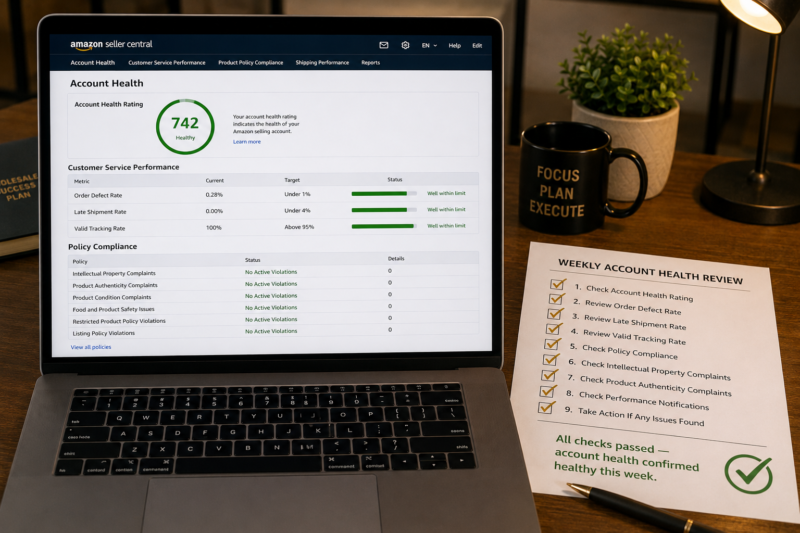
| Weekly Account Health Check | Target | Status |
|---|---|---|
| Account Health Rating score | 200 or above — green status | ☐ |
| Order Defect Rate | Under 1% — green status | ☐ |
| Late Shipment Rate | Under 4% — green status | ☐ |
| Valid Tracking Rate | Above 95% — green status | ☐ |
| Intellectual Property Complaints | Zero active complaints | ☐ |
| Product Authenticity Complaints | Zero active complaints | ☐ |
| Product Condition Complaints | Zero active complaints | ☐ |
| Restricted Product Violations | Zero active violations | ☐ |
| Any new unread Seller Central performance notifications | All read and actioned | ☐ |
| All checks passed — account health confirmed healthy this week | ✅ Clear | |
Conclusion — Check Weekly and Act the Same Day on Any Alert
Account health problems rarely appear suddenly without warning — they develop gradually through accumulated complaints violations and metric deterioration. The sellers who lose their accounts are usually those who stopped checking their account health regularly or who saw an amber warning and assumed it would resolve itself. A weekly review of the full Account Health dashboard combined with same-day action on any Seller Central notification is the simplest and most effective account protection habit you can build as a wholesale FBA seller. Make it part of your Monday morning routine — it takes under five minutes when everything is healthy and can save your entire business when it is not.
Find your next wholesale brand through our Brands Directory. Research every product with Keepa. Confirm every margin with AMZScout. And protect your account by reviewing your account health every single week using the checklist in this guide.
FIND YOUR NEXT WHOLESALE BRAND — SELL WITH A HEALTHY ACCOUNT
Browse 5,000+ Verified Wholesale Brands Free
Find verified wholesale trade contacts in the Brandhunterz Brands Directory — source your product apply for your account and sell on Amazon FBA with a healthy account using the monitoring process in this guide.
About the Author
This article is written by the team at Brandhunterz Ltd — a UK registered Amazon FBA wholesale sourcing company (Company No: 15342697) registered in England and Wales since 2023. Visit brandhunterz.com to learn more.