
FBA PACKAGING AND SHIPPING
How to Label Products for Amazon FBA — FNSKU Barcodes and Prep Requirements
By Brandhunterz Ltd | Company No: 15342697 | 13 minute read
Affiliate Disclosure: This article contains affiliate links. If you purchase through our links we may earn a commission at no extra cost to you. We only recommend tools we genuinely use and believe in. Read our full disclaimer.
Labelling products correctly before sending them to Amazon FBA is one of the most operationally critical tasks in the wholesale fulfilment process. The FNSKU barcode label is the single piece of information that connects your physical product unit to your seller account inside Amazon’s fulfilment centre. When it is missing incorrectly applied low quality or placed in the wrong position Amazon cannot process your unit — and the consequences range from a relabelling fee to a complete rejection of the affected units at your cost. For wholesale FBA sellers handling tens or hundreds of units per shipment applying labels correctly every single time is not just a compliance task — it is a core business operation.
We are Brandhunterz Ltd — a UK registered wholesale sourcing company (Company No: 15342697) — and in this complete guide we explain exactly what the FNSKU barcode is how to generate and print it how to apply it correctly to every product type and all the additional prep labelling requirements that apply to specific product categories including expiry date labels suffocation warnings and hazard labels.
💡 Quick Summary
Every unit sent to Amazon FBA must carry one FNSKU barcode label on its outermost surface — generated in Seller Central printed on 30-up A4 label sheets and applied flat over all existing barcodes. The label must be scannable at 15cm in clear black and white print. Additional labelling requirements apply for products with expiry dates products sold in poly bags products with suffocation warning requirements and products containing lithium batteries. Always scan-test a sample label before applying to your full batch.
What is an FNSKU Barcode and Why Does Amazon Require It
FNSKU stands for Fulfilment Network Stock Keeping Unit. It is a unique barcode identifier that Amazon generates specifically for your seller account and your specific product listing. Unlike a standard EAN or UPC barcode — which identifies the product regardless of who is selling it — the FNSKU identifies the product AND the specific seller who sent it to the fulfilment centre. This distinction is critical for two reasons:
| Why FNSKU Matters | What Happens Without It |
|---|---|
| Links your physical unit to your seller account | Amazon cannot credit the sale to your account — revenue lost or incorrectly attributed |
| Enables dedicated inventory tracking per seller | Without FNSKU your stock may be co-mingled with other sellers’ inventory — quality control lost |
| Enables accurate received quantity reconciliation | Amazon cannot confirm your sent quantity was received — discrepancies become unresolvable |
| Required for FBA receiving process to complete | Units without readable FNSKU are held — relabelling fee applied or units returned at seller cost |
Step 1 — How to Generate FNSKU Labels in Seller Central
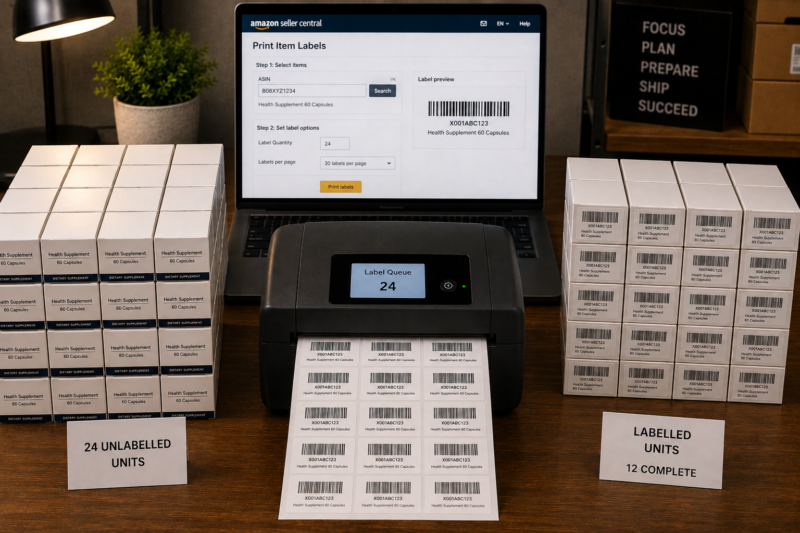
FNSKU labels are generated directly inside your Amazon Seller Central account — they are unique to your seller account and cannot be reused across different products or different sellers. Here is exactly how to generate and download your FNSKU labels:
Navigate to Manage FBA Inventory in Seller Central
Log in to sellercentral.amazon.co.uk and go to Inventory in the top navigation bar. Click Manage FBA Inventory. This shows all your active FBA listings. Find the product you want to generate labels for — you can also generate labels during the shipment plan creation process which is the most common workflow for wholesale sellers preparing a new shipment.
Click Print Item Labels for the Relevant ASIN
Find the product in your FBA inventory list and click the dropdown arrow in the Actions column beside it. Select Print Item Labels from the dropdown menu. Alternatively during your shipment plan workflow you will reach a Print Labels step automatically — this generates the same FNSKU labels specific to the units in that shipment.
Select Label Type and Enter Number of Labels
Select the label type — for standard self-adhesive label sheets choose 30 labels per page which matches the standard 30-up A4 label sheet format. Enter the exact number of labels you need — this should match exactly the number of units you are sending to FBA. Do not print more labels than you have units — surplus labels should be securely disposed of to prevent accidental misuse.
Download and Print the Label PDF
Seller Central generates a PDF file containing your FNSKU labels in the 30-up layout. Download this PDF and print it on your label sheets. Print settings must be set to actual size or 100 percent scale — never scaled to fit — as scaling changes the barcode dimensions and makes it unscannable. Use a laser printer for sharp clean print quality — inkjet printers can produce smudged barcodes that fail warehouse scanning.
Step 2 — Choosing the Right Label Printer
The quality of your FNSKU labels is directly determined by your printing setup. Poorly printed labels cause receiving failures that delay your stock going live and can trigger relabelling charges. Here is a comparison of the two main printing options for FBA sellers:
| Printer Type | Pros | Cons | Recommended |
|---|---|---|---|
| Thermal label printer | Fast — no ink costs — sharp consistent barcodes — purpose-built for label printing | Higher upfront cost — thermal label rolls needed | ✅ Best option |
| Laser printer with label sheets | Good print quality — uses standard 30-up A4 label sheets — most sellers already own one | Slower than thermal — toner cost — sheet misalignment risk | ✅ Good option |
| Inkjet printer with label sheets | Low cost — widely available | Ink can smudge — barcode quality variable — risk of scan failures at warehouse | ❌ Not recommended |
Step 3 — How to Apply FNSKU Labels Correctly
Printing a high-quality FNSKU label is only half the task — applying it correctly to every unit is equally important. A perfectly printed label applied to the wrong location or applied over a curved surface will fail scanning at the fulfilment centre just as surely as a poor-quality print would. Here is the exact application process:
Identify the Flattest Surface on the Product
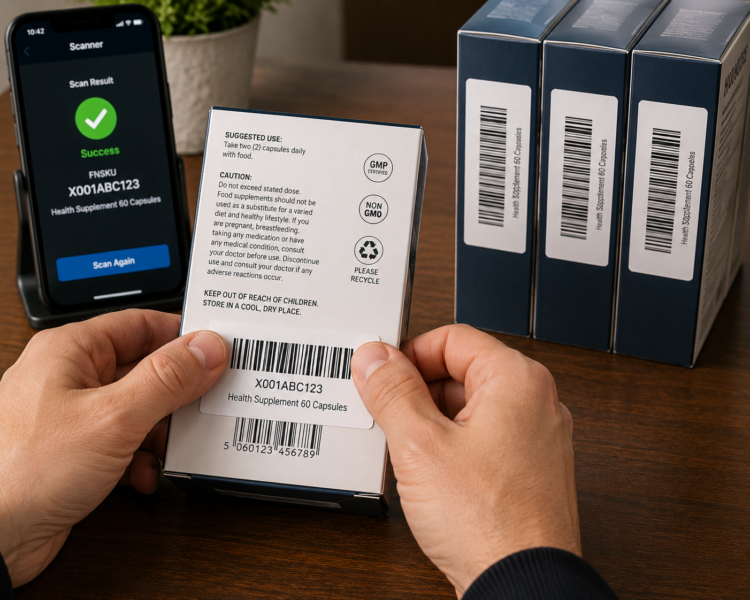
Before applying any label identify the flattest available surface on the product packaging. For most boxed retail products this is the back panel or the bottom panel. Avoid curved surfaces — bottles tubes and rounded containers are particularly problematic because labels applied to curves peel at the edges during transit and sorting in the warehouse. If a product has no flat surface it must be placed in a poly bag and the FNSKU label applied to the flat outer surface of the bag.
Cover All Existing Barcodes Completely
Position your FNSKU label directly over the product’s original manufacturer barcode — EAN UPC or any other scannable code — so that the FNSKU completely covers it with no part of the original barcode visible underneath. If the original barcode is larger than the FNSKU label use an additional opaque sticker to cover the remaining barcode area before applying the FNSKU on top. Any original barcode that remains scannable alongside the FNSKU will cause confusion during warehouse receiving.
Apply Label Firmly — No Bubbles or Wrinkles
Peel the FNSKU label from the sheet and apply it to the product surface in one smooth motion. Press firmly from the centre outward to eliminate any air bubbles. The label must lie completely flat with all edges adhered — any lifted edges or bubbles across the barcode area will cause scan failures. On large batch labelling sessions check every fifth or tenth label to confirm consistent adhesion and flatness.
Scan-Test Every Label Before Packing
Use a handheld barcode scanner or your smartphone with a barcode scanning app to test-scan a sample of your applied labels — at minimum the first label and then one label per 10 units applied. Point the scanner at the FNSKU label from approximately 15cm distance and confirm it reads the correct FNSKU code. If any label fails to scan remove it cleanly apply a fresh label and test again before that unit goes into the box.
Count Labelled Units Before Boxing
Before placing labelled units into shipping boxes count them one final time. The count must match the quantity you entered in your Seller Central shipment plan. A discrepancy between your plan quantity and your actual box contents — even by a single unit — creates a received quantity discrepancy that Amazon will flag and that you will need to investigate and resolve after the shipment has been processed.
FNSKU Labelling on Specific Product Types
Standard boxed retail products are the easiest to label — the FNSKU goes flat on the back panel over the original barcode. But wholesale FBA sellers frequently encounter product types that require different labelling approaches. Here is how to handle the most common non-standard cases:
| Product Type | Labelling Approach |
|---|---|
| Round bottle or tube — no flat surface | Place in a sealed poly bag — apply FNSKU label flat on the outside of the bag — cover poly bag itself with label not the bottle inside |
| Product in shrink wrap — barcode underneath wrap | Apply FNSKU to the outside of the shrink wrap over the original barcode position — do not remove shrink wrap |
| Multi-unit set sealed in poly bag | Apply FNSKU to the outside of the sealed poly bag — all individual unit barcodes inside the bag do not need to be covered |
| Product in retail window box — barcode on back | Apply FNSKU directly over original barcode on the back of the retail box — standard application |
| Bubble-wrapped fragile product | Apply FNSKU label to the outside of the bubble wrap — never inside the wrap — must be readable on the outermost surface |
| Product with multiple barcodes on packaging | Cover every scannable barcode on the entire packaging with FNSKU or opaque sticker — leave only FNSKU readable |
Additional Labelling Requirements Beyond FNSKU
The FNSKU label is required on every unit — but certain product types require additional labels or markings beyond the FNSKU. These additional requirements are enforced by Amazon to meet safety legal or operational standards and failing to apply them correctly is treated the same as any other packaging non-compliance:
Expiry Date Labels
Food grocery supplement and health products must display a clearly readable expiry date in the format MM-YYYY on the outermost surface of the unit. If the manufacturer’s expiry date is printed in a format Amazon does not accept — such as a Julian date code or a best before printed on the base without a clear month-year format — you must apply an additional sticker label showing the expiry date in the correct format. The date must be visible without opening any packaging and must show at minimum 90 days remaining from Amazon’s receiving date.
Suffocation Warning Labels
Any poly bag with an opening larger than 12.7cm must carry a suffocation warning label. The warning must state that the bag is not a toy and should be kept away from babies and children. The text must be in English and must be clearly readable — either printed directly on the bag or applied as a sticker label. Pre-printed poly bags with suffocation warnings already included are widely available and are strongly recommended for wholesale sellers who regularly use poly bags as part of their prep process.
Sold as Set — Do Not Separate Labels
Products that consist of multiple items sold together as a single unit must be labelled with a Sold as Set — Do Not Separate label on the outer packaging or poly bag. This prevents warehouse staff from separating the components and selling them individually. The label must be clearly visible and must appear on the outermost surface of the bundled unit.
Lithium Battery Hazard Labels
Products containing lithium batteries — whether built-in or sold with batteries — must carry the appropriate UN hazmat label on the shipping box. The specific label required depends on whether the batteries are lithium-ion or lithium-metal and whether they are installed in the device or packed separately. UN3481 applies to lithium-ion batteries installed in equipment. UN3091 applies to lithium-metal batteries installed in equipment. These labels must appear on the outer shipping box — not on the individual product unit — and must meet IATA dangerous goods labelling specifications.
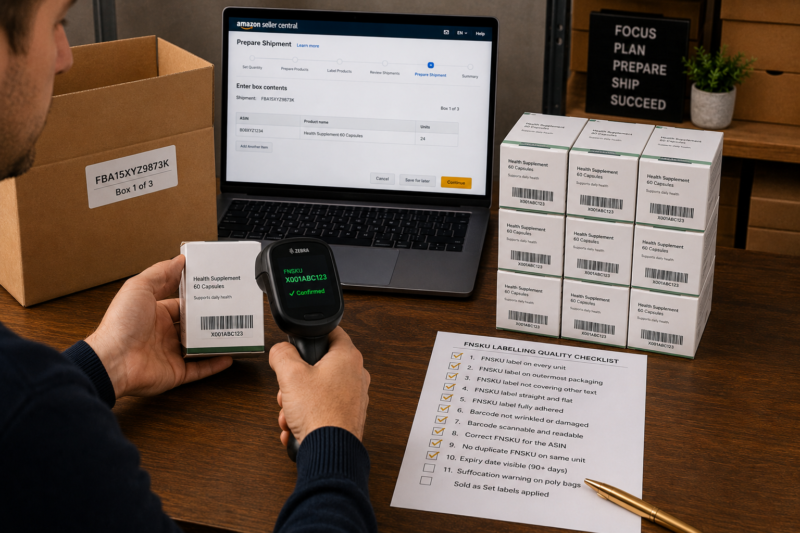
The Complete FNSKU Labelling Quality Checklist
| Labelling Quality Check | Required |
|---|---|
| FNSKU label generated in Seller Central — correct ASIN confirmed | ✅ Yes |
| Labels printed at 100% scale — not scaled to fit — on laser or thermal printer | ✅ Yes |
| Sample label scan-tested before bulk application — reads correct FNSKU code | ✅ Yes |
| Each unit has exactly one FNSKU label — no duplicates | ✅ Yes |
| FNSKU label applied on flat surface — no curves or seams | ✅ Yes |
| All original barcodes on unit fully covered by FNSKU or opaque sticker | ✅ Yes |
| Label applied on outermost surface — not inside poly bag or under wrapping | ✅ Yes |
| Label lies completely flat — no bubbles wrinkles or lifted edges | ✅ Yes |
| Expiry date label applied to food supplement or health units where required | ✅ Yes |
| Suffocation warning on all poly bags with opening over 12.7cm | ✅ Yes |
| Sold as Set labels on all multi-component bundles | ✅ Yes |
| All labelling checks passed — units ready to pack into shipping boxes | ✅ GO |
Conclusion — Label Correctly Every Time Without Exception
FNSKU labelling is one of the few tasks in Amazon FBA wholesale where there is no room for approximation. The label is either correct or it is not — and the consequences of an incorrect label fall entirely on the seller. Build a consistent labelling workflow using the correct printer settings the scan-test process and the pre-boxing count check and apply it without exception to every unit in every shipment regardless of how routine the process feels.
Find your next wholesale brand through our Brands Directory. Research every product with Keepa. Confirm your margin with AMZScout. And label every unit correctly before every shipment using the process in this guide.
FIND YOUR NEXT WHOLESALE PRODUCT TO LABEL AND SHIP
Browse 5,000+ Verified Wholesale Brands Free
Find verified wholesale trade contacts in the Brandhunterz Brands Directory — source your next product apply for your account and label and ship to Amazon FBA following every requirement in this guide.
About the Author
This article is written by the team at Brandhunterz Ltd — a UK registered Amazon FBA wholesale sourcing company (Company No: 15342697) registered in England and Wales since 2023. Visit brandhunterz.com to learn more.