
WHOLESALE BUSINESS FINANCE · 2026
How to Track Amazon FBA Inventory Costs and COGS
By Brandhunterz Ltd | Company No: 15342697 | 13 minute read
Affiliate Disclosure: This article contains affiliate links. If you purchase through our links we may earn a commission at no extra cost to you. We only recommend tools we genuinely use and believe in. Read our full disclaimer.
Cost of Goods Sold — COGS — is the single most important financial figure in your Amazon FBA wholesale business. It determines your gross profit directly affects your tax liability and provides the foundation for every meaningful financial metric you track from true margin to return on inventory investment. Yet COGS is also one of the most poorly tracked figures in most FBA seller accounts — either because sellers only track the invoice cost of their stock or because they fail to account for the full range of costs that should be included in a complete and accurate COGS calculation.
We are Brandhunterz Ltd — a UK registered wholesale sourcing company (Company No: 15342697) — and in this complete guide we walk you through exactly how to define calculate and track your inventory costs and COGS for your Amazon FBA wholesale business across both Amazon USA and Amazon UK — giving you the financial clarity to make better sourcing decisions manage your working capital more effectively and file accurate tax returns.
💡 Quick Summary
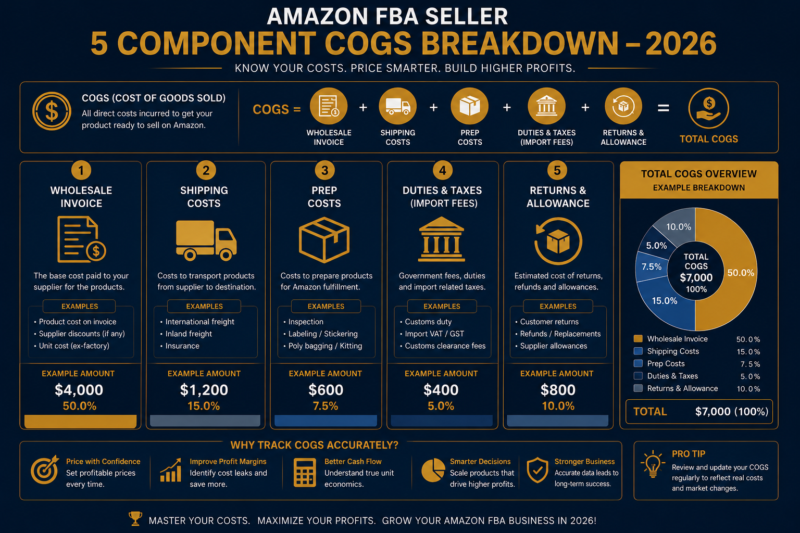
Your true COGS for Amazon FBA wholesale includes five components — wholesale invoice cost, inbound shipping cost, FBA prep and labelling cost, import duties if applicable, and a returns allowance for unsellable returned units. Track COGS at the SKU level using a dedicated inventory cost spreadsheet updated with every purchase order. Use the weighted average cost method for calculating per-unit COGS when you purchase the same product at different prices across multiple orders. Connect your inventory tracking to QuickBooks or Xero via A2X for automated monthly COGS reporting.
What is COGS and Why Does It Matter for FBA Sellers?
Cost of Goods Sold (COGS) is the total cost directly associated with producing or acquiring the products you sell. For Amazon FBA wholesale sellers COGS is the total cost of getting each unit of inventory into the Amazon fulfilment centre and ready for sale — including every cost from the moment you place your wholesale order to the moment the product is available in FBA inventory.
COGS matters for three distinct reasons that affect your business directly. First it determines your gross profit — revenue minus COGS equals gross profit and every percentage point improvement in COGS tracking accuracy translates directly into more accurate gross profit reporting. Second it is a critical tax deduction — correctly calculating and claiming COGS reduces your taxable profit and therefore your tax liability. Third it enables accurate per-unit margin calculations — without precise COGS data you cannot know whether any individual product is actually profitable after accounting for all acquisition costs.
The Gross Profit Formula
Gross Profit = Revenue − COGS
Net Profit = Gross Profit − Operating Expenses
Understating COGS overstates gross profit and net profit — making your business appear more profitable than it is and potentially leading to under-reserved tax payments and overly optimistic reinvestment decisions.
The Five Components of True FBA COGS
Most FBA sellers only record the wholesale invoice cost as their COGS — missing four additional cost components that can collectively add 15 to 30 percent to the true per-unit cost of their inventory. Here is a complete breakdown of every cost component that belongs in your COGS calculation.
Component 1 — Wholesale Invoice Cost
The wholesale invoice cost is the price you pay your supplier per unit — the most obvious component of COGS and the one all sellers track. However even this figure requires careful calculation when volume discounts apply. If your supplier charges $8.00 per unit for orders under 100 units and $7.20 per unit for orders over 100 units your COGS for a 120-unit order is $7.20 per unit — not $8.00. Always use the actual price paid per unit on the specific invoice rather than the standard list price.
Component 2 — Inbound Shipping Cost
The cost of shipping your inventory from your supplier or warehouse to Amazon’s fulfilment centre is a direct product acquisition cost that belongs in COGS — not in operating expenses. Calculate your inbound shipping cost per unit by dividing the total shipping invoice by the number of units in the shipment. For a $45 UPS shipment containing 150 units your inbound shipping cost per unit is $0.30. Include this figure in your COGS for every unit in that shipment.
If a single shipment contains multiple different products allocate the shipping cost across products proportionally by weight or volume — whichever is more accurate for your specific product mix. Allocating shipping equally by unit count works well for products of similar size and weight but will distort COGS for mixed shipments containing both lightweight and heavy items.
Component 3 — FBA Prep and Labelling Cost
If you apply FNSKU labels poly bag products bundle items or perform any other preparation before shipping to FBA the cost of this preparation is a direct inventory cost that belongs in COGS. For sellers who prep their own inventory this includes the cost of label sheets poly bags bubble wrap and any other materials used. For sellers who use a third-party prep centre it includes the per-unit prep fee charged by the service — typically $0.25 to $1.50 per unit depending on the complexity of the preparation required.
Component 4 — Import Duties and Customs Costs
If you source products internationally — importing from suppliers in China, Europe, or other countries — import duties customs broker fees and freight forwarding costs are all direct inventory acquisition costs that belong in COGS. These costs can be significant — US import duties on consumer goods typically range from 0 to 25 percent of the product’s customs value depending on the product category and country of origin. Always obtain a landed cost calculation that includes all import costs before finalising the COGS for internationally sourced inventory.
Component 5 — Returns Allowance for Unsellable Units
When customers return products to Amazon some returned units are deemed unsellable — damaged or opened beyond resale condition. The cost of these unsellable returned units is a direct inventory loss that should be included in COGS. Calculate your unsellable return rate as a percentage of units sold and add this percentage of your per-unit COGS as an additional COGS allowance. For most standard consumer goods categories an unsellable return rate of 0.5 to 2 percent is typical.
| COGS Component | Typical Per Unit Cost | Tracked By Most Sellers? |
|---|---|---|
| Wholesale Invoice Cost | Varies — largest component | Yes — always |
| Inbound Shipping Cost | $0.30 to $1.00 per unit | No — frequently missed |
| FBA Prep and Labelling | $0.10 to $1.50 per unit | No — frequently missed |
| Import Duties and Freight | 0 to 25% of product value | Sometimes — often missed |
| Returns Allowance | 0.5 to 2% of COGS | No — rarely tracked |
COGS Calculation Methods — Which One Should You Use?
When you purchase the same product multiple times at different prices — which is common in wholesale when volume discounts or price changes affect your cost between orders — you need a consistent method for calculating the COGS of each unit sold. The three main COGS calculation methods are FIFO, LIFO, and Weighted Average Cost.
| Method | How It Works | Best For FBA Sellers? |
|---|---|---|
| FIFO — First In First Out | Oldest inventory costs assigned to units sold first | Yes — matches physical flow of FBA inventory |
| LIFO — Last In First Out | Newest inventory costs assigned to units sold first | No — not permitted under IFRS used in UK |
| Weighted Average Cost | Average cost of all units in inventory applied to each unit sold | Yes — simplest to maintain for small portfolios |
Weighted Average Cost — Worked Example
Weighted average cost is the recommended COGS method for most FBA wholesale sellers because it is straightforward to calculate and update with each new purchase order. Here is a worked example showing how to calculate weighted average cost when you make multiple purchases of the same product at different prices:
| Purchase Order | Units | Cost Per Unit | Total Cost |
|---|---|---|---|
| Order 1 — January | 48 units | $8.00 | $384.00 |
| Order 2 — February | 96 units | $7.50 | $720.00 |
| Order 3 — March | 72 units | $7.80 | $561.60 |
| Total / Weighted Average | 216 units | $7.71 avg | $1,665.60 |
In this example the weighted average cost per unit is $7.71 — calculated by dividing the total cost of all inventory ($1,665.60) by the total number of units (216). Every unit sold from this combined inventory pool would be assigned a COGS of $7.71 regardless of which specific order it came from. When you place Order 4 simply recalculate the weighted average by adding the new order’s total cost and unit count to the existing pool.
Building Your Inventory Cost Tracking System
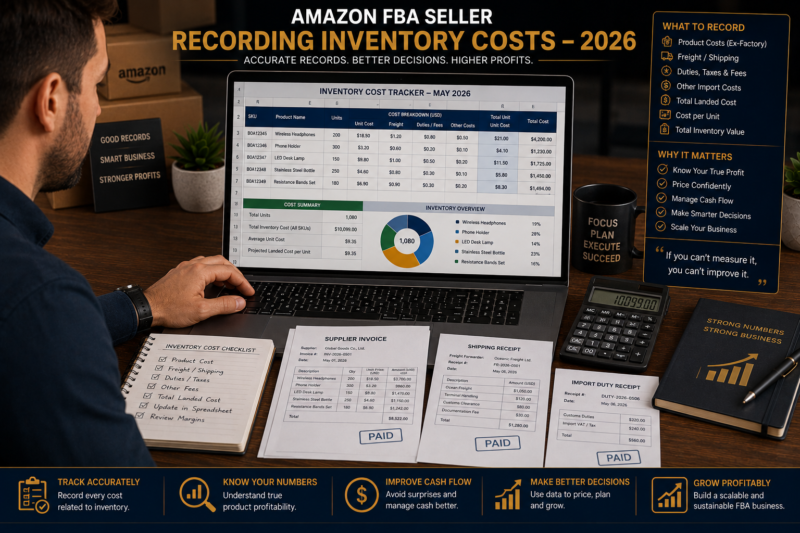
An effective inventory cost tracking system records every purchase order and its associated costs at the SKU level — giving you the data to calculate accurate COGS for every product in your portfolio at any point in time. Here is how to build a simple but effective tracking system using a spreadsheet before graduating to accounting software integration.
The Inventory Cost Tracker — Essential Columns
📋 Inventory Cost Tracker Spreadsheet — Required Columns
- Product Name: Full product name as listed on Amazon
- ASIN: Amazon Standard Identification Number
- Supplier Name: Brand or distributor supplying the product
- Purchase Order Date: Date order was placed with supplier
- Units Ordered: Total units in this purchase order
- Wholesale Cost Per Unit: Invoice price per unit
- Total Invoice Cost: Units × wholesale cost per unit
- Inbound Shipping Cost (allocated): Shipping cost allocated to this product
- Prep and Labelling Cost: Per unit prep cost × units
- Import Duties (if applicable): Duty cost allocated per unit
- Total COGS This Order: Sum of all above costs
- True COGS Per Unit: Total COGS ÷ units ordered
- Weighted Average COGS: Updated average across all orders for this SKU
- Units Currently in FBA: Current live inventory count
- Total Inventory Value at Cost: Units in FBA × weighted average COGS
Updating Your Tracker — Monthly Process
Record Every Purchase Order When Placed
Add a new row to your inventory cost tracker for every purchase order on the day it is placed. Record the product ASIN supplier name units ordered and wholesale cost per unit immediately — do not wait until the stock arrives or until you have all the shipping costs. Incomplete records become harder to reconstruct accurately after the fact.
Add Shipping Costs When the Shipment is Booked
When you book your FBA inbound shipment through Seller Central the shipping cost is confirmed at that point. Update your tracker immediately with the confirmed shipping cost allocated per unit across the products in that shipment. For shipments containing multiple products allocate shipping costs proportionally by weight or by unit count depending on which method is more accurate for your product mix.
Reconcile Units Received Against Units Ordered Monthly
At the end of each month check the units Amazon received against the units you declared in each shipment plan. If Amazon received fewer units than you shipped your inventory count and COGS calculation need adjusting. Open a reconciliation request in Seller Central for any significant discrepancy and adjust your tracker once the reconciliation is resolved.
Calculate Monthly COGS From Units Sold
At the end of each month pull your units sold per ASIN from the Seller Central Business Reports. Multiply units sold by your weighted average COGS per unit for each product to calculate the month’s total COGS. Sum across all products for your total monthly COGS figure — the number that goes into your monthly profit and loss statement.
Automating COGS Tracking With Accounting Software
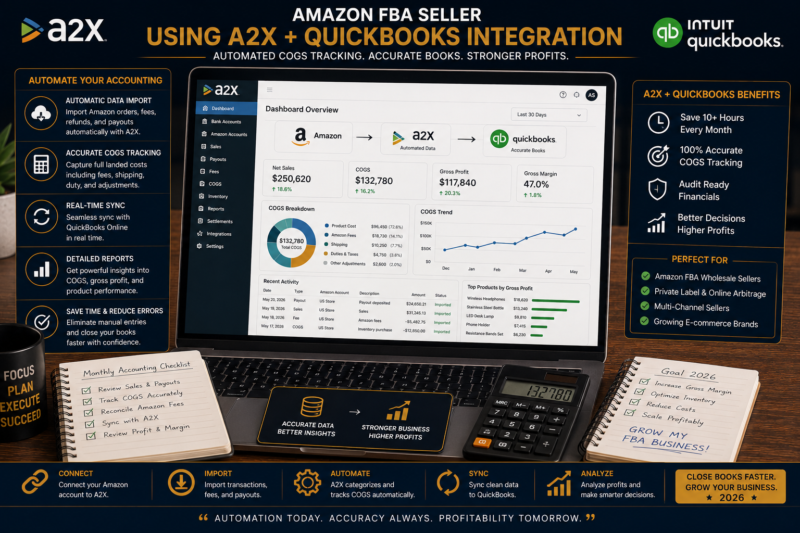
Once your FBA business generates more than $5,000 per month in revenue the manual spreadsheet approach to COGS tracking becomes increasingly time-consuming and error-prone. At this stage integrating your inventory tracking with accounting software — QuickBooks or Xero — connected to your Amazon account via A2X transforms your COGS tracking from a manual monthly exercise into an automated continuous process.
How A2X Handles COGS for FBA Sellers
A2X is an accounting integration tool that automatically fetches your Amazon settlement data every two weeks and maps it into your accounting software in the correct accounting format. For COGS tracking A2X creates accounting entries that correctly categorise Amazon fee deductions from your disbursements — separating referral fees fulfilment fees and other Amazon charges into the correct accounting categories automatically. When combined with your inventory cost data entered in QuickBooks or Xero A2X enables your accounting software to calculate COGS accurately for every reporting period without manual intervention.
Common COGS Tracking Mistakes to Avoid
Recording COGS When Stock is Purchased Rather Than When it is Sold
COGS is recognised when inventory is sold — not when it is purchased. The cost of inventory that has been purchased but not yet sold is an asset on your balance sheet — not an expense. Recording all stock purchases as an immediate expense in the month of purchase distorts your monthly profit figures and creates inaccurate tax reporting. Under the accrual accounting method stock costs move from the balance sheet to the income statement only when the units are sold.
Ignoring Inventory at Year End
At your financial year end the value of unsold inventory sitting in Amazon’s fulfilment centres must be correctly reported as a balance sheet asset. Failing to account for year-end inventory understates your assets and overstates your COGS — resulting in a higher tax deduction than you are entitled to and inaccurate financial statements. Conduct a full inventory valuation at cost at your year end and share this with your accountant for inclusion in your year-end accounts.
Confusing Amazon Fees With COGS
Amazon referral fees FBA fulfilment fees and storage fees are operating expenses — not COGS. COGS covers only the costs of acquiring the inventory itself. Amazon fees are the costs of selling and fulfilling that inventory — a separate category in your profit and loss statement. Confusing the two categories distorts both your gross profit margin and your operating expense reporting making it impossible to accurately assess either your sourcing efficiency or your operational cost structure.
Frequently Asked Questions
How Do I Handle COGS for Products Damaged or Lost by Amazon?
When Amazon loses or damages your inventory they reimburse you at the estimated selling price of the affected units minus applicable fees. From a COGS perspective the original cost of those units remains in your COGS for the period — you have still incurred the cost of acquiring them. The Amazon reimbursement is recorded as income in the same period. If the reimbursement is less than your total cost for those units the difference is recorded as a loss. Track Amazon reimbursements separately from regular sales in your accounting records to maintain accurate reporting.
Should FBA Storage Fees Be Included in COGS?
No — Amazon FBA storage fees are an operating expense not a COGS item. Storage fees are the cost of warehousing your inventory after it has been acquired and delivered to Amazon — they are not part of the cost of acquiring the inventory itself. Record storage fees as a separate line item under operating expenses in your profit and loss statement. The exception would be if you were calculating a fully loaded unit economics model for internal decision-making — in that case you might allocate storage costs per unit as part of your margin analysis even though they sit outside COGS in your formal accounts.
How Often Should I Update My Inventory Cost Tracker?
Update your inventory cost tracker every time you place a new purchase order — not monthly or quarterly. Real-time tracking prevents the accumulation of a backlog of orders that becomes increasingly difficult to reconstruct accurately from memory. For sellers placing 5 to 10 purchase orders per month this means updating the tracker 5 to 10 times per month — typically a 5 to 10 minute task each time if your tracker template is set up efficiently.
How Do I Value Slow-Moving or Obsolete Inventory?
Inventory that is unlikely to sell at or above its cost should be written down to its net realisable value — the price at which you expect to actually sell it. For FBA sellers this situation arises with products that have experienced significant price drops making the current selling price lower than your original COGS. When you identify such products write down the inventory value in your accounts to the lower of cost or net realisable value and record the write-down as a loss in the current period. This is both an accounting requirement and a signal to stop reordering that product immediately.
Related Articles — Keep Learning
- How to Manage Cash Flow in Your Amazon FBA Wholesale Business
- How to Calculate Your True Amazon FBA Profit Margin
- How to Build a Wholesale FBA Budget from Scratch
- How to Use Business Credit to Scale Your Amazon FBA Business
- Amazon FBA Tax Guide for USA and UK Sellers 2026
- How to Find Your First Wholesale Product to Sell on Amazon FBA
- Browse the Brandhunterz Brands Directory — Free Access
- Amazon FBA and eBay Wholesale Courses by Brandhunterz
SOURCE PROFITABLE INVENTORY TODAY
Browse Verified Wholesale Brands — Free Access
Accurate COGS tracking starts with knowing exactly what you paid for every unit. The Brandhunterz Brands Directory gives you instant free access to verified wholesale brands with real trade contacts across USA and UK marketplaces — so you can source confidently at margins that your COGS tracking will confirm.
About the Author
This article is written by the team at Brandhunterz Ltd — a UK registered Amazon FBA wholesale sourcing company (Company No: 15342697) registered in England and Wales since 2023. Visit brandhunterz.com to learn more.